Fastgraph
Authors: John Mosher, Ken Taylor, Anand Joshi, Dileep Nair, Richard Leahy, Chinmay Chinara, Raymundo Cassani
THIS TUTORIAL IS CURRENTLY UNDER CONSTRUCTION
Contents
Introduction
Single-pulse electrical stimulation, or SPES, is used to study how stimulation at one brain site evokes activity across other implanted regions. In SEEG recordings, these stimulation-evoked responses are often measured from many contacts across multiple stimulation sites, making them difficult to review using conventional waveform displays. The Fastgraph, or Functional-Anatomical STacked area graph, provides a compact way to summarize these responses by displaying them as stacked area plots organized using anatomical information.
Each Fastgraph represents the response to stimulation of one contact pair. The recorded responses from other contacts are rectified, stacked, and displayed over time. Contacts can be separated by hemisphere, sorted according to response strength within a selected latency window, and colored by anatomical region or cortical label. Within Brainstorm, this process combines SPES recordings, SEEG contact locations, and anatomical labels to help users compare responses across stimulation sites, identify regions with prominent evoked activity, and review large stimulation protocols more efficiently.
Please note that this tutorial is intended for users already familiar with Brainstorm. It does not provide detailed explanations of the software's interface or theoretical foundations. For comprehensive introductory material, refer to the Brainstorm introduction tutorials.
License
This EEG, MRI, and CT data provided in this tutorial remain the property of the Cleveland Clinic, Ohio, USA. Use or distribution of this dataset outside the scope of the Brainstorm tutorials - including for research purposes - is strictly prohibited without prior written consent. For inquiries regarding permissions, please use the Brainstorm user forum.
Clinical description
The dataset featured in this tutorial was recorded at the Epilepsy Monitoring Unit (EMU) of the Cleveland Clinic, Ohio, USA. It pertains to a 39-year-old ambidextrous female with medically refractory seizures presents with seizures consisting of a loss of awareness. Scalp video-EEG monitoring showed interictal epileptiform discharges arising from both left and right anterior temporal regions. The typical clinical seizures showed ictal EEG changes that were classified as left frontotemporal, right frontotemporal, or non-localizable.
References
Further details for this study can be found below:
Kenneth N. Taylor, Anand A. Joshi, Jian Li, Jorge A. Gonzalez-Martinez, Xiaofeng Wang, Richard M. Leahy, Dileep R. Nair, John C. Mosher.
The FAST graph: A novel framework for the anatomically-guided visualization and analysis of cortico-cortical evoked potentials.
Epilepsy Research, Elsevier, 2020.
Download and installation
Prerequisites:
Brainstorm Installation: Ensure you have a working copy of Brainstorm installed on your computer.
Familiarity with Brainstorm: This tutorial assumes that you have completed all the Brainstorm introduction tutorials and are comfortable with its interface and basic functionalities.
Download the dataset:
Go to the Brainstorm Download page
Download the file: tutorial_fastgraph.zip (to be added).
- Unzip it into a folder that is not located in any Brainstorm directories (i.e., not in the Brainstorm program folder or database folder).
Brainstorm Setup:
- Start Brainstorm.
From the top menu, select: File > Create new protocol.
Name the new protocol: TutorialFastgraph
Set the following options:
"No, use individual anatomy",
"No, use one channel file per acquisition run".
Files in dataset
tutorial_fastgraph/
anatomy/: Anatomy data
pre_T1.nii.gz: Raw pre-implantation T1 MRI (in NIfTI-1 format),
cat12: Folder containing precomputed CAT12 head tissue surfaces segmented from the MRI volume above. More details about the files can be found in MRI segmentation using CAT12.
recordings/: SEEG recordings
Baseline.edf: Raw SEEG baseline recording (in EDF format),
Subject01_electrodes_mm.tsv: Position of electrode contacts identified with Brainstorm in world coordinates.
Access the recordings
Link the recordings
- Switch to the "functional data" view (2nd button, on top of the database explorer).
Right-click on the subject folder > Review raw file:
Select the file format: EEG: EDF/EDF+
Select the recording: tutorial_fastgraph/recordings/Baseline.edf to add to the database (add image)
The new files Link to raw file lets you access the contents of the original SEEG files. The menu Review raw file does not actually copy any data to the database. More details.
Import the contacts positions
In order to generate the graphs, we need accurate 3D positions for the contacts of the depth electrodes. Placing the contacts requires a good understanding of the implantation scheme reported by the neurosurgeon and some skills in reading MRI scans.
The channel file EDF channels contains the name of the channels, but not their positions. We need to import or edit the positions of the SEEG contacts.
Right-click on the channel file > Add EEG positions > From other studies > Implantation. (add image)
- At the end, you get a report indicating how many channels from the SEEG recordings were attributed a new 3D position. The channels are matched by name: the position file you import must include the labels of the channels, and they must be named exactly in the same way as in your recordings.
Review recordings
Detect single-pulse triggers in SPES
This section deals with detecting the per-stimulation block triggers and adding them as events in the raw file, along with some customization options, which are explained in detail below.
Drag the Link to raw file to Process1 tab. Click Run > FAST graph > Detect single-pulse triggers in SPES.
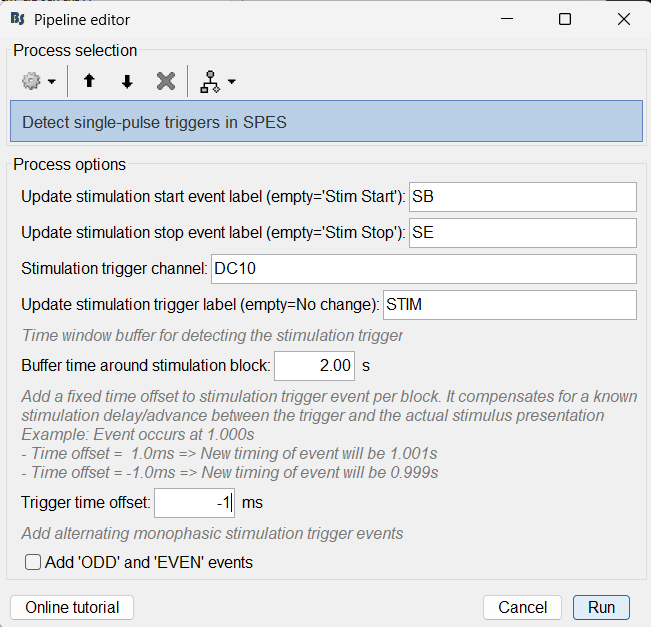
Write about per-block detecting stimulation triggers (DC10) and adding ODD EVEN events.
Import epochs of interest
Importing the stimulation start/begin blocks. Load Single-Pulse Electrical Stimulation (SPES) from raw data.
Remove SPES artifacts
Remove Single-Pulse Electrical Stimulation (SPES) artifacts and slow drifts:
- Detect stimulation events from a selected trigger channel
- Replaces the artifact window around each event using spline interpolation
- Apply Empirical Mode Decomposition (EMD) based filtering to remove low-frequency drift components
ODD EVEN events from cleaned data
- Import ODD EVEN events from cleaned data
- Average ODD and EVEN event groups ('By trial groups (folder average)' option)
- Average each of the above obtained ODD and EVEN per session per stimulation site so that we get a single averaged file.
Plot Fastgraphs
Plot Fastgraphs for the individual averaged file above.