Tutorial 11: Time-frequency
This tutorial introduces how to compute time-frequency decompositions of MEG recordings and cortical currents using complex Morlet wavelets. There are several ways to reach the same result, please read all the sections carefully and then chose the method that is best suited for your own data.
Contents
-
Tutorial 11: Time-frequency
- Introduction to complex Morlet wavelets
- Compute from recordings
- Description of the options
- Display time-frequency maps
- What's in those "timefreq" files
- Time and frequency bands
- Time-frequency on clusters time series
- Time-frequency on sources
- Time-frequency on scouts time series
- Shortcut using the database explorer
- Processing time-frequency files
- Next
Introduction to complex Morlet wavelets
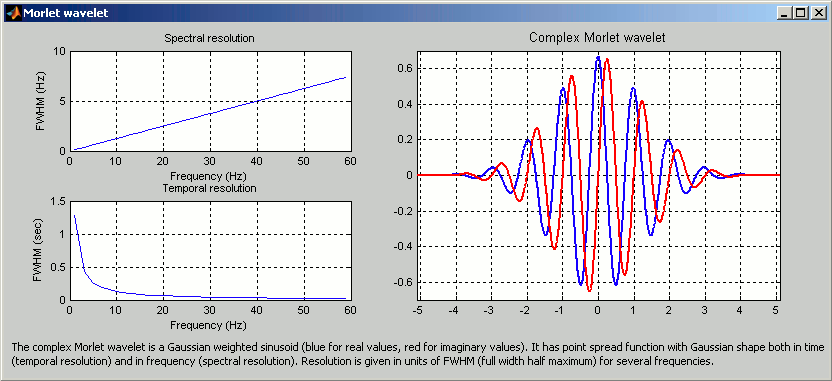
Complex Morlet wavelets are very popular in EEG/MEG data analysis for time-frequency decomposition. They have the shape of a sinusoid, weighted by a Gaussian kernel, and they can therefore capture local oscillatory components in the time series. An example of this wavelet is show below, where the blue and red curves represent the real and imaginary part, respectively.
Contrary to the standard short-time Fourier transform, wavelets have variable resolution in time and frequency. When designing the wavelet, we basically decide a trade off between temporal and spectral resolution.
To design the wavelet, we first need to choose a central frequency, ie the frequency where we will define the mother wavelet. All other wavelets will be scaled and shifted versions of the mother wavelet. Unless interested in designing the wavelet at a particular frequency band, the default 1Hz should be fine.
Then, the desirable time resolution for the central frequency should be defined. For example, we may wish to have a temporal resolution of 3 seconds at frequency 1 Hz (default parameters). These two parameters, uniquely define the temporal and spectral resolution of the wavelet for all other frequencies, as shown in the plots below.
Resolution is given in units of Full Width Half Maximum of the Gaussian kernel, both in time and frequency. The relevant plots are given below.
Compute from recordings
- We are going first to compute the time-frequency decomposition for the two averaged recordings we have in the protocol.
Drag'n'drop the two ERP files from StimRightThumb and StimLeftThumb in the "Processes" list, as explained in tutorial 9 (Processes). Select the "Recordings" button.
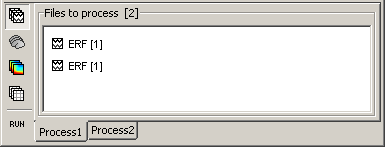
Click on Run. Then select the process: Spectral analysis > Time-frequency decomposition.
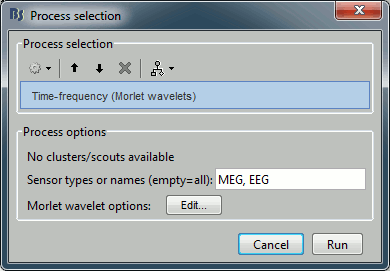
You do not have anything else to configure here: we want to get the time-frequency decomposition for all the time points, and we do not want to save the output file in a specific condition. The only thing that you may do is add a comment to the file (text field in the top of the figure). Click on Run.
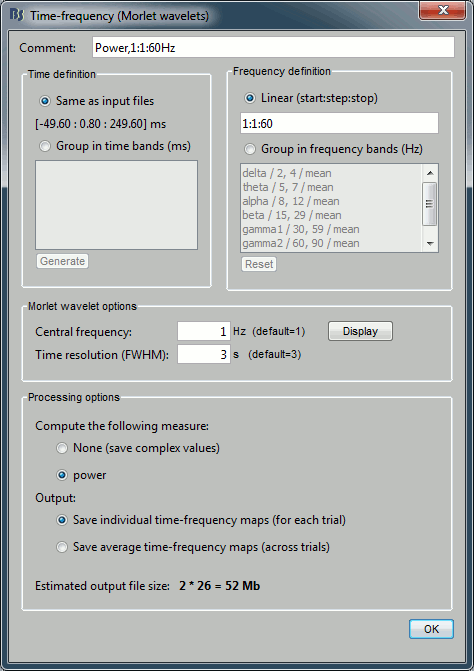
- This option window allows you to 1) define bands in time and frequency or analyze the data in all points, 2) configure the wavelet, and thus its time and frequency resolution, 3) define which sensors to process, and the output type (compex coefficients or squared coefficients / power).
Description of the options
Comment: This is the string that will be displayed in the database explorer to represent the output file.
Time definition:
- This panel describes the time points for which you will get a value at the end of the computation.
Same as input file: If you select this option, you would get the time-frequency decomposition (TF) for each of the time samples in the input file (here: 375 samples between -50ms to 250ms)
Group in time bands: This option adds another step of computation:
- 1) It first computes the TF for each of the time points in the initial file, excactly like with the "same as input file" option
- 2) For each time band: it groups the corresponding time points by averaging the power of theire TF values.
- Definition of the time bands: two methods
- Enter your own time bands in the text area, one line per time band, with following forma: "name : start_time, stop_time"
- Click on the "Generate" button to create automatically a list of time bands with the same length. You will be asked the maximal length of each time band.
Frequency definition:
- This panel describes the frequencies for which the power will be estimated at each time instant.
Linear: You can specify the frequencies with any Matlab syntax start:step:stop. The default is "1:1:30", which produces 60 values [1, 2, 3, 4, ..., 59, 60]
Group in frequency bands: As for the time definition, this option leads to a two-step process:
- 1) It computes the TF for 4 frequencies for each frequency band. For example, the first default frequency band "delta: 2,4" would estimate the TF for the frequencies [2, 2.66, 3.33, 4]
- 2) Then for each frequency band: it averages the power of the 4 frequencies, so that you get only one value for each frequency band (and for each time point and each sensor).
- Definition of the frequency bands:
- One line per frequency band, with the format "name : start_freq, stop_freq"
- Click on the "Reset" button to go back to the default settings.
Morlet wavelet options:
- Describes one wavelet for a given frequency ("Central frequency" parameter).
- This wavelet is then scaled for all the other frequencies requested in the "frquency definition" panel.
- See the first section of this tutorial for a description of those parameters.
Processing options:
Sensors to process:
- This is the list of the sensors for which the TF is going to be computed.
- You can provide either sensor types (eg. EEG, MEG, MEG GRAD), or sensor names (eg. MLC15, MEG0121, EEG23)
Compute the following measure:
- The TF returns basically the wavelet coefficients for each frequency/time/sensor, which are complex values. Typically, what you want to display is the power of the coefficients, which is the square of the amplitude: abs(TF).^2. You can choose if you want to apply this transformation or not.
Power: Applies the "power" transformation right after the computation. This induces a loss of the phase information.
None: Save the TF coefficients as they are computed. This can be useful if you plan to use those decompositions for other purposes that requires the phase.
- If you select "None" here, the power will be computed on the fly for the various displays.
- Some combinations of options may disable this choice. Example: if you ask for time bands or frequency bands, the program will have to compute the power before averaging the values; so in those cases the "None" option is diabled.
Output:
Save individual TF maps: This option stops the computation here, and saves in the database one time-frequency file for each input file.
- Be very careful using this option because if you have hundreds of trials, it will fill your hard drive very quickly.
- One full TF file in this case contains [nSensors x nTime x nFreq] = 3.397.500 values = 25 Mb.
- You can however limit the amount of data produced by using time and/or frequency bands. For 15 time bands and 6 frequency bands, the size of each file drops to: 110 Kb.
Save average TF maps: This option is available only when there are more than one input files (number of files you dorpped in the Processes tab).
- Instead of saving the TF for each file separately, it automatically computes the average of the power of all the TF.
- This is a good choice if you do not plan to use independently all the TF files, because it saves a lot of time and disk space.
Display time-frequency maps
- Back to our evoked fields. Let's first keep all the default options for time, frequency and wavelet defintions.
Just change the Output option to Save individual TF maps. What we want is to compute two TF decompositions, one for the Left condition and one for the Right, not the average of the two.
- Click on "Ok". After a while, two new files will appear in the tree, representing the TF for the two averaged recordings of the two conditions.
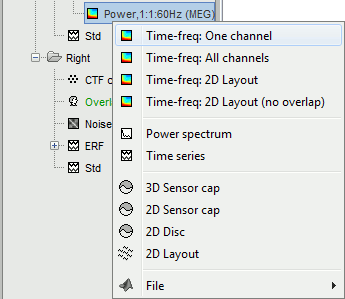
Right-click on the TF file of the StimLeftThumb condition to see what are the possible display mode.
Time-frequency maps
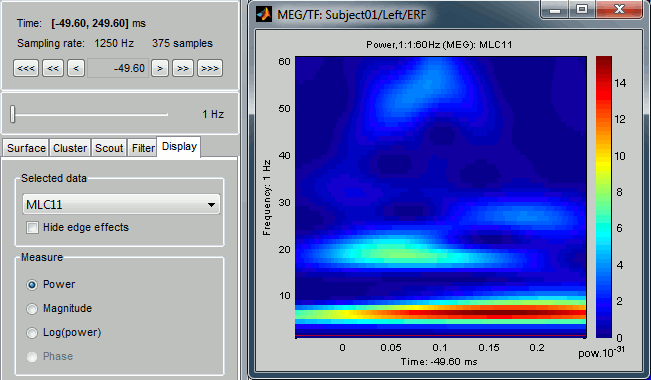
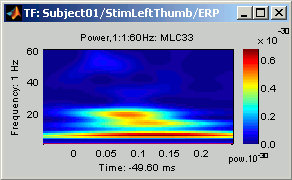
- This is the default view for the TF dcompositions of full recordings value, ie. what would be displayed if you double-click on this file. It represents shows for one sensors (or one cluster/scout/source) the power of each frequency at each time.
When you load some time-frequency information, the "Time-freq" tab automatically appears in the main Brainstorm window, to offer some options for the displays.
 -
- 
Time-frequency maps: "Time-freq" tab
Current frequency: Slider that shows the current frequency selected in ALL the figures.
Exactly as the time is Brainstorm, the frequency selection/display is centralized and managed by one control only for all the figures. As a consequence, it is impossible to display TF files with different frequency definitions at the same time. This can be perceived as an annoying limitation, but it allows all the simultaneous displays to be consistent at anytime, and make the interface much more intuitive to manipulate, with lower risks of mistakes in the interpretation of the different figures.List of sensors: This controls shows what is displayed in the selected figure. Try to change it, it will update the display of the figure, showing the frequency powers for another sensor.
Warning: this selection is relative only to the selected figure, and gets updated when you selected another TF figure.
 -
- 
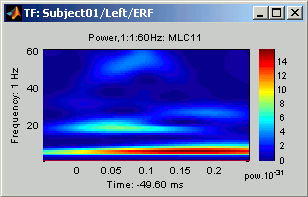
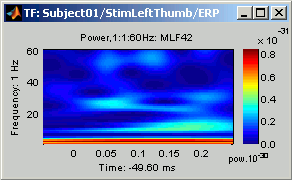
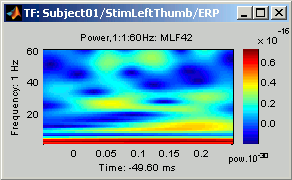
Display square root of power: This is a global setting that is applied to all the figures when selected, and saved from one session to another.
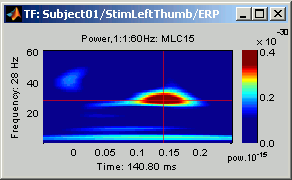
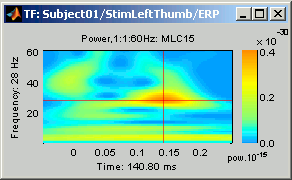
When unchecked (left fig): displays the power for each time/frequency, as described previously.
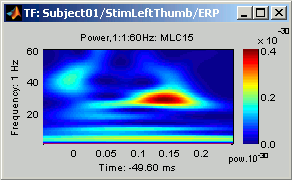
When checked (right fig): displays the square root of the power; it produces displays with much less contrast between the high and low values, allowing to see better what is happening in the high frequencies.
 -
- 
Time-frequency maps: Mouse and keyboard
Left-click: Selection of current time and frequency.
- If you click anywhere on a TF figure, it will move the current time/frequency cursor to the clicked point, update the Time and the Frequency sliders in the Brainstorm window, and also update all the other visualization figures.
- If you change the current time or the current frequency with the sliders or with another figure, you would observe that the time/frequency cursor position is updated.
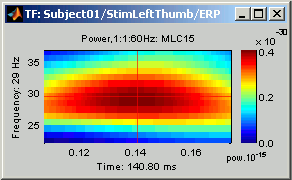
Left-click + move: Select a time/frequency range.
Hold the left mouse button and move the mouse to mark a selection in both time and frequency. The legends of the X and Y axis are updated to display the selected time and frequency ranges selected.
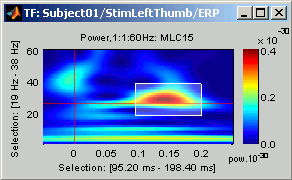
- This selection is used by some functions accessible in the figure's popup menu.
Zoom:
Mouse wheel: Zoom/unzoom in time, centered on the current time cursor.
Control + mouse wheel: Zoom/unzoom in frequencies, centered on the current frequency cursor.
Right-click + move, or Control + left-click + move: Move in the zoomed image.
Double-click: Restore initial view.
Colormap:
- As explained in the previous tutorials, you can change the colormap by left-clicking on the colorbar on the right of the figure, holding the button, and then by moving the mouse.
- Up/down: Changes the brightness of the colormap.
- Left/Right: Changes the contrast.
This has the same effect than changing the brightness/contrast using the popup menu.
 -
- 
Popup menu: Right-click on the figure.
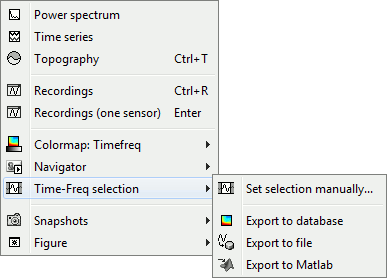
All the menus have been described in the ?tutorial #4 "Exploring the recordings", except the "Time-frequency selection menu":
Set selection manually: Does the same thing as drawing a time/freq selection square on a figure, but by typing the values for time and frequency manually.
Export to database: Save the selection for the displayed sensor in a new TF file in the database. However, it is necessary to keep the same time definition for this new file because as it has to stay compatible with the other files it is linked with (here: the recordings file). So in this case, only the selected frequencies are saved, but the time selection is ignored, all the time points are saved.
Remember that only one sensor is exported using this menu, all the others are ignored.Export to file: Same as "Export to database", but the saved file is not registered in the database. The user has to select where to save the file.
The database time constrains do not apply here, so the ONLY the selected time points are exported.Export to Matlab: Same as "Export to file", but the output structure is sent to a variable in the Matlab base workspace instead of being saved to a file.
Keyboard shortcuts:
Left and right arrows: Change the current time
Page-up and page-down: Also change the current time, but faster (10 time samples instead of one)
Up and down arrows: Change the the sensor displayed in this figure (same as using the drop-list in the Time-freq tab)
Control + up and down arrows: Change the current frequency
Control + R: View the original MEG recordings (this shortcut and the following are visible in the popup menu)
Control + T: View the time-frequency 2D topography (explained in the next sections)
Control + I: Save as image
Control + D: Dock figure in the Matlab environment.
Time-frequency maps (all the sensors)
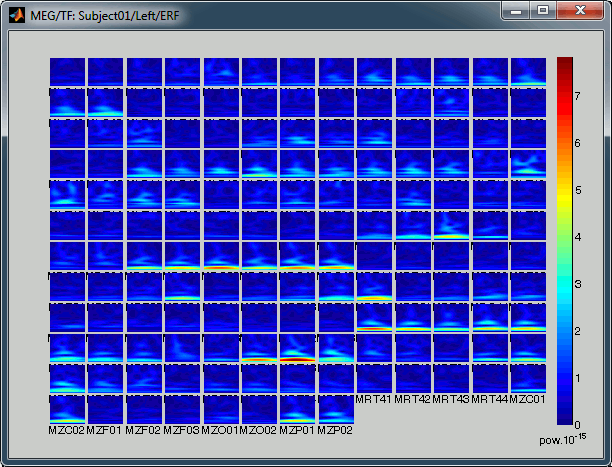
Right-click on the TF file in condition StimLeftThumb and select: "Time-frequency maps (all sensors)". This is a spatial view of the TF maps for all the sensors. This is not a very interactive display: all what you can do is making it bigger and changing the colormap.
Time-frequency 2D topography
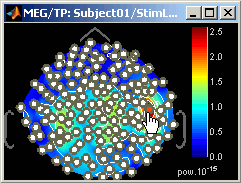
Right-click on the TF file in condition StimLeftThumb and select successively the first three menus in "MEG": 3D Sensor cap, 2D Sensor cap, 2D Disc.
![[ATTACH]](/moin_static1911/brainstorm1/img/attach.png "[ATTACH]")
- All those three windows represent the same information, in a slightly different way: a spatial map of the power of the current frequency, for all the sensors at the current time.
- Try to move the time and frequency sliders and see what happens.
Keyboard shortcuts:
Left and right arrows: Change the current time
Page-up and page-down: Also change the current time, but faster (10 time samples instead of one)
Up and down arrows: Change the current frequency
Control + E: Display the sensors markers
Control + E again: Display the sensors names
All the other shortcuts and the popup menu are already described in ?tutorial #4 "Exploring the recordings".
- Display the sensors (Control + E)
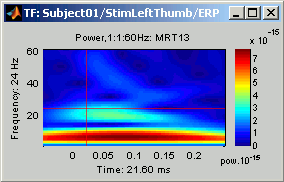
Shift + Click on a sensor: Displays the time-frequency decomposition for that specific sensors.
![[ATTACH]](/brainstorm/Tutorials/TutTimefreq?action=AttachFile&do=upload_form&ticket=006939032d.105943c2b3ddd683cd1d172598fd33df0e8d5c54&target=topo3DSensorCap.gif "[ATTACH]")
![[ATTACH]](/brainstorm/Tutorials/TutTimefreq?action=AttachFile&do=upload_form&ticket=006939032d.105943c2b3ddd683cd1d172598fd33df0e8d5c54&target=topo2DSensorCap.gif "[ATTACH]")
![[ATTACH]](/brainstorm/Tutorials/TutTimefreq?action=AttachFile&do=upload_form&ticket=006939032d.105943c2b3ddd683cd1d172598fd33df0e8d5c54&target=topo2DDisc.gif "[ATTACH]")
Time-frequency 2D Layout
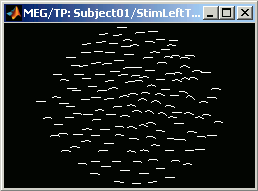
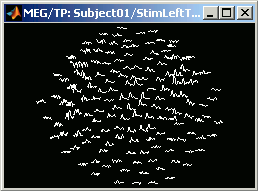
The last display mode available for those TF decomposition of recordings is this "2D Layout" menu. Right-click on the TF file for the Left condition and select MEG > 2D Layout.
This represents spatially the power of the current frequency for all the sensors and all the time points. Try to move the current frequency slider to see how the display changes when increasing the frequency. It is a good example to show that the time resolution increase with the frequency. Below: the "2D Layout" displays for f=8Hz and f=60Hz.
- Useful operations for this window:
Mouse wheel: Zoom / unzoom
Left+right click + move: Move into the window
Control + E: Display the channels names
All the other shortcuts and the popup menu are already described in ?tutorial #4 "Exploring the recordings".
What's in those "timefreq" files
Right click one of the TF files, and select the menu File > View .mat file, to have a look to what is the actual contents of those structures.
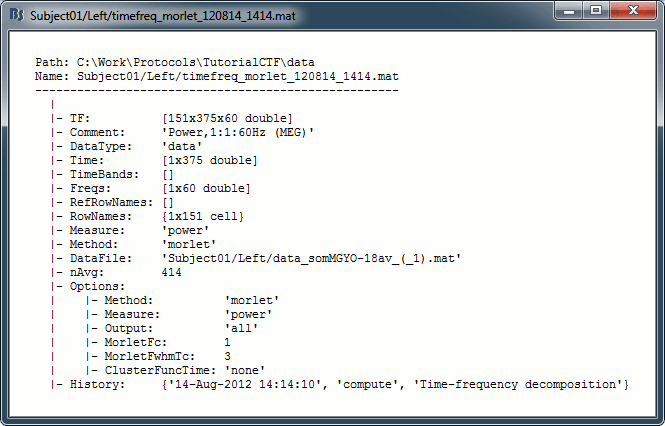
TF: [nSensors x nTime x nFrequency] matrix containing all the values of the time-frequency decomposition (complex wavelet coefficients, or power of amplitudes)
- nSensors: Number of sensors for which the TF has been estimated
- nTime:
If there are time bands defined, nTime = size(TimeBands,1) = number of time bands
- If there are no time bands (linear time sampling): nTime = length(Time)
- nFrequency:
- If there are frequency bands defined, nFrequency = size(Freqs,1) = number of frequency bands
- If there are no frequency bands (linear frequency sampling): nFrequency = length(Freqs
Comment: String displayed in the database explorer to represent the file.
DataType: Explains from what kind of data this file was computed. Possible values are: 'data', 'results', 'cluster', 'scout'
Time: Time vector used to estimate this file.
TimeBands: Description of the time bands. Cell array {nTimeBands x 3}, where each line represents a time band {'band_name', time_start, time_stop}
Freqs:
- If frequecy bands: Cell array {nFreqBands x 3}, where each line represents a frequency band {'band_name', freq_start, freq_stop}
- In linear frequency sampling: vector containing all the frequencies
RowNames: Cell array of strings that describes each line of the TF matrix. In this specific case, it would be the list of all the MEG sensor names. But it could also be a list of names of scouts or clusters.
Measure: Contains the name of the function that was applied right after the computation of the wavelet coefficients. So it represents the type of data contained in the TF matrix. Possible values:
- Empty matrix: No measure applied, TF contains the complex wavelet coefficients.
- 'Power': TF contains the power for each frequency, ie. the square of the amplitude: abs(coefficients).^2
DataFile: Initial file from which this file was computed. In the database explorer, the TF file will be shown as a child of this DataFile file.
ChannelFlag: Good/bad channel vector of the recordings file at the time the TF file was computed
nAvg: Number of trials that were averaged to obtain this file (copied from the recordings file at computation)
Time and frequency bands
Frequency bands
- Drag'n'drop the averaged file !StimLeftThumb/ERP in the Process tab, click on Run, select "Time-frequency decomposition" process, and click on Run again.
- Just change the frequency definition: select "Group in frequency bands", leave the default frequency bands, and click on Ok.
Double-click on the file you've just computed "Power,FreqBands".
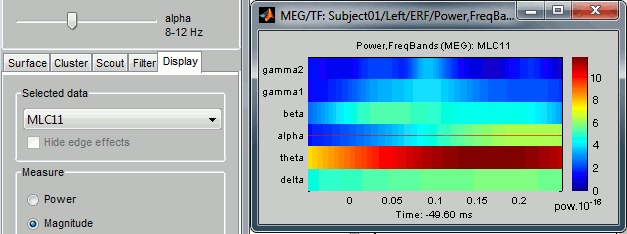
- You can notice that now the frequency selection is discreet, both in the figure and in the frequency slider, it is not possible to select a frequency in between. At each time and for each sensor, there are now just 6 values, one per frequency band.
- Now if you try to open at the same time the first TF that you have computed "Power,1:1:60Hz", you would get an error message: This frequency definition is not compatible for display with the linear [1...60] scale.
- Display the other possible views (All sensors, 2D Sensor Cap, 2D Layout), and change the current time and the current frequency in different ways (sliders, keyboard, clicks on figures). Play with the open figures until you are completely comfortable with those representations.
Time bands
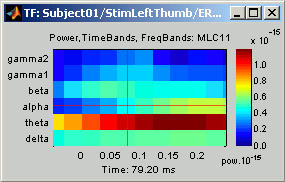
- Compute TF again for file !StimLeftThumb/ERP, but this time select the option "Group in time bands" (with "linear" frequency definition). To generate a list of regular time intervals, click on "Generate" and enter "30" ms as the duration of each time band.
- You get 11 time bands: t-2 and t-1 before 0ms, and t1 to t9 after 0ms. Click on Ok to start the computation.
Double-click on this new file "Power,TimeBands, 1:1:60Hz"
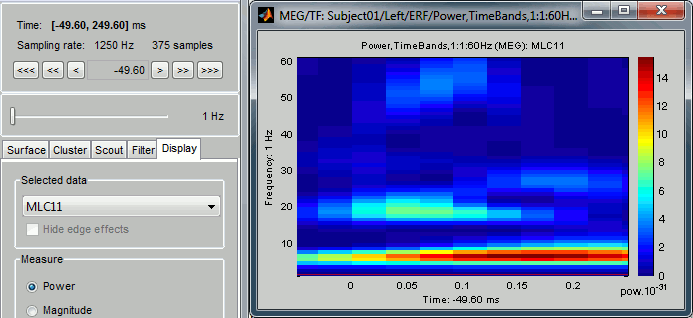
- Observe that the behavior is not the same as with the frequency bands: it is still possible to select a specific time in a time band (using the slider or clicking on the figure). This is because the time definition in the interface is still based on the ERP averaged file time definition, which is "continuous". Only 11 values in time are computed, and when requesting values a specific time point, the interface gets the values associated with the time band that time point belongs to.
- As a consequence, it is possible to open at the same time the first TF file that you have computed: "Power,1:1:60Hz". You would not get an error message like with the frequencies mismatching.
- Display also other types of figures (All sensors, 2D topographies), change current time and frequency several times in serveral ways (sliders, keyboard, clicks on figures).
Time bands and frequency bands
Just for curiosity, compute a file with both time and frequency bands.
Time-frequency on clusters time series
If you do not remember how to create a cluster of sensors, you should read again ?tutorial #8 "Regions of interest".
- Create two clusters "c1" and "c2" for the Left condition.
- Display a time series view for the !StimLeftThumb/ERP average:
- Select a few sensors, and click on the "New sel" button in the "Cluster" tab.
- Press "Escape" to unselect all the selected sensors.
- Select another group of sensors, and click on the "New sel" button again.
- Drag'n'drop the !StimLeftThumb/ERP file in the Processes list. Click on run.
Select the process "Spectral analysis > Time-frequency decomposition".
As some clusters are now available, you can have access to them in this interface.
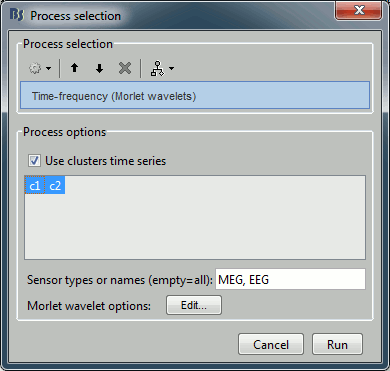
- Check the "Use only selected clusters", and select them both.
- The effect of this selection is that the TF decomposion will not occur on all the channels, but only on the averaged time series for each cluster.
- Click on run, do not change any TF option, click on OK.
- To compute the TF of each cluster, the operations are the following:
- Get time series for each sensor in the cluster
- Compute the TF for each sensor
- Compute the power of the TF
- Apply the "cluster function", that combines the different sensors TF to get one TF only for each cluster.
The selection of the "cluster function" is done in the "Cluster" tab, menu "View > Cluster function". Possible choices: mean (default), max, power.
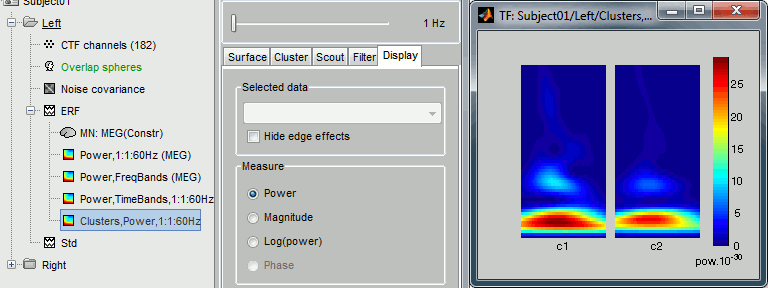
A new file "Clusters,Power,1:1:60Hz" appears in the database. The size of TF matrix in this file is [nClusters x nTimes x nFrequencies] = [2 x 375 x 60]. Double-click on it. The list in the "Time-freq" tab only contains two items: c1 and c2.
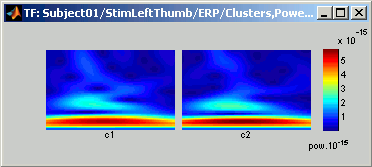
Right-click on file and select "Time-frequency maps (All sensors)". There are only two displays, one per sensor.
Time-frequency on sources
- Next thing that may interest you: how to display the TF decompositions for the sources time series. Let's first see how it works.
- It is possible to estimate the TF for each source of the brain, but it would be unrealistic to save this information to a file. The size of the TF matrix would be [nVertices x nTimes x nFrequencies] = [15010 x 375 x 60] = 1.28 Gb!
- We need then to simplify this problems. Two methods: compute the TF only for a few scouts (next section), or use the linear property of the TF decomposition.
As both the source reconstruction process (ImagingKernel * recordings) and the TF are linear operators, it is possible to exchange them:
TF(Inverse(Recordings)) = Inverse(TF(Recordings))
=> Power(TF(Inverse(Recordings))) = Power(Inverse(TF(Recordings)))So the solution is to estimate the TF of the recordings, and then multiply it on the fly by the ImagingKernel only for the required sources and/or frequency and/or time instant. This will be done in a completely transparent way from a user point a view.
- Start the computation of the TF for a source file:
- Drag'n'drop the intial sources file computed for the !StimLeftThumb/ERP file in the Processes tab.
- Select the "Sources" button in the Processes tab.
- Warning: Make sure not to take the "zscore" file, but the file which is called "MN: MEG(Constr)".
Click on Run. Select "Spectal analysis > Time-frequency decomposition" and click on Run.
Note that almost all the options are disabled. This is because the Power transformation is non-linear: we need to keep the complex Morlet wavelet coefficients. Those complex values will be first multiplied by the ImagingKernel matrix; the power is computed after, for display only.
- As a consequence, it is impossible to compute time or frequency bands now, because they are averages of the power values.
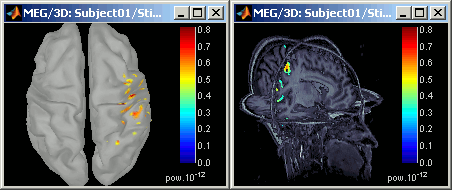
Click on Ok. A new file appears in the database explorer, as a child of the source file. Right-click on it, try all the visualization menus.
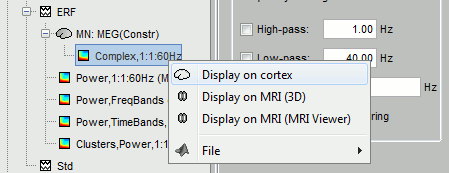
If you understood well how works the visualization of both the sources and the time-frequency maps, the manipulation of those figures should be rather intuitive. Change several times the current time and the current frequency in different ways.
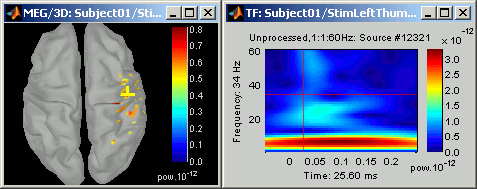
Shift + click on the cortex surface: This is a useful shortcut that you should remember. It displays the TF decomposition of the selected source.
Time-frequency on scouts time series
It is interesting to display the TF for a single source, but it is hard to extract synthetic information that can be analyzied statistically or compared between subjects this way. A better option is to define cortical regions of interest (scouts, see ?tutorial #8), and compute the TF for the average time serie of these scouts.
- Create scouts:
Right-click on the TF file for the ERP sources file of condition StimLeftThumb. Select "Display on cortex".
- Change current time and frequency so that you can observe the main response in the somato-sensory cortex (eg. t = 46.40ms, f = 45Hz).
- With the "Scout" tab, create two scouts on this cortex surface, one in the left somato-sensory cortex, and one in the right.
Rename them "LeftSS" and "RightSS".
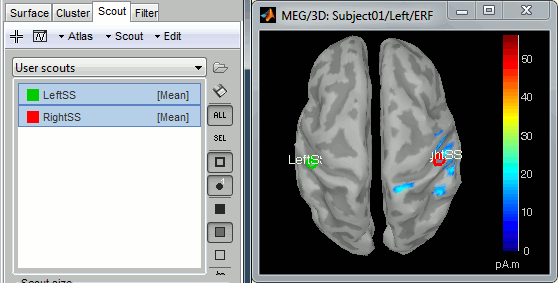
- Compute the TF decomposition for these scouts:
- Drag'n'drop the sources file (MN: MEG(Constr)) into the Processes tab.
- Select the "Sources" button in the Processes tab.
Click on Run. Select "Spectral analysis > Time-frequency decomposition".
As some scouts are defined, you will see this new box:
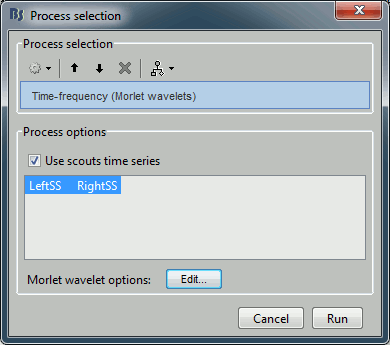
- Select "Use only selected scouts", and select both scouts in list. Click on Run.
- This time, the all the options are available again. We are going to compute the full TF matrix at once for the two scouts, so we can compute the power right away, together with time and/or frequency bands.
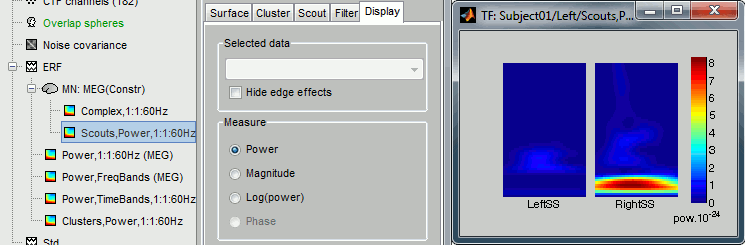
- Do not change any option and click on Ok. A new file appears in the tree, as a child of the sources file: "Scouts,Power,1:1:60Hz".
- To compute the TF of each scout, the operations are the following:
- Get time series for each source in the scout
- Compute the TF for each source
- Compute the power of the TF
- Apply the "scout function", that combines the different sources TF to get one TF only for each scout.
The selection of the "scout function" is done in the "Scout" tab, menu "View > Scout function". Possible choices: mean (default), max, power.
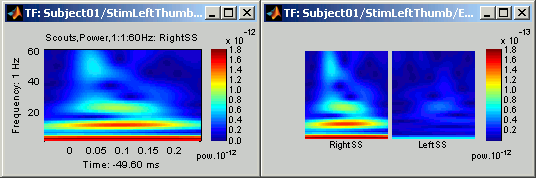
Right-click on this file and try the two visualization menus available.
Shortcut using the database explorer
You may have already noticed that when you right-click on a recordings or sources file in the database explorer, there is a "Time-frequency" menu.
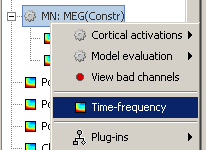
This menu does the same things as when you drag'n'drop the files in the Processes panel and then select the "Spectral analysis > Time-frequency decomposition" process, but it skips a few steps and directly shows the options for the TF decomposition.
- Thus it is not possible this way to select scouts or clusters of sensors.
- But it is a good option to get quickly the TF for a few files as it saves a lot of mouse clicks.
- Not that you can call this menu on several files/folders at the same time, by doing a multiple selection in the database tree (holding shift or control button) and then by right-clicking on any of the selected items.
Processing time-frequency files
Time-frequency files, once computed, can be processed with the Processes tab, exactly as recordings or sources file, as introduced in ?Tutorial #9.
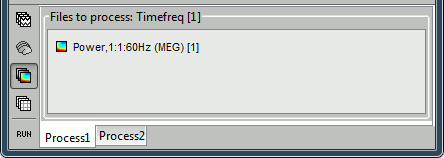
Drag'n'drop the TF files in the Processes panel, select the "Time-freq" button, click on Run, and select a process.
Same for the Statistics tab: it can be used to compute t-tests on TF files.
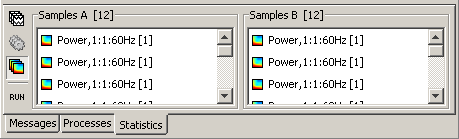
Warning: Those features are still experimental, they might not work properly. Note also that it is impossible to display yet the results of the t-tests on TF files.
Next
This is the last tutorial for Brainstorm introduction. You had an overview of most of the software features.
Now you can go back to the main Tutorials page, and read tutorials that are closer to your centers of interest.