SEEG Time-Frequency Analysis for Epileptogenic Zone Localization (under construction)
Authors: xxx.
This tutorial introduces some concepts that are specific to the management of intracranial, SEEG recordings in the Brainstorm environment, and explains how to compute maps of epileptogenicity from ictal and interictal recordings. It is based on a clinical case from the McGovern Medical School, University of Texas Health Science Center at Houston, Texas, USA.
Note that the operations used here are not detailed, the goal of this tutorial is not to introduce Brainstorm to new users. For in-depth explanations of the interface and theoretical foundations, please refer to the introduction tutorials.
NOT FOR CLINICAL USE:
The performance characteristics of the methods and software implementation presented in this tutorial have not been certified as medical devices and should be used for research purposes only.
Dataset description
License
This tutorial dataset (EEG, MRI and CT data) remains property of the McGovern Medical School, University of Texas Health Science Center at Houston, Texas, USA. Its use and transfer outside the Brainstorm tutorials, e.g. for research purposes, is prohibited without written consent. For questions, please contact Yash Shashank Vakilna, MS ( Yash.Shashank.Vakilna@uth.tmc.edu ).
Clinical description
The dataset was recorded at the Epilepsy Monitoring Unit at UTHealth Houston. It includes recordings for a patient who was a 25-year-old right-handed woman with drug-resistant epilepsy since age six and a prior right parietal opercular corticectomy at 15 presented with weekly focal aware seizures featuring a left-hand tingling aura and focal impaired awareness seizures with staring and pouting. In the Epilepsy Monitoring Unit (EMU) she had intermittent right parietal slowing and ten habitual seizures arising from C4-P4, and MRI revealed bilateral perisylvian polymicrogyria (PMG), pachygyria, right posterior temporal periventricular nodular heterotopia, and post-surgical changes. MEG localized discharges to the right superior parietal region adjacent to her previous resection, and SEEG implantation mapped two distinct onset patterns: low-voltage fast activity in right superior parietal PMG during focal aware seizures and repetitive spiking in posterior insular PMG during impaired awareness seizures. After multidisciplinary review, she underwent uncomplicated MR-guided laser interstitial thermal therapy targeting the right superior parietal and posterior insular PMG and remained seizure-free at one-year follow-up.
SEEG recordings
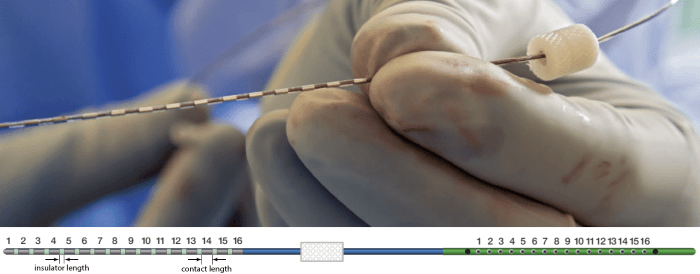
The depth electrodes used in this example dataset are PMT SEEG Depth Electrodes, with the following specifications:
- Diameter: 0.8 mm
- Contact length: 2 mm
- Insulator length: 1.5 mm
- Distance between the center of two contacts: 3.5 mm
- Between 8 and 16 contacts on each electrode
Files
tutorial_seizure_fingerprinting/
anatomy/: Anatomy data
pre_T1.nii.gz: Raw pre-implantation T1 MRI (in NIfTI-1 format)
pre_T2_FLAIR.nii.gz: Raw pre-implantation T2 FLAIR MRI (in NIfTI-1 format)
post_CT.nii.gz: Raw post-implantation CT scan (in NIfTI-1 format)
post_CT_coreg.nii.gz: Post-implantation CT scan (in NIfTI-1 format) coregistered, resliced and skull-stripped using SPM
pre_DWI/pre_DWI.nii.gz: Raw diffusion weighted MRI (in NIfTI-1 format)
pre_DWI/pre_DWI.bval: Contains a single number per volume that indicates how large of a diffusion gradient was applied to the data
pre_DWI/pre_DWI.bvec: Contains a triplet of numbers per volume that shows in what directions the gradients were applied
recordings/: SEEG recordings
Baseline.edf: Raw SEEG recordings (in EDF format) for baseline
ictal_repetitive_spike.edf: Raw SEEG recordings (in EDF format) for seizure with Ictal repetitive spiking
interictal_spike.edf: Raw SEEG recordings (in EDF format) for interictal spike
LVFA_and_wave.edf: Raw SEEG recordings (in EDF format) for seizure onset with Low-voltage-fast-activity
- All the anatomical images have been de-identified with defacing from Brainstorm.
References
All details for this study can be found here: https://zenodo.org/records/14807262
Download and installation
Requirements: You have already followed all the introduction tutorials and you have a working copy of Brainstorm installed on your computer.
BrainSuite (optional): Make sure you have the latest version of BrainSuite installed. Follow steps as per the BrainSuite for Brainstorm tutorial. This is required to perform skull stripping when importing CT below in order to remove extracranial regions from the CT.
SPM: If you are running Brainstorm from the MATLAB environment, you need to have the SPM12 toolbox installed on your computer, as a Brainstorm plugin or a custom installation.
With the stand-alone compiled version of Brainstorm: all the needed SPM scripts have been compiled and included in the executable. This is required for two purposes:- Coregistration between pre-implantation MRI and post-implantation CT volumes.
Use mask from SPM based tissue segmentation to remove extracranial regions from the CT.
ct2mrireg: To have an alternate way of doing the coregistration between pre-implantation MRI and post-implantation CT volumes, you need to have the ct2mrireg plugin installed on your computer, as a Brainstorm plugin. It can be found under the menu Plugins > Anatomy > ct2mrireg. If using Brainstorm with MATLAB, please install the Image Processing Toolbox.
Download the dataset:
Go to the Download page of this website, and download the file: tutorial_seizure_fingerprinting.zip.
- Unzip it in a folder that is not in any of the Brainstorm folders (program folder or database folder).
Brainstorm:
- Start Brainstorm
Select the menu File > Create new protocol. Name it "TutorialSeizureFingerprinting" and select the options:
"No, use individual anatomy",
"No, use one channel file per acquisition run".
Import the anatomy
Pre-implantation MRI
Right-click on the TutorialSeizureFingerprinting folder > New subject > Subject01.
Keep the default options you defined for the protocol.Switch to the Anatomy view of the protocol.
Right-click on the subject node > Import MRI.
Set the file format: MRI: NIfTI-1 (*.nii;*.nii.gz).
Select: tutorial_seizure_fingerprinting/anatomy/pre_T1.nii.gzThe MRI viewer opens automatically. Click on "Click here to compute MNI normalization", option "maff8". This method is embedded in Brainstorm and does not require the installation of SPM12. However, it requires the automatic download of the file SPM12 Tissue Probability Maps. If you do not have access to internet, see the instructions on the Installation page. It is based on an affine co-registration with the MNI ICBM152 template from the SPM software, described in the following article: Ashburner J, Friston KJ, Unified segmentation, NeuroImage 2005..
![[ATTACH]](/moin_static1911/brainstorm1/img/attach.png "[ATTACH]")
Click on Save to close the MRI viewer. New node named pre_T1 is created.
![[ATTACH]](/brainstorm/Tutorials/SeizureFingerprinting?action=AttachFile&do=upload_form&ticket=006946758b.60f24bd7f9a5612302819116a8c09390bb357091&target=1-2.png "[ATTACH]")
![[ATTACH]](/brainstorm/Tutorials/SeizureFingerprinting?action=AttachFile&do=upload_form&ticket=006946758b.60f24bd7f9a5612302819116a8c09390bb357091&target=3.png "[ATTACH]")
While it is not applicable to this data, but while importing some MRIs if there is a transformation available in the NIfTI header, then a window pops up asking if you would want to apply the transformation to the MRI file. Choosing Yes will orient the MRI based on this transformation.
Post-implantation CT
The pre-implantation MRI above will be used as the anatomical reference for this subject. We will now import a second scan done after the SEEG implantation, on which we can see the SEEG contacts. In this dataset, the post-implantation volume is a CT scan (contacts hypersignal appear in white).
Right-click on the subject node > Import CT.
Select: tutorial_seizure_fingerprinting/anatomy/post_CT.nii.gzChoose No for the NIfTI Scaling. The data scaling feature allows the storage in a wider range than what would be allowed by the datatype. For more info check here.
Choose Yes for the transformation for MRI orientation.
Choose SPM for coregistration. See the section Volume coregistration for more details on this option.
Choose Yes for reslicing so that the CT voxel dimensions match those of the MRI.
Choose SPM for skull stripping to remove any non-brain tissues as we need just the electrodes inside the brain. See the section Skull Stripping for more details on this option.
The MRI viewer opens automatically, showing the post-implantation CT volume as a colored layer on top of the previous volume. Adjust the transparency and amplitude threshold of this layer in the section Data options of the Surface tab, adjust its colormap with the popup menu of the figure. Use this display to validate that the coregistration of the two volume is correct, all the parts of the head must align well.
New node named postCT_spm_reslice_masked_spm is created. The postfix _spm_reslice_masked_spm indicates the different processes it has gone through. To see the history of the processes for this file, right click on post_CT > File > View file history.
To just view the CT File, right click on post_CT > Display > MRI Viewer.
![[ATTACH]](/brainstorm/Tutorials/SeizureFingerprinting?action=AttachFile&do=upload_form&ticket=006946758b.60f24bd7f9a5612302819116a8c09390bb357091&target=coreg_ct.png "[ATTACH]")
![[ATTACH]](/brainstorm/Tutorials/SeizureFingerprinting?action=AttachFile&do=upload_form&ticket=006946758b.60f24bd7f9a5612302819116a8c09390bb357091&target=coreg_clean_ct.png "[ATTACH]")
![[ATTACH]](/brainstorm/Tutorials/SeizureFingerprinting?action=AttachFile&do=upload_form&ticket=006946758b.60f24bd7f9a5612302819116a8c09390bb357091&target=4.png "[ATTACH]")
![[ATTACH]](/brainstorm/Tutorials/SeizureFingerprinting?action=AttachFile&do=upload_form&ticket=006946758b.60f24bd7f9a5612302819116a8c09390bb357091&target=5.png "[ATTACH]")
![[ATTACH]](/brainstorm/Tutorials/SeizureFingerprinting?action=AttachFile&do=upload_form&ticket=006946758b.60f24bd7f9a5612302819116a8c09390bb357091&target=disp_ct.png "[ATTACH]")
Generate isoSurface
This creates a thresholded mesh from the CT to separate the contacts out from rest of the CT. This aids the user towards localization of the electrodes and its contacts more accurately.
Right click on post_CT > CT segmentation > Generate SEEG/ECoG isosurface.
This will bring the Generate isosurface window. This window shows 4 values: the Background level, White level, Max Intensity and the suggested Set isoValue, all of them given in the Hounsfield Unit (HU) scale. The first 3 values are calculated automatically from the histogram of the CT and are displayed for reference to help the user to decide on what to set the isoValue for getting a good thresholded mesh. The editable isoValue field shows an estimated best guess based on mean of White Level and Max Intensity. Just let that value be and press OK.
![[ATTACH]](/brainstorm/Tutorials/SeizureFingerprinting?action=AttachFile&do=upload_form&ticket=006946758b.60f24bd7f9a5612302819116a8c09390bb357091&target=6.png "[ATTACH]")
![[ATTACH]](/brainstorm/Tutorials/SeizureFingerprinting?action=AttachFile&do=upload_form&ticket=006946758b.60f24bd7f9a5612302819116a8c09390bb357091&target=7.png "[ATTACH]")
Another recommended way to select a more desirable isoValue for the thresholding is to just open the CT file (by double clicking on it), click on the MIP: Functional in the MRI Viewer, use the Data Options > Amplitude slider in the Surface tab to browse through the threshold and hover on the slider to get the value that can be used to enter into the isoValue field in GUI above.
![[ATTACH]](/brainstorm/Tutorials/SeizureFingerprinting?action=AttachFile&do=upload_form&ticket=006946758b.60f24bd7f9a5612302819116a8c09390bb357091&target=7_tip.png "[ATTACH]")
An isosurface is generated showing the contact as blobs overlayed on the 3D MRI slices. The Thresh slider under Surface options can be used to fine tune and regenerate mesh with different isoValues.
![[ATTACH]](/brainstorm/Tutorials/SeizureFingerprinting?action=AttachFile&do=upload_form&ticket=006946758b.60f24bd7f9a5612302819116a8c09390bb357091&target=8.png "[ATTACH]")