Good morning.
I need to study only the BEM surface generated in Brainstorm, and I would export it to Matlab. I can view the mesh of the BEM Surface in Brainstorm, but I don’t succeed in defininig the value of the coordinates of the vertices. Without the coordinates, I can’t reproduce the BEM surface on Matlab. How can I do?
Please, help me.
Giuseppe Lisciandrello.
Hi Giuseppe,
I’m not sure what you mean with “defining the value of the coordinates of the vertices”?
All the fields of the surface files are described in the introduction tutorials:
http://neuroimage.usc.edu/brainstorm/Tutorials/ExploreAnatomy#On_the_hard_drive:_Surface
To convert the coordinates of the vertices between coordinate systems:
http://neuroimage.usc.edu/brainstorm/CoordinateSystems#Converting_between_coordinate_systems
Cheers,
Francois
I want to reproduce only the BEM surface in Matlab as a meshgrid, and to do it I need to know the value of the coordinates of all the vertices. In http://neuroimage.usc.edu/brainstorm/Tutorials/ExploreAnatomy#On_the_hard_drive:_Surface Sphere.Vertices command is explained, but in my Brainstorm it doesn't appear. Why? And can I use this command for my aim?
When I click (for example): bem_innerskull_1922V/File/View file contents, this is what appears:
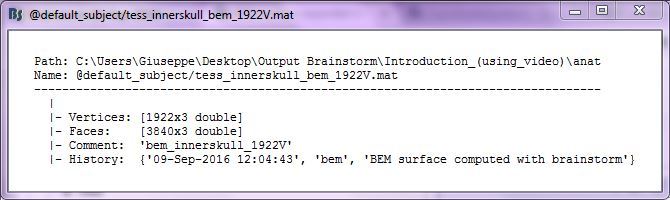
There aren't informations about the coordinates of the vertices. How can I view them?
The field Reg.Sphere.Vertices is related with the co-registration to the FreeSurfer atlas:
http://neuroimage.usc.edu/brainstorm/Tutorials/CoregisterSubjects
You would find it only in the cortex surface (subject and template). I don’t think this is what you need.
The coordinates of the vertices are simply in the field .Vertices.
To convert these coordinates to a different coordinate system (MRI or MNI), see this page:
http://neuroimage.usc.edu/brainstorm/CoordinateSystems#Converting_between_coordinate_systems
Maybe you could read the first 5 tutorials in the section “Get started”, it would help you understand how Brainstorm work:
http://neuroimage.usc.edu/brainstorm/Tutorials
In the field Vertices it’s written only: [1922x3 double]. There aren’t the coordinates! You can see it in image posted in my previous message.
These are the coordinates of the 1922 vertices of the surface.
Each point has three values (x,y,z) in SCS coordinates.
[QUOTE=Francois;11013]These are the coordinates of the 1922 vertices of the surface.
Each point has three values (x,y,z) in SCS coordinates.[/QUOTE]
I think I've got a problem, because there aren't the values (x,y,z) of each vertex. There is only this: 
. I dont' know how to solve this problem. But, anymore, thanks!
Giuseppe Lisciandrello.
Right-click on the surface > File > Export to Matlab > "sSurf"
Then in your Matlab command window, type sSurf.Vertices.
It all looks like what it’s supposed to, you have everything you need here.
If you don’t understand what is happening here, I recommend you read the Brainstorm introduction tutorials and maybe some introduction to mesh manipulations in Matlab.
[QUOTE=Francois;11017]Right-click on the surface > File > Export to Matlab > "sSurf"
Then in your Matlab command window, type sSurf.Vertices.
It all looks like what it’s supposed to, you have everything you need here.
If you don’t understand what is happening here, I recommend you read the Brainstorm introduction tutorials and maybe some introduction to mesh manipulations in Matlab.[/QUOTE]
Okay, thanks! I’ll do it!
Cheers,
Giuseppe Lisciandrello.