Hello,
I’m trying to use brainstorm on win7 64bits
first i tried to install brainstorm_140415 with MCR_R2012b_win64
and when running brainstorm3.bat i have :
Matlab R2012b not found.
ERROR: Matlab R2012b does not seem to be installed on your computer.
- Go to the Brainstorm website
- Download the Matlab Compiler Runtime (R2012b).
But MCR is well instaled (java and Visual C++ too)
So i tried with brainstorm_140430 and with bst_bin_R2013b_140312(with MCR_R2013b_win64)
and i still have the problem brainstorm does not see MCR installed at C:\Program Files\MATLAB\MATLAB Compiler Runtime.
Do you have any idea about that ?
Hello,
You may not have the correct privileges to execute the batch file.
Please try to run with administrator rights: right-click on brainstorm3.bat > Run as administrator.
Alternatively, you can create your own .bat file anywhere on your hard drive, with one single line (after adapting to point at the correct java.exe and brainstorm3.jar):
"C:\Program Files\MATLAB\R2012b\sys\java\jre\win64\jre\bin\java.exe" -jar "C:\Work\Dev\brainstorm3\bin\R2012b\brainstorm3.jar"
Cheers,
Francois
Dear Francois,
I just tried with brainstorm_140504
run brainstorm3.bat as administrator, it stills : “ERROR: Matlab R2012b does not seem to be installed on your computer”.
I wrote the following bat :
"C:\Program Files\MATLAB\MATLAB Compiler Runtime\v80\sys\java\jre\win64\jre\bin\java.exe" -jar "C:\Program Files\brainstorm3\bin\R2012b\brainstorm3.jar"
as administrator or not, a console window opens and closes quickly and nothing happens (no process running in task manager)
Thanks for your help
Cheers
Have you checked that the file “java.exe” you are indicating really exists?
The problem could also be that the brainstorm3 folder is in C:\Program files. Win7 has weird privileges for this folder that you cannot change. You can try to move the brainstorm3 folder to some user folder (Documents or Desktop) and try again.
You can also run your own .bat file from a command prompt so you can see the error message that is returned:
Start menu > Execute “cmd” > “cd your_bat_folder” and type the name of your batch file.
This way the window will not close and you’ll be able to read the error message.
Francois
hello,
the java.exe really exists, i tried to move brainstorm3folder in Documents.
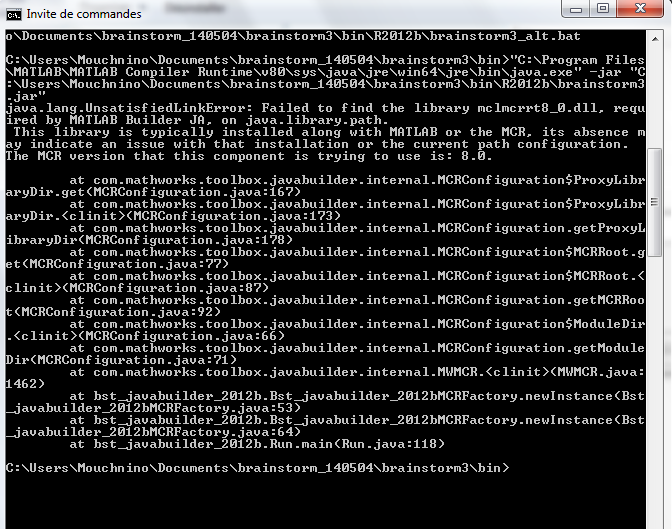
and when i run my batch from prompt i have this error
so i read that MATLAB install shipped with a specific JVM version. A MATLAB install is only fully supported on the JVM version it is shipped with.
the readme in C:\Program Files\MATLAB\MATLAB Compiler Runtime\v80\sys\java\jre\win64\jre says version 6, but i had java 7 installed
so I uninstalled java7 and installed java6 but the probleme persists.
The problem is not the version of Java or the access to the JVM, you can have many versions of Java installed on a Windows computer without any problem.
What causes the problem is the access to the file mclmcrrt8_0.dll: it is not found on the system path when you execute the program.
This library is what allows you to execute compiled Matlab code on your computer, and should be added automatically in your path during the MCR install.
So I guess something went wrong during the installation, or the installer didn’t have enough privileges to set the path.
To make the Brainstorm compiled distribution more robust to this problem, I edited the brainstorm3.bat to always add “%MATLABROOT%\runtime\win32” and “%MATLABROOT%\runtime\win64” to the system path before running the execution of Brainstorm.
Please download again Brainstorm from the website and try again.
Cheers,
Francois
I had reinstalled the MCR as administrator and It works well with my batch
"C:\Program Files\MATLAB\MATLAB Compiler Runtime\v80\sys\java\jre\win64\jre\bin\java.exe" -jar "C:\Users\Mouchnino\Downloads\brainstorm_140506\brainstorm3\bin\R2012b\brainstorm3.jar"
but with your new brainstorm3.bat, i still have “matlab not found”
Thank you for your patience !
Best Regards,