[BUG] Duneuro-FEM Windows Plugin Generates Gmsh v4 Mesh with Non-Continuous Node Indices, Causing Import Failure

Dear Brainstorm Developers and Users,

I am encountering a critical issue where the computed Head Model results from the Duneuro FEM plugin cannot be imported into the Brainstorm database. All my software components are updated to their latest versions.

:police_car_light: Problem Description
Successful Computation: The Duneuro plugin successfully completes the FEM solver process within minutes, generating the necessary .msh file in the temporary directory.

Import Failure: However, neither the automatic import process nor my manual attempts to import the generated head_model.msh file succeed; both immediately result in an error.

Software Environment: Both Brainstorm and the Duneuro plugin are the latest versions (updated on [Please fill in your latest update date here, e.g., December 8, 2024]), running on Windows 11. My CPU is an Intel i9-14900HX.

:cross_mark: Detailed Error Message
When attempting to manually import the head_model.msh file, MATLAB throws the following error:

Matlab

Error using mesh_load_gmsh4>read_nodes (line 248)
node numbers have to be a continuous list of indexes starting at 1
My Diagnosis
This error indicates that the Gmsh v4 file generated by the Duneuro pre-compiled plugin on my Windows system contains non-continuous node indices.

Brainstorm's import script (mesh_load_gmsh4.m) strictly requires node indices to be continuous, causing it to reject the file and preventing me from proceeding with source localization analysis. This issue persists even with the latest software versions, suggesting a potential bug triggered by a specific compiled version of Duneuro or my particular Windows system environment.

Request for Assistance
I kindly request assistance from the development team. Could you please advise on the following:

Have other users reported this issue? Is there a temporary fix script (e.g., a more lenient version of mesh_load_gmsh4.m) available?

Is there a way to force the Duneuro plugin to generate the Gmsh v2 format (which typically has a simpler index structure) to bypass this error?

Thank you for your attention and help!

Ping @tmedani

Hi @324
Could you provide more details on the previous steps and how the mesh is generated?
Were you able to display the mesh in Brainstorm?

And what parameters did you select for the Duneuro?

Thanks

Hi @tmedani,

Thank you very much for following up on this critical issue. I am happy to provide the exact details regarding the mesh generation process and the parameters used.

1. Mesh Generation Workflow and Previous Steps

(generate the FEM model successfully)

(computing head model)

2. Ability to Display Mesh

The mesh could NOT be displayed in Brainstorm due to a severe hang-up during the import process.

Failure Point (Crucial Correction): The plugin did not fail immediately with an error. Instead, when the system attempted to automatically load the generated head_model.msh file (or when I manually attempted the import), the process froze or hung indefinitely (CPU usage was minimal).↳

Action Taken: I allowed the process to run for more than twenty minutes (20+ min) before determining it was stalled. I then manually interrupted the MATLAB execution using Ctrl+C.↳

3.Diagnosis based on correction

The primary issue might be the extremely slow (or non-terminating) parsing of the Gmsh v4 file by mesh_load_gmsh4.m, and the continuous indexing error is likely a misleading state that the parser was in when abruptly interrupted (Ctrl+C). This suggests a performance issue with handling the specific structure of the Gmsh v4 file generated by the Duneuro Windows build, rather than an immediate parsing failure.

I look forward to an official fix for either the plugin output or the mesh_load_gmsh4.m script. Thank you again for your assistance.

Hi @324

Thanks for sharing the detailed response.

It seems that the mesh process was not completed correctely, and something went wrong with Brain2mesh. Therefore, the lead field is not computed; you cannot run DUNEuro if the mesh is incorrect.

Can you share the FEM mesh, the file FEM 338627V (brain2mesh, 5 layers). You can send it to MATLAB and save the MATLAB file. You can do that by right-clicking on the FEM mesh, then File> export to MATLAB, and then save the file and send it here. I can check what is wrong.

Otherwise, can you try generating the FEM mesh using an alternative method?
The recommended option is SimNibs3.

Best,
@tmedani

Hi @tmedani,
Thank you for your prompt response. I have exported the FEM mesh file as requested:

File: [FEM_mesh_338627V.mat]

Original path in Brainstorm: FEM 338627V (brain2mesh, 5 layers)
Please find the attached link Unique Download Link | WeTransfer

Let me know if you need any additional information. Thanks for your assistance!

Best regards,

@324

Hi @324

I just tried to download the file but the link is expired.

Can you update the link.

Thanks,

Hi @tmedani,

Thanks for the heads-up.

You’re right, the link had expired. I’ve uploaded the file again and updated the link below:

Please try downloading now and let me know if it works.

Best regards,

@324

Got it, thanks.

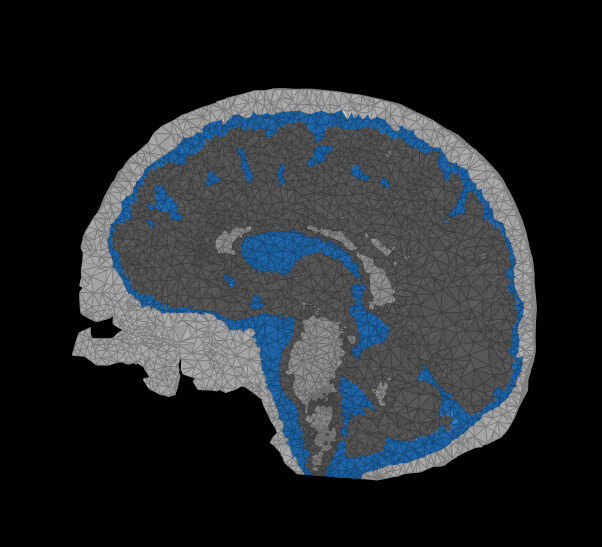
I was able to load it to Brainstorm and display it. Here is the views.

It seems that the background of the MRI is segmented as scalp. I guess that the quality of your MRI is not good for the default parameters.

The other surfaces looks correct.

In principle, the Duneuro would work on this mesh; however, it is not recommended; you need to check the FEM mesh before running the solver. So this is not a reason for the error that you are getting.

Were you able to display the mesh using Brainstorm?

You can try using another method for the segmentation, you can give a try with Roast, or SimNibs.

Hi @tmedani,

Thank you for your detailed reply and helpful suggestions.

Following your advice, I tried using SimNibs for MRI segmentation, and it worked very well. The issue with the background being mis-segmented as scalp has been resolved, and the resulting surface mesh now meets the expected quality.

When I initially viewed the mesh in Brainstorm, the background was indeed being classified as scalp under default parameters, which confirmed that the original MRI quality was affecting the segmentation outcome. After switching to SimNibs, the segmentation results are much more accurate, and the subsequent FEM mesh generation passed inspection without issues.

I am now able to proceed with Duneuro simulations smoothly, and the previous errors appear to have been caused by the initial mesh quality.

Thanks again for your guidance and support!

Best regards,
@324