Hello,
I am trying to do parametric t-test on recordings between the groups. But some subjects have different matrix, they can not be changed even I have tried to change channel file. I did averaging and time frequency analysis and permutation tests on time domain, so, I can not do standardizing uniform list of channels. What can I do now ?
Thanks,
Selin
Hi Selin,
Can you post a few screen captures illustrating your problem? (your database, the error messages, the contents of the files, etc)
Thanks,
Francois
Here it is. Also I have an another problem. I downloaded the both Colin27 and ICBM152 templates for MNI transformation, but when I try to compute MNI transformation it shows an error 'file does not exist'. I send its screen capture, too.
Thanks,
Selin
Hi Selin,
Please start by updating Brainstorm (menu Help > Update Brainstorm).
This will solve the download problem. However, I’m not sure I understand why you need this.
Why is the default ICBM152 template available in Brainstorm not enough for you?
Then double-check the size of the data matrices: the error message you get indicates that not all the trials you are testing have the same dimensions.
Maybe you didn’t import the same number of time samples in your two conditions. Averaging and testing are done value by value, and the dimensions of all the matrices must be strictly the same.
(Right-click a trial > File > View file contents, and check the size of the matrix “F”)
Cheers,
Francois
Francois,
When I tried to update brainstorm it gave me this error: " File to download does not exist. Software was not updated." I need to compute MNI transformation for volume source models. I dowloaded Colin 27, FSAverage_2016 and ICBM12 for this and run compute MNI transformation but everytime it showed me “File does not exist”.
Thank you so much,
Selin
Hi Selin,
Maybe you have a problem with your internet connection. Are you behind a firewall or a proxy?
If so, you need to go to the Matlab preferences and configure the proxy so that Matlab can go through the proxy, or disable the firewall / configure it so that Matlab can access the internet.
Test your connection by typing in your Matlab command line: web(‘http://www.google.com’)
Alternatively, you can download all the files by yourself.
- Update Brainstorm: go to the download page on the website, download a new brainstorm version, unzip it, and delete the old one (it will not delete your database or preferences)
- Download the SPM atlas used for computing the SPM/MNI transformation: download the file “SPM_TPM.zip”, unzip it, copy TPM.nii in your user template folder ($HOME/.brainstorm/defaults/spm/TPM.nii)
You don’t need to download any other anatomy template to compute this MNI transformation (Colin27 or others), but if you need them, you can download them manually too.
http://neuroimage.usc.edu/brainstorm/Tutorials/DefaultAnatomy#Changing_the_default_anatomy
Cheers,
Francois
Hi Francois,
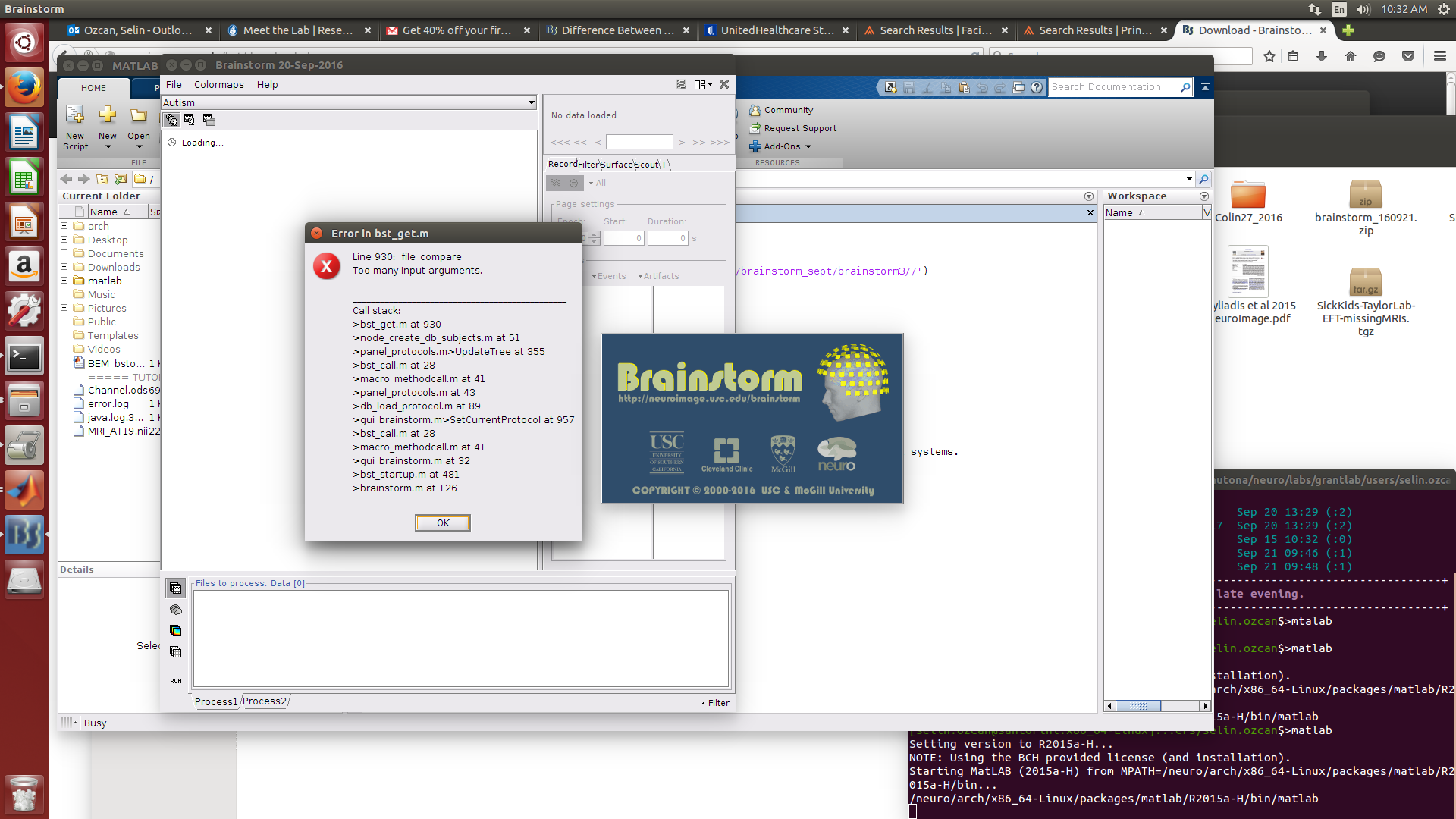
I updated brainstorm as you said and opened again, then this message appeared and could not open the protocol:
It shows this error for just one protocol which I tried volume source models.
Thanks,
Selin
Hi Selin,
I guess something is damaged in your protocol, but it’s difficult to know without having the data in hand.
Do you have a backup version of it that you could use instead?
Otherwise, try the following:
- File > Delete protocol > Only detect from database
- With your file explorer: delete the file “/…/Autism/data/protocol.mat”
- File > Load protocol > Load from folder > “/…/Autism”
How big is the entire folder “Autism” ?
Cheers,
Francois
Francois,
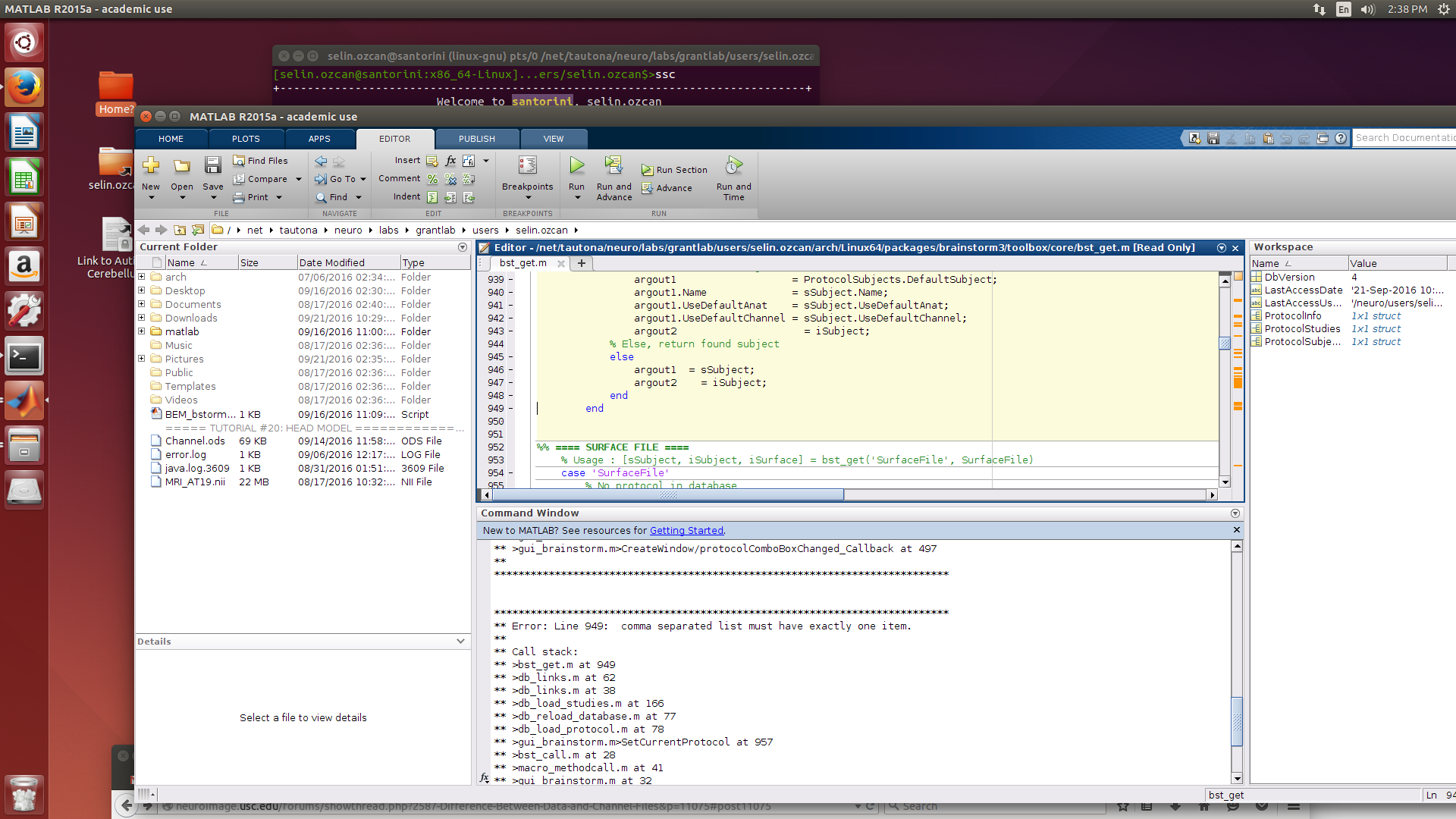
I deleted than loaded as you said, it has showed me this error (also line 949 is above):
Autism entire folder is 206 GB.
Thanks,
Selin
Hi Francois,
Also this message occurs when try to reload the protocol " No method setFileName with matching signature found for class brainstorm.tree.BstNode’ "
Thanks,
Selin
Please start by updating Brainstorm to today’s version. You error lines do not match the version that is currently online.
- Close Brainstorm and type “brainstorm reset” in your command window, then close Matlab
- Delete all the versions of Brainstorm your have on your computer
- Make sure that none of the Brainstorm folder are saved in your Matlab path (you shouldn’t add brainstorm subfolders to your path)
- Download and unzip a fresh version from the Download page on the website
I guess your error is linked to some database issue.
Can you make sure that you have one and only one folder named “@default_subject” in any subfolder of your protocol.
Same thing for folder “@inter”.
Francois
We have done all step as you wrote and still have this error : “comma separated list must have exactly one item.” Also we have checked my database there is one @default_subject and @intra folder but multiple @default_study and @inter folders. Does it makes difference ?
I am very appreciated for your helps Francois, thank you so much.
Selin
And can you post the full error message you get now, so I can know where is the line that causes the problem.
Multiple @inter folders? This should never happen…
Can you take a screen capture of the folder architecture showing this (like the left pane of a file explorer)
I have restarted now, here it is:
I have written wrong, not multiple @inter folders, multiple @intra folders exist. There is one @default_subject and @inter folders but multiple @default_study and @intra.
Thank you,
Selin
Hi Selin,
There is something wrong in your database, a file that is saved with incorrect information and that cannot be displayed correctly (first error message) or processed by the databasing system (second error message), but I cannot say what without debugging the program…
If you want to try to do it yourself:
- Make a FULL backup of your database before you start doing any modification (if you don’t have a backup set up, it’s time to buy a new external hard drive… it’s the same as with any computer-based task, you need to backup your work regularly if you don’t want to lose any information or any time in fixing these kinds of issues).
- Close Brainstorm
- Replace the line that causes the error with:
try
… the original line …
catch
disp(‘error’)
end
- Place a breakpoint on the disp line (click on the left side of the code editor to get a red dot)
- Start Brainstorm, the program will stop when it hits the error, and you can inspect the values of all the variable to try to understand which is the file that causes the problem.
- Then you can try to fix the error: fix the file or delete it, then stop the debugger, remove the breakpoint, delete the data/protocol.mat file, and restart Brainstorm.
- Repeat for the two errors if necessary, but start with the first one, it should fix the second one as well
If you’re lost in the code, ask someone around you who is comfortable with Matlab programming.
Otherwise, I can try to connect remotely to your computer and do it myself (ssh, nomachine or teamviewer), but I am leaving for two weeks and won’t have time to do it before October 9th.
Good luck with the debugging!
Francois
Thank you so much for your helps, Francois ! I am very appreciated.
Selin