Digitize not working in standalone version

Hi all,

I’ve been (unfortunately) forced to use the standalone version due to an issue with our Matlab campus license. Everything seems to work fine, but when I try to use the “digitize” function, I get the error I’m reporting. I’m using a Polhemus Fastrak connected via serial cable and used to work perfectly with the old Brainstorm. Is there a way to solve the problem? Thank you.

paolo

  • Which version of the standalone are you using?

  • In the main Brainstorm window go to File > Command window, paste the command below and execute it:

    which('newline', '-all')

    What is printed in the terminal? It should be something like:

    built-in (/usr/local/MATLAB/R2023a/toolbox/matlab/strfun/newline)
    

Hi Raymundo,

I’m using the 03-Sep-2025 version (downloaded this morning), and in the terminal I get exactly the same message you printed (just in windows format), with a %shadowed at the end. Thank you,

paolo

Oh! That seems to be the issue, it is not using the Matlab's newline function
Can you post the entire path (or paths) that is returned?

Do your mean 23-Sep-2025? That is the current binary in the Download page (uploaded yesterday)

Yeah, sorry, it’s 23-Sep-2025. Here’s the entire output:

C:\Users\p_enr\AppData\Local\Temp\p_enr\mcrCache9.14\bst_ja1\home\rcassani\.brainstorm\plugins\mvgc\MVGC1-1.3\deprecated\utils\newline.m
built-in (C:\Program Files\MATLAB\MATLAB Runtime\R2023a\toolbox\matlab\strfun\newline)                                                    % Shadowed

Thank you

paolo

:thinking: The culprit is newline introduced in the MVGC toolbox.
We'll update the binary in the next hours and let you know when it is ready

2 Likes

WoW!!! Thank you Raymundo!

paolo

Solved! Please redownload the standalone version from the website, it should be the 24-Sep-2025

Hi Raymundo,

Just downloaded the last standalone version, unfortunately I keep getting the same error:

BST> =================================

Warning: instrfind will be removed in a future release. There is no simple replacement for this.

---

** Error: Line 118:  newline
** Too many output arguments.
**
** Call stack:
** >ICTRemoveFunctionalityHelper.m>ICTRemoveFunctionalityHelper.getWarningString at 118
** >ICTRemoveFunctionalityHelper.m>ICTRemoveFunctionalityHelper.displayWarning at 130
** >ICTRemoveFunctionalityHelper.m>ICTRemoveFunctionalityHelper.ICTRemoveFunctionalityHelper at 88
** >serial.m>serial.serial at 150
** >panel_digitize.m>CreateSerialConnection at 1912
** >panel_digitize.m>Start at 183
** >panel_digitize.m at 31
** >bst_call.m at 28
** >gui_brainstorm.m>@(h,ev)bst_call(@panel_digitize,'Start') at 151
**

---

And here’s the output of the “which”

C:\Users\labl2\AppData\Local\Temp\labl24\mcrCache9.14\bst_ja1\home\rcassani\.brainstorm\plugins\mvgc\MVGC1-1.3\deprecated\utils\newline.m
built-in (C:\Program Files\MATLAB\MATLAB Runtime\R2023a\toolbox\matlab\strfun\newline)                                                     % Shadowed

Sorry.

paolo

Hi Paolo, something went wrong on our side on uploading the file.
Please download it again and try

Hi Raymundo,

I’ve just tried the new version. As you can see the Digitize GUI looks ok, but if I try to collect a point usign the pen, I get another error. Sorry.

I don’t know if this may represent a problem, but I did not mention that our Polhemus Fastrak is connected via a serial-to-USB cable. Forgot to mention it because it used to work perfeclty when Matlab was availble.
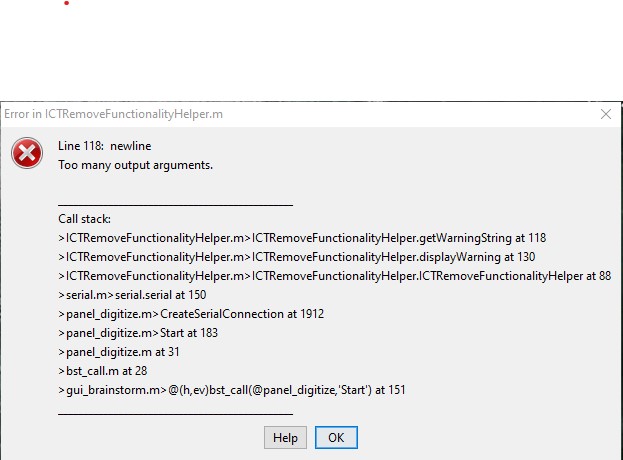
Thank you.

paolo

Please try with the most updated compiled 30-sep-2025

Moreover, you may want to check the updated version of the Digitizer, v2024
https://neuroimage.usc.edu/brainstorm/Tutorials/TutDigitize

Hi Raymundo,

I’ve just tested the last compiled version and it looks like digitize works! Thank you so much! I’ll keep you posted anyway.

Best,

paolo

@penrico, thank you for your feedback! It helps us to keep Brainstorm features functional in both versions, source and compiled.