Hello
I'm trying to run some stats on LORETA source PSDs between different emotion states. I've run a permutation paired t-test for a neutral condition vs. the emotion condition to see different areas of activation in different frequency bands in the different emotions.
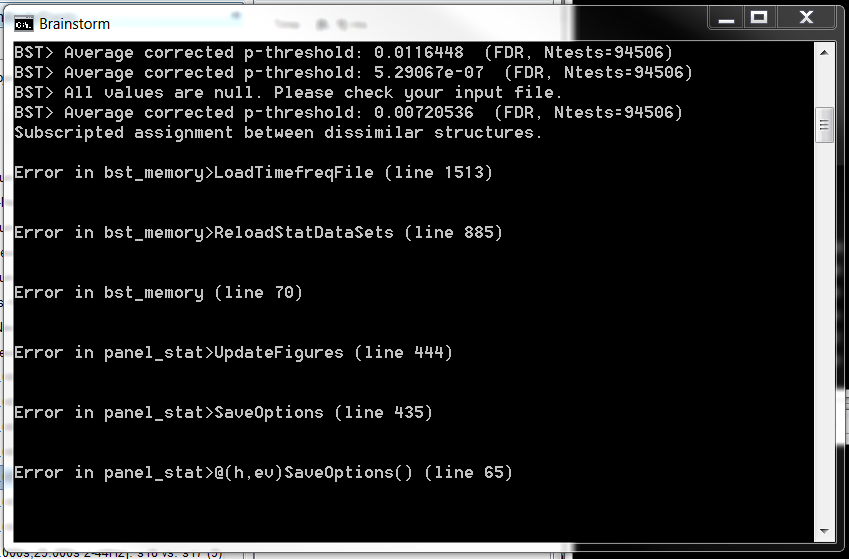
When I open the stat PSD source file and try to change the multiple corrections e.g. from uncorrected to FDR, I get the following error message:
If I then close the windows, and then re-open them, it seems that the multiple comparison correction has been implemented (or turned off, if that's what I've tried to do).
However when I do this for some conditions vs. others, it seems to be implementing it differently since the scales are different on the colour bar, and not in units of t, which is what I was expecting.
Here's an example of two emotions, where one looks to be corrected, but the other doesn't, and they have different scales:
Any ideas as to what's going on with this error for me?
I'm running Brainstorm on Windows 7 with Matlab Runtime R2015b.
Many thanks
Luli
Hi Luli,
I think I fixed recently something related with the display of stats on PSD files (especially the units).
Please try by updating Brainstorm, and try again. It will not solve your issues, but at least we’ll be at the same stage.
Then, could you send me some example files and instructions on how to reproduce your errors?
- Right-click on Group analysis > File > Duplicate subject
- In the copied subject, delete all the files that are not necessary to reproduce the issue(s)
- Right-click on the copied subject > File > Export subject
- Upload the zip file somewhere (eg. dropbox, google drive…)
- Send me the link on this thread (or in a private message via the forum)
Thanks
Francois
Hi Francois
Thanks for your rapid response and also thanks again for Brainstorm. It’s so good.
I’ll privately message you the dropbox link for the files.
I’ve included individual source PSD data files (n=9) for three emotion states - disgust (code 11), love (code 15) and neutral (code 17). I’ve run a paired permutation t-test on the disgust vs. neutral and the love vs neutral. The outcomes of these t-tests from both the November version of Brainstorm, and the latest update, are in the Intra-Subject folder. The results seem the same for both versions.
When I open the intra-subject folder t-test results, and try to change the multiple comparisons menu, I get a beep and an error message, and it freezes until I close the display windows. And as mentioned above the units are different for the disgust vs. neutral and love vs neutral after I re-open the files with FDR applied, and neither are in units of t.
Thanks again for your help
Luli
I ended up sending the dropbox link in a message flag - please let me know if you don’t get it.
Thanks.
Hi Luli,
Thanks for the example files.
When you double-click on any of the t-test files in intra-subject, you should see the units being displayed as “t”. If you don’t, it’s because you haven’t updated Brainstorm, or because your colormap is configured otherwise. Double-click on the colorbar to reset it to its default configuration.
For the second issue, the error you got when changing the method for multiple comparisons, there was a bug in the code. I think I fixed it. Please update Brainstorm (menu Update > Update Brainstorm) and try again.
In the example you sent me it displays empty maps, because you don’t have enough subjects at this stage (N=9 is too low to assess significance).
Cheers,
Francois
Hi Francois
Thanks for your response and for fixing the bug.
I have updated the latest file of Brainstorm from the installation page - file: brainstorm_180130.zip, but when I open it, by clicking on the brainstorm3.bat file which is dated 30/01/18, the Brainstorm version says 8th January 2018. This is after I’ve deleted the previous brainstorm3 folder.
This also happened for me with the 28th January version. Hence the t unit not showing up with either update.
So something weird is happening?
Thanks
Luli
I didn’t realized you were using the compiled version of Brainstorm.
I recompiled a new version, you can now update Brainstorm (delete the brainstorm3 folder and download a new one from the website)
Hi Francois
I've just been comparing a volume head model to mixed and surface models, and I have come across the same error as above when I try to apply a multiple comparisons correction on the volume model. It works fine on the surface and mixed models.
This is still using Brainstorm on Matlab runtime, using the most up to date version of Brainstorm that I obtained from the website.
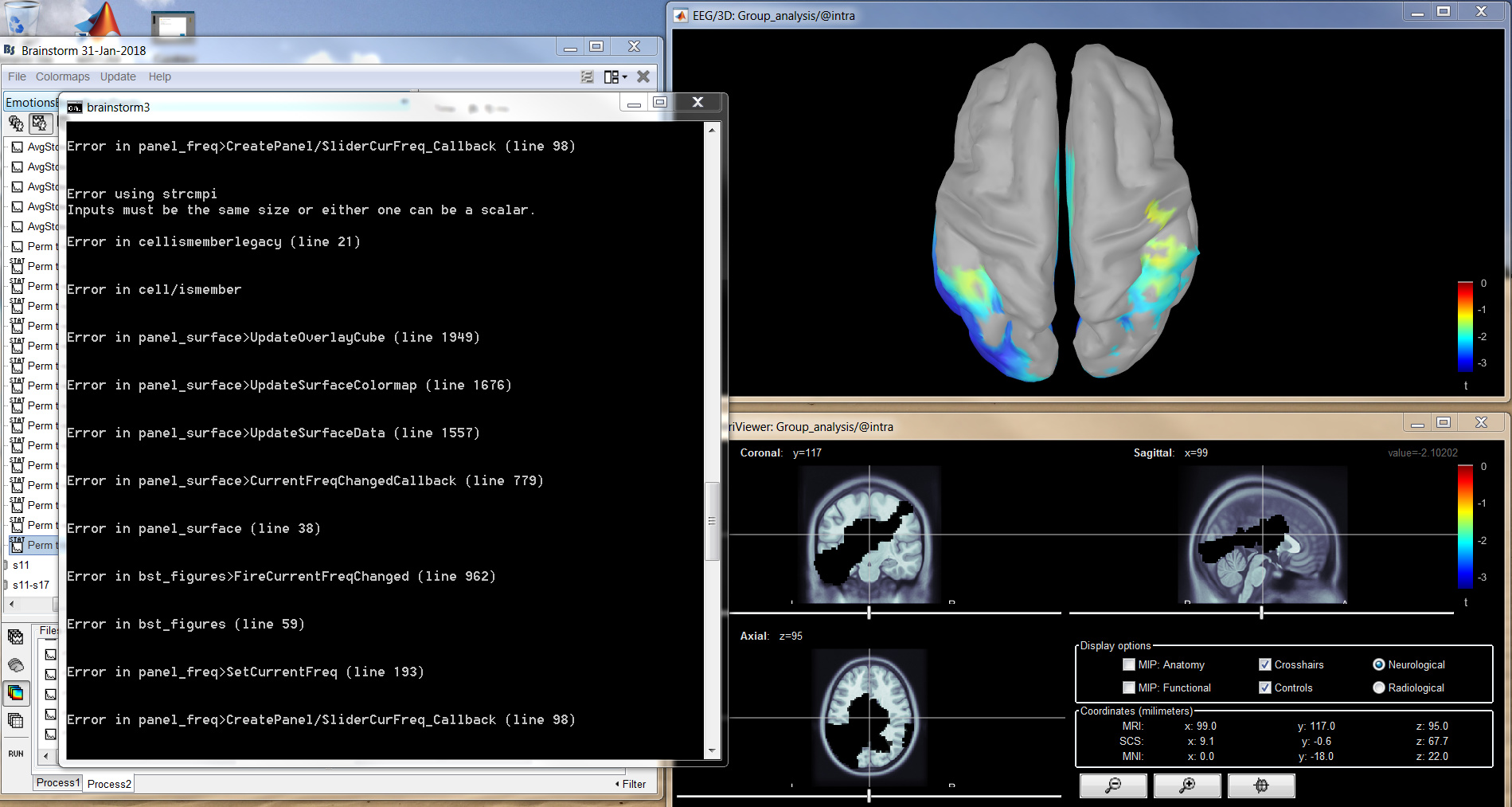
Also some areas of activation on the volume trace are being shown in black, which doesn't correspond to anything on the colour map (shown below, comparing it to the surface model above), when I don't have "absolute values" clicked i.e. when there are negative t values:
Thanks
Luli
I have come across the same error as above when I try to apply a multiple comparisons correction on the volume model
And you do not get anything in output?
Please copy-paste the full error message here.
Also some areas of activation on the volume trace are being shown in black, which doesn’t correspond to anything on the colour map (shown below, comparing it to the surface model above), when I don’t have “absolute values” clicked i.e. when there are negative t values
The error message in your screen capture is related to which of the issue?
What kind of file is the file displayed with black voxels? Do you get colors if you double-click on the colorbar?
If you want me to have closer look at it: please zip the .mat file you cannot visualize correctly, upload it somewhere and post the download link here.
Hi Francois
With the multiple comparisons issue, the error is the same as in my the original post, in that when I attempt to change something in the stat menu, like the multiple comparisons, or the p value threshold, I get a beep, and just a spinning wheel until I close all the windows. If I then re-open them, then the changes in the stat menu have then been implemented. This occurs when I open MRI viewer of volume head model data, but not cortex projections of surface or mixed model source data, which works fine.
The following is the error message I get in the matlab runtime window with the beep:
An example of a file which this occurs with can be downloaded here (I've just copied the one file, I hope that is adequate?): Dropbox - File Deleted - Simplify your life
With regards to the black voxels - it was fixed by double clicking on the colour bar. (It was an MRI image of volume source model data - e.g. the file I linked above.) Thanks for that.
The error message in the figure I posted in my previous post was related to the first issue, not the second. I didn't get an error message with the black voxels.
Thanks
Luli
THanks
Please send me also the file “tess_cortex_mixed.mat” you created in the default anatomy.
Forget this last request, I don’t need this surface, I could reproduce the two errors with the file you sent me.
I fixed both issues:
- the error when changing the options in the Stat tab
- the black regions when the colormap is set to map values between a negative value and 0
Please update Brainstorm and try again.
Hi Francois
Thank you for that.
However I downloaded the new compiled version of Brainstorm that runs on Matlab runtime (brainstorm_180324.zip), but it still says it’s the 31st January version, and so I’m still getting the same error.
Luli
I compiled a new version of Brainstorm and pushed it on the server.
You can now download today’s version from the website.
Thanks also for your help with this.
Luli