Hello,
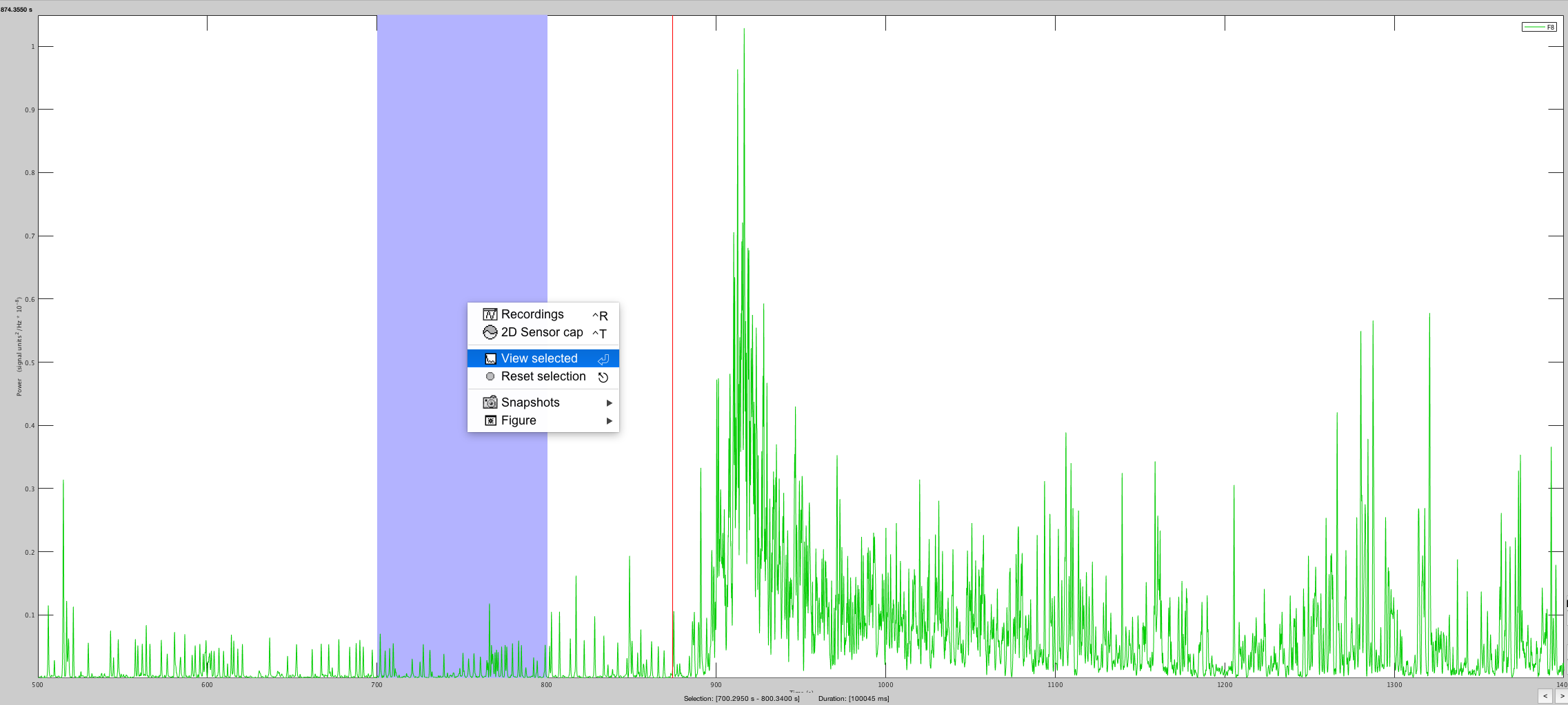
I am trying to resect a smaller fragment of a time-frequency time series plot, however when I click the 'View Selected' option nothing happens. I believe a new window should pop up just showing the highlighted portion, but that doesn't happen and the Matlab command line doesn't mention any error. I've included a screenshot of the step I am referring to.
Is there another way to go about resecting the smaller fragment without having to import a new epoch with those time constraints?
Any guidance you all could provide would be greatly appreciated.
Catherine
Hi Catherine,
The menu "View selected" stands for "View selected signal", not the selected time window. I will try to make this more explicit.
If you just want to see a zoomed version of this figure on this time window: use the mouse wheel to zoom in, and then move in the zoomed figure by clicking on the middle mouse button (or the wheel, or left+right click) and moving the mouse.
https://neuroimage.usc.edu/brainstorm/Tutorials/ExploreRecordings#Mouse_shortcuts
To create a new file with only the selected data, you can probably find something like this in the Snapshots menu. But this is not really a recommended procedure: it saves the data that is displayed (that might be modified in various ways), instead of reading data from the original file.
If you want to create a copy of this file with just this time segment, the proper way is to use the processes "Extract > Extract time" or "Extract > Extract values" on this file.
Francois