Hello,
I was wondering if there was an easy way to produce a code that takes afigure min Brainstorm and generate the code to reproduce the exact view:
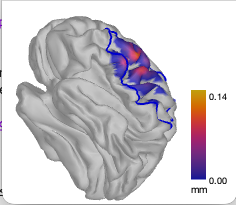
For example, i would set this view manually, then i would like to ask brainstorm to generate the code that would produce this exact same view so i could complete the following code to obtrain the exact figure as shown before (but automatically):
sFile = sStudy.Result(contains({sStudy.Result.Comment}, 'Summed Sensitivities')).FileName;
hFig = view_surface_data(sSubject.Surface(sSubject.iCortex).FileName, sFile, 'NIRS', 'NewFigure');
bst_figures('SetBackgroundColor',hFig, [1 1 1])
hFig.Position = getFigureSize(w, h);


iRoi = find(strcmp({sCortex.Atlas(1).Scouts.Label}, ROI_name));
panel_scout('SetSelectedScouts', iRoi)
%SetScoutsOptions(overlayScouts, overlayConditions, displayAbsolute, showSelection, patchAlpha, displayContour, displayText, displayRegionColor)
panel_scout('SetScoutsOptions', 1, 1, 1, 1, 1, 1, 0);
panel_surface('SetSurfaceSmooth', hFig, 1, 0.3);
bst_colormaps('SetColormapName', 'source', 'cmap_royal_gramma');
bst_colormaps('SetMaxCustom',         'source', 'mm', 0, 0.15);

% Get colorbar and axes handles
hColorbar = findobj(hFig, '-depth', 1, 'Tag', 'Colorbar');
hAxes     = setdiff(findobj(hFig, '-depth', 1, 'Type', 'axes'), hColorbar);

YTickLabel = hColorbar.YTickLabel;
hColorbar.YTick = hColorbar.YTick([1,end]);
hColorbar.YTickLabel = YTickLabel([1, end], :);
Basically, it would be nice to be able to generate this kind of function automatically:
function setView(hFig)

    hAxes = findobj(hFig, '-depth', 1, 'Tag', 'Axes3D');

    % Update camera position
    view(hAxes, [174.6377, 35.1445]);
    campos(hAxes, [0.1248    1.1161    0.8342]);
    zoom(hFig, 1.15);

    camtarget(hAxes, [0.0201   -0.0001    0.0450]);
    camup(hAxes, [0, 0, 1]);
    set(hAxes, 'CameraViewAngle', 6.6053);

    % Update head light position
    camlight(findobj(hAxes, '-depth', 1, 'Tag', 'FrontLight'), 'headlight');


end