Issue with Group folder

Hi

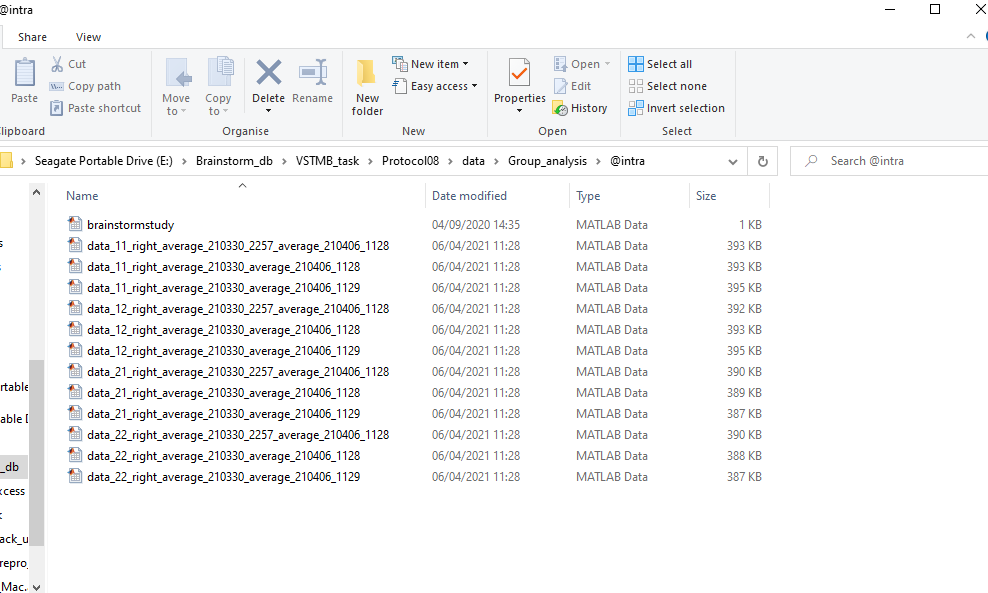
The Intra-Subject folder in the Group analysis folder won't open. I attach a screenshot below with error message. I had a similar issue with another folder with some group averages. I tried going into the data folder with the database and deleting the files (with the exception of a file 'brainstormstudy' which is every group folder) these folders contained but the problem is still there for the intra-subject folder. Could you advise how I might fix this?

I attach a screenshot below with error message

This error seems to indicate an error with the Comment field of the files (what appears as the file label in the Brainstorm database explorer). At least one of them has a Comment which is not a string of characters.
Have you been editing any of the file structures manually? And by mistake could have saved a numerical value or a structure in this field?

Otherwise, it could be a Brainstorm bug.
If this is the case, I would need your help to try to reproduce the error: what process did you use to generate a file that made the explorer crash?

I had a similar issue with another folder with some group averages. I tried going into the data folder with the database and deleting the files (with the exception of a file 'brainstormstudy' which is every group folder) these folders contained but the problem is still there for the intra-subject folder

You probably just need to reload the protocol.
Right-click on the top folder of your database explorer > Reload.

I tried - Right-click on the top folder of your database explorer > Reload. At first the Intra-Subject folder disappeared but after I restarted Brainstorm it was back with same error. I attach a screenshot of this folder's contents in my database. Could it be something in the name of these files causing the error? I haven't manually change any file names and can't recall making any changes recently that would account for this. I have made adjustments to file names using scripts running the Tag function but haven't had issues with this before.

I am currently unable to run scripts successfully so it might be a broader problem? Using the search function eg. (sFiles = bst_process('CallProcess', 'process_select_search', , , ...
'search', '(([name CONTAINS "resample"]))'); ) returns a blank ''. I tried variants of this to retrieve different files but no success. Also tried searching terms in the database using 'New search' but just stays stuck on 'Applying search'.

Right-click on the top folder of your database explorer > Reload. At first the Intra-Subject folder disappeared but after I restarted Brainstorm it was back with same error.

I meant: Reload after deleting all the files.
(there are still many files in the @intra folder while you said you deleted them).

You most likely have errors in your database, caused either by manipulation errors of software bugs.
I can't help you or fix anything in the software if you can't first get it back to work and then break it again...

Identify faulty files, move them away from the brainstorm_db folder, reload.
Do not move or delete entire folders, or brainstormsubject.mat/brainstormstudy.mat files.
Repeat until you don't have errors anymore.
Then put one suspicious file back to where it was. Reload. If you can reproduce the error with one single file, load it in Matlab and check its structure (and copy-paste the output here).

You probably have errors or messages displayed in the Matlab command window that can indicate what is the cause of the problem.
Copy-paste all the suspicious messages here.

Make sure you make a full backup of your database before breaking it further.
If you have recent backup which works: maybe think about reusing it instead of wasting hours trying to fix the existing one.
If you don't have a backup set up: time to learn how to work safely with computers :slight_smile:

Hi Francois,

I tried that and found the file causing the issue. Seems to be the comment field - instead of a single string like the other files it was a 1x3 string. Not sure how that happened. I haven't altered any single file manually or through scripts. I attach screenshot.

Thanks for your help as always. I'll make another back-up now :slight_smile:

It means that there is a problem somewhere in a brainstorm function...
It would be helpful if you managed to reproduce this behavior.
If you find what you did in order to get this error, please let me know.

I did my main analysis on 3 groups (HLG_MLD, HLG_MOD, CG). I wanted to do some analysis on subgroups so I split these three groups according to median accuracy of overall sample (high vs low) creating 6 groups by adding tags HGH and LOW. To get the group averages of the three primary groups (ignoring the HGH and LOW tags) I tried the below script with loops. This led to the error. I had to use the script without loops (filling in the group names and outcomes manually) to get the averages.

Group = {'CG', 'HLG_MLD', 'HLG_MOD'}
Outcome = {'11_right', '12_right', '21_right', '22_right'}

sFiles = []

% Process: Select files using search query
sFiles = bst_process('CallProcess', 'process_select_search', [], [], ...
'search', '(([name CONTAINS "bl"] AND [name CONTAINS "Avg"] AND [path CONTAINS "Subject"]))');

for k = 1:length(Group)
for j = 1:length(Outcome)
Tag = Group{k}+"_"+Outcome{j}

% Process: Select file names with tag: resample
sFiles1 = bst_process('CallProcess', 'process_select_tag', sFiles, [], ...
'tag', Group{k});
sFiles1 = bst_process('CallProcess', 'process_select_tag', sFiles1, [], ...
'tag', Outcome{j});

% Process: Average: Everything
sFiles1 = bst_process('CallProcess', 'process_average', sFiles1, [], ...
'avgtype', 1, ... % Everything
'avg_func', 1, ... % Arithmetic average: mean(x)
'weighted', 0);

% Process: Add tag:
sFiles1 = bst_process('CallProcess', 'process_add_tag', sFiles1, [], ...
'tag', Tag, ...
'output', 1); % Add to file name

end
end

I think I figured out the issue. The line to add a tag needs the tag to be in char format not in string. I added - Tag = convertStringsToChars(Tag) - and now it works.

What you should do is use simple quotes ' (which define arrays of chars) instead of double quotes " (which define strings) everywhere in your code.
This is not Python code, the two are not interchangeable.
The str type is relatively new in MATLAB and not handled anywhere in Brainstorm.