Dear all
I am following the basic tutorial for brainstorm
I am blocked at tutorial evaluation of noise level. I put the entire subject in the psd process but it does only process run 1
Thank you
Anne-Cecile
Hi Anne-Cecile,
Could you share screenshots of the steps you are taking?
Check that
- The Process1 tab indicates three data files (Data [3]) when the whole Subject is drag-and-dropped
- The Filter field does not have any string
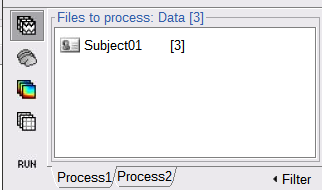
Best,
Raymundo

Dear Raymundo
here are my screen capture
in noiselevelend.png, i end up with two results but in run 1 and they are the same
Thank you
Anne-Cecile
I did drag the pictures to the message instead of using the upload tool. Seems to work.
I had to delete my message because as new user i am limited in what i can post in the forum.

here is the result screen shot after using the power spectrum density tool.
It seems it worked fine if you click in the [+] sign beside the Link to raw file for the second run and for noise you will see their respective PSD nodes.
It is likely you ran the process once with run01, and then again for the three files run01, run02 and noise. Thus ending with two PSDs for run01.
You can delete the duplicated PSD file (select it then Del key or right-click > File > Delete)
ok my mistake. I understand now. Thank you very much