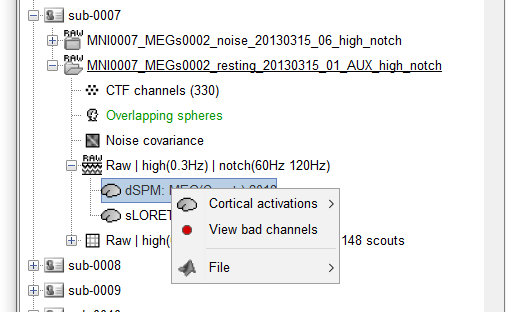
I'm trying to project sources to the default anatomy but I don't have the option "Project sources" when I right-click on the source file as said in the tutorial.
Yet, I have the option when I right-click on the RAW file. Using that, an error occurs in the Matlab command window:
Error using in_bst_results (line 238)
Cannot use this operation on source files attached to continuous RAW files.
Error in bst_project_sources (line 229)
[ResultsMat,ResFile] = in_bst_results(ResultsFile, 1);
Thanks for your help.
Yes, by importing the raw data into the database and computing sources, the "Project sources" finally appears in the menu. I have continuous resting-state data so I don't see why should I do that. By the way, now I'm trying to project sources and I get this error in the Matlab command window:
Error using  *
Requested 15002x180001 (20.1GB) array exceeds maximum array size preference. Creation of arrays greater than this
limit may take a long time and cause MATLAB to become unresponsive. See array size limit or preference panel for
more information.

Error in in_bst_results (line 241)
        Results.ImageGridAmp = Results.ImagingKernel * DataMat.F(Results.GoodChannel, :);
It seems the function tries to generate all the 15000 time-series which is obviously not possible. I was expecting a kernel with the size (sources*sensors) like when I compute the source file.
I'm sorry, there is no solution for projecting the source maps based on the original continuous recordings. Projecting sources on the default anatomy would necessarily produce a full matrix [Nsources x Ntime].
An alternative would be for you to compute your measure of interest at the subject level (ie. a power or connectivity measure) and then project the result on the template for group analysis.
This is what we illustrate in our resting state tutorial: https://neuroimage.usc.edu/brainstorm/Tutorials/RestingOmega
Thank you so much for informing me.
I was wondering if there are specific functions in Brainstorm for projecting connectivity results on a template or to perform the projection like the one in this paper: https://www.ncbi.nlm.nih.gov/pubmed/25680519 (section 2.9)
The analysis in this article was done with Brainstorm. The interpolation of the time-frequency and connectivity values from the individual anatomy to the MNI template is the one available in Brainstorm, based on the FreeSurfer registered spheres: https://neuroimage.usc.edu/brainstorm/Tutorials/CoregisterSubjects
Yes. I know. They also used resting-state 2 to 10 min recordings and projected the resulted time-series to the template. I have resting-state data and Freesurfer spheres too but as I mentioned in the first post, I failed to do the projection based on the tutorial (https://neuroimage.usc.edu/brainstorm/Tutorials/CoregisterSubjects). So I want to know how they made it possible? Is there a specific method to project these time-series or connectivity values on a cortical template?
I followed the instruction in the resting-state tutorial (https://neuroimage.usc.edu/brainstorm/Tutorials/RestingOmega) but it only explains the projection of PSD maps on default anatomy.
Thanks for your help.
Indeed, maybe this was done in custom scripts... @eflorin@Sylvain Could you provide more details on your analysis?
It would seem more logical to me to compute the measure of interest using the subject anatomy, and then project only the final maps to the template. Not all the file types are supported yet, let me know if you have trying to do this.
Hi Pedram,
we did indeed project the megPAC time series from each individual onto the default brain. However, the data were downsampled to 10 Hz before projecting. In addition we had quite extensive RAM (at least 64GB). So there was no custom script, but only the downsampling and the RAM did the trick.
Best wishes,
Esther
Thank you so much Francois. I'm doing connectivity analysis, and in the subject level I should average the signals in the ROIs that are spatially consistent across subjects and then calculate connectivity values between these signals. So I would be forced to only use Freesurfer generated ROIs since I can't define other scouts in the subject level that enable between-subject study. Also, I don't know how it is possible to project connectivity results to the template. I don't see the point of doing such a projection.
Hi
Thanks in advance for explaining that. Since I don't have a 64GB RAM and I can't perform this downsampling based on the approach that I'm using, do you have any suggestions for doing network-based connectivity analysis using resting-state (~5 min) recordings? in my thoughts, the projection of individual sources to a template with RSN parcellations is necessary here.
So I would be forced to only use Freesurfer generated ROIs since I can't define other scouts in the subject level that enable between-subject study.
You can create your ROIs on the MNI ICBM152 template available in the folder (Default anatomy), and then project the scouts on each subject (explore the menus of the Scout tab).