Python: Error when importing CAT12 folder

Hi everyone,

I’m trying to import an anatomy previously segmented with CAT12 into Brainstorm, but I’m running into an issue.

My workflow is the following:

  1. I first import the raw MRI to extract the SCS values from subjectimage.mat.

  2. Then I call the function import_anatomy_cat to load the CAT12 folder:

imported_anatomy = import_anatomy_cat(iSubject, cat_folder, 15000, 0, SCS, 0, 2, 1);

When I run this in MATLAB directly, it seems to work without problems.
However, I’m building a Python script using the MATLAB Engine, and even though I follow the exact same steps, I get the following error during the CAT12 import:

Incorrect number or types of inputs or outputs for function findChild.

Error in panel_protocols>UpdateNode (line 628)
nodeSubject = nodeRoot.findChild('subject', iSubject, -1, 0);
^^^^^^^^^^^^^^^^^^^^^^^^^^^^^^^^^^^^^^^^^^^^^^^^^^^^^^^^^^^^^

Error in panel_protocols (line 46)
eval(macro_method);
^^^^^^^^^^^^^^^^^^^

Error in db_add_surface (line 73)
panel_protocols('UpdateNode', 'Subject', iSubject);
^^^^^^^^^^^^^^^^^^^^^^^^^^^^^^^^^^^^^^^^^^^^^^^^^^^

Error in import_surfaces (line 226)
iNewSurfaces(end+1) = db_add_surface(iSubject, BstTessFileShort, NewTess.Comment);
^^^^^^^^^^^^^^^^^^^^^^^^^^^^^^^^^^^^^^^^^^^^^^^^^^^^^^^^^^^^^^^^^^^^^^^^^^^^^^^^^

Error in import_anatomy_cat_2019 (line 280)
[iLh, BstTessLhFile, nVertOrigL] = import_surfaces(iSubject, TessLhFile, 'GII-WORLD', 0);
^^^^^^^^^^^^^^^^^^^^^^^^^^^^^^^^^^^^^^^^^^^^^^^^^^^^^^^^^^^^^^^^^^^^^^^^^^^^^^^^^^^^^^^^^

Error in import_anatomy_cat (line 30)
errorMsg = import_anatomy_cat_2019(varargin{:});

No method 'findChild' with matching signature found for class 'org.brainstorm.tree.BstNode'.

I'm not sure why this happens only when running the process through the MATLAB Engine in Python.
Has anyone encountered this before or knows what might be causing this?

Thank you in advance!

It seems at some point the expected classes change when the import_anatomy_cat() is called from Python.

What is the value and class in Python for the variable iSubject when calling import_anatomy_cat()?


In a different venue, use process_ files every time it is possible (as in this case), this helps by abstracting the DB handling (e.g., in this case, there is no need to specify iSubject):

:light_bulb: Since the CAT12 segmentation folder was generated without Brainstorm, it is recommended not to keep the raw MRI. There is a copy of this MRI in the CAT12 folder.
To import the CAT12, it's simpler to use a process:

    % Process: Import anatomy folder
    bst_process('CallProcess', 'process_import_anatomy', [], [], ...
        'subjectname', 'Subject01', ...
        'mrifile',     {cat_folder, 'CAT12'}, ...
        'nvertices',   15000, ...
        'nas',         SCS.NAS, ...
        'lpa',         SCS.LPA, ...
        'rpa',         SCS.RPA);

This is shown in the script for the Corticomuscular coherence tutorial:


Out of curiosity. Have you try to run a tutorial Matlab script (e.g., the tutorial_coherence.m) from Python?

Thank you for you reply Raymundo.

I changed my import function to the one you recommended:

% Process: Import anatomy folder
    bst_process('CallProcess', 'process_import_anatomy', [], [], ...
        'subjectname', 'Subject01', ...
        'mrifile',     {cat_folder, 'CAT12'}, ...
        'nvertices',   15000, ...
        'nas',         SCS.NAS, ...
        'lpa',         SCS.LPA, ...
        'rpa',         SCS.RPA);

However, I am still encountering some issues. When I import a CAT12 or FreeSurfer folder from Python, not all the files are imported, whereas importing the same folder directly in MATLAB works perfectly and all files are included. Do you know what could be causing this difference?

To answer your question, no, I haven’t. Would it be best if I did?

Thank you!

For FreeSurfer, there are three different options, and for CAT12 there are two options.
When you do it in the GUI, pay attention to the option that you are using, and use the same one in the process.

E.g. to import the CAT12 folder with the thickness, you should use:

'mrifile',     {cat_folder, 'CAT12+Thick'}, ...

Thank you for your help. However, as I am using the same option in both MATLAB and Python, shouldn’t the same files be imported?

Best Regards,

Claudia

It should, at the end of the day the Matlab Engine API for Python just allows Python to call Matlab functions, so the same code is executed.

Okay, then it seems I might still be running into the same issue. I am calling the same function with the exact same options, yet the imported files are different. When I run it from Python, I don’t get the cortex files.

Maybe you could help me better if I share the code with you.

This is my function with MATLAB:

bst_process('CallProcess', 'process_import_anatomy', [], [], ...
                'subjectname', SubjectName, ...
                'mrifile',     {cat_folder, 'CAT12+Thick'}, ...
                'nvertices',   15000, ...
                'nas',         [122.044, 213.194, 116.231], ...
                'lpa',         [52.192, 120.859, 91.918], ...
                'rpa',         [198.087, 127.331, 84.62]);

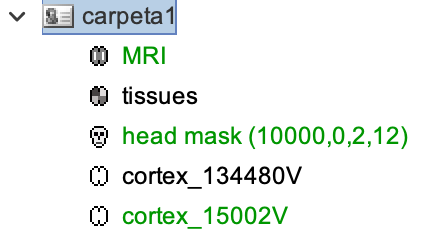
With this, the files that get imported are the ones under “carpeta1”:

Now, using Python, my function is:

self.eng.bst_process('CallProcess', 'process_import_anatomy', [], [], 
                    'subjectname', subject_name,
                    'mrifile',     [anat_seg_folder, 'CAT12+Thick'], 
                    'nvertices',   15000, 
                    'nas',         nas_coordinates, 
                    'lpa',         lpa_coordinates, 
                    'rpa',         rpa_coordinates,
                    nargout=0)

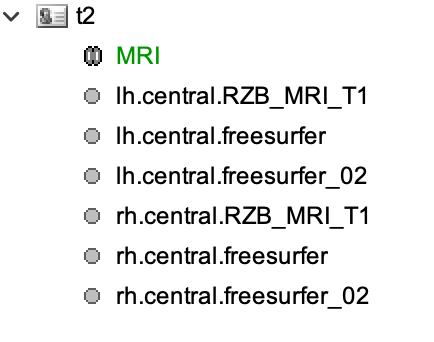
Here, the nas, lpa, and rpa coordinates are the same MATLAB double variables used in the MATLAB version. However, the files imported are the ones under “t2” instead.

Is there something I should be doing differently?

Do you get any error in the Python console?
It seems the import process is ending prematurely (as hemisphere surfaces are not merged).

In Python, try to pass nvertices as float 15000.0, that may be the trouble.

Can you describe your Matlab-Python setup, so I can replicate it?
(If you have a file to recreate the Python env that would be easier)

No, no error shows in the console; it just says that the segmentation has been completed. However, I tried passing nvertices as a float and it worked. Thank you!

Regarding the setup, I am writing a Python file where I collect user inputs and, based on those, I call Brainstorm functions using the MATLAB engine.

I did mean the OS, Python and Matlab versions.
However this is not needed as the problem is now solved.

In future instances, do not forget to always pass numbers as float when calling Brainstorm functions with the Matlab Engine API. Unless you are absolutely sure that the function that is called expects and int.