Environment:
-
Brainstorm version: brainstorm_251018.zip
-
MATLAB version: R2023b (Academic use)
-
OS: macOS with M4 chip (Apple Silicon)
-
Computer: Fresh installation on new Mac
Background: I have a file protocol that was created in an older version of Brainstorm. I exported/zipped this protocol and am now trying to use it on a new computer with a fresh Brainstorm installation.
Detailed description of the problem:
Step 1: What I did
-
Installed MATLAB R2023b with full license through my university
-
Downloaded and installed Brainstorm (latest version from October 16, 2025)
-
Configured MATLAB Runtime R2023b and set LIBRARY_PATH as instructed
-
Successfully launched Brainstorm from MATLAB
Step 2: Loading the protocol
-
Extracted my file protocol ZIP file to my Documents folder
-
The extracted folder contains multiple subject folders: Subject 1, Subject 2, Subject 3, etc.
-
Inside each subject folder, I can see in Finder that there are subfolders with data files (anatomy files, channel files, data files, etc.)
-
Used File → Load protocol in Brainstorm and selected the file folder
-
Brainstorm prompted: "Warning: You are running a newer version of Brainstorm. Some modifications have to be performed on your database. Update database now?"
-
I clicked "Yes"
Step 3: The problem –> After the database update completes:
-
The protocol “my file” appears in the left panel of Brainstorm
-
I can see all the subject folders listed (Subject 1, Subject 2, Subject 3, etc.)
-
I can expand each subject folder
-
Under each subject, I see "Default anatomy"
BUT: There are no data files visible anywhere
What I expect to see but don't:
-
Raw data links/files under each subject
-
Processed data files
What I actually see:
-
Just the subject names and "Default anatomy"
-
Empty space where the data should be
-
The interface looks like the protocol has subjects but no imported data
Visual description:
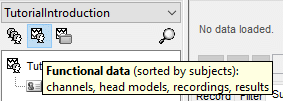
StroopTask (anatomy)
├─ Default anatomy
├─ Subject 1
│ └─ Default anatomy [nothing below this]
├─ Subject 2
│ └─ Default anatomy [nothing below this]
└─ [other subjects, same pattern]
What I verified:
-
The original protocol folder on disk DOES contain all the data files (I can see them in Finder)
-
The folder structure looks complete with anat/, data/, and other subfolders
-
File sizes indicate data is present (not empty folders)
What I've tried:
-
Clicking "No" on database update: Protocol becomes completely inaccessible with error "protocol directory not found"
-
File → Load protocol multiple times: Same result each time
-
Creating a fresh protocol and trying to import the anatomy folders: Shows subjects but still no data files
-
Restarting Brainstorm: Same issue persists
My questions:
-
Is there a known compatibility issue when loading protocols created in older Brainstorm versions?
-
Does the database update process potentially fail to properly index/display existing data files?
-
Is there a log file I can check to see what's happening during the database update?
-
Should I try a different approach to import this existing protocol?
-
Do I need to downgrade Brainstorm to match whatever version created this protocol originally?
Additional context: This is my first time setting up Brainstorm on Apple Silicon (M4 chip). I'm not sure if there are any special considerations for this architecture that might be causing issues.
Any help would be greatly appreciated! I have all my analysis work in this protocol and need to access the data
Thank you,
Ana