Hi,
I used a volumetric head model, but after a discussion with an engineer of my lab, it might have too much vertices. Thus, I created a new head model in my protocol, with less vertices but when I want to copy it to my subjetcs, I have an error message telling that I already have a head model and that I can't copy this one automatically. I need to copy it by hand, which could be a bit long as I really have a lot of subjects. Is there a way to do this automatically and to automatically choose this new head model for source reconstruction?
Thanks for your help,
Adeline
Is there a way to do this automatically and to automatically choose this new head model for source reconstruction?
Automatically, no.
At least not if you keep the existing head models. If you delete all the existing head model files, you would not have this error anymore.
The fastest option is probably to copy-paste (CTRL+C/CTRL+V) your new head model to the destination folders.
Alternatively you can write a script that gets the list of study indices using bst_get and then copy set the file with panel_protocols('CopyFile', iDestStudy, HeadModelFile, 'headmodel', iSrcStudy);. Do not try to start working on this if you are not very confident with Matlab programming and Brainstorm scripting.
https://neuroimage.usc.edu/brainstorm/Tutorials/Scripting
Thanks a lot for your reply. The head model should be deleted for each participant? (I tried to do it with selected file by tag but it did not work, but maybe I did a mistake. Is brainstorm suppose to find the head model with tag as another file?)
The file selection processes allow selecting the same files as the Process1 and Process2 tabs. But these file lists can also contain files that contain actual MEG/EEG data or their derivatives: raw recordings, imported epochs, source results, connectivity graphs or time-frequency maps.
You can select the headmodels in the database explorer with the search panel:
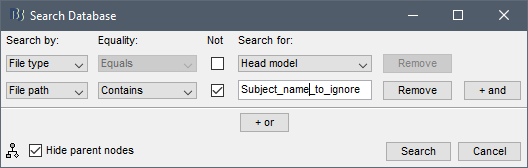
Then select with CTRL+A all the files and delete them (make sure you don't delete the file you want to copy everywhere)

https://neuroimage.usc.edu/brainstorm/Tutorials/PipelineEditor#Search_Database
Thank you for your detailed answer! I did not know the search database option and it is very helpful!