We have computed PSD at the source level (calculated using constrained/loose constrained sLORETA) for each subject’s EEG data in our study (we are particularly interested in activity in a specific frequency band in source space for this dataset). We are using individual anatomy and registration with brainstorm’s freesurfer functionality and head modeling with EEG BEM. We’d like to spatially smooth the source frequency data in this particular band for each subject at 5mm FWHM before projecting the data for group analysis, however we get the error report: “Spatial smoothing is only supported for head surface models” when we try to do this. Is there a way to smooth frequency data at the source level using brainstorm? If not, does anyone know a good tool to implement this for instance on the .gii files output by brainstorm?
You should be able to run the process “Sources > Spatial smoothing” on the PSD files.
If you get this error message “Spatial smoothing is only supported for head surface models” it is because you are trying to run this process on volume or mixed source model, or because there is some bug somewhere.
Smoothing spatially the surface maps make sense only for surface source models with constrained orientations, otherwise the source maps are already smooth enough to be averaged across subjects.
First, make sure you are using today’s version of Brainstorm (menu Help > Update Brainstorm), then compute again the PSD file.
If you are still getting the same error message, please
post a screen capture of the Brainstorm window showing your PSD file in the database explorer, and
send me the timefreq_…mat file for which you get this error (upload it somewhere and send me the link a separate email - click on my username on this forum)
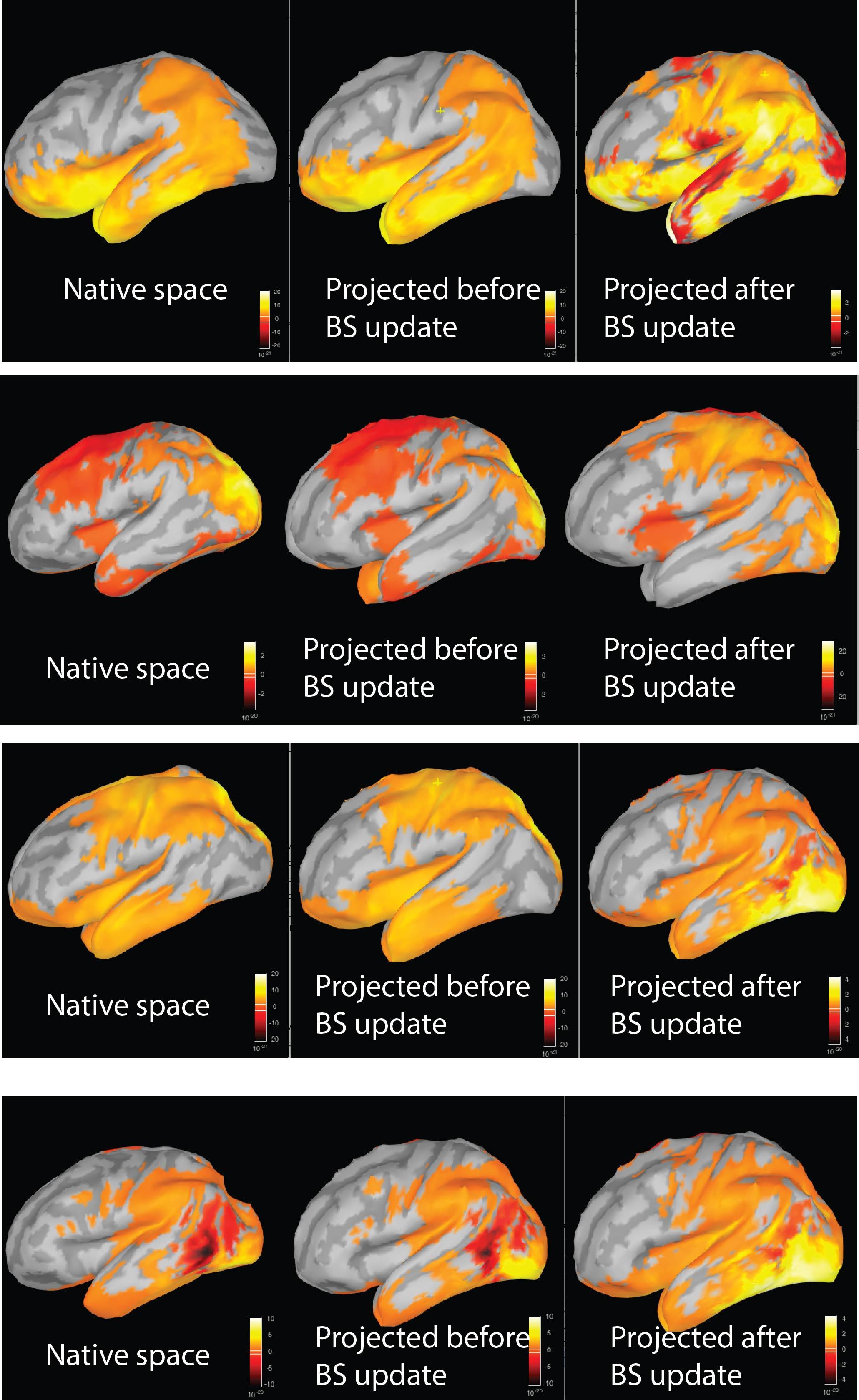
Thank you, updating brainstorm fixed the smoothing source PSD issue. However, I got confused because our results changed dramatically after smoothing and re-projecting smoothed sources after updating. After some testing I realized this had nothing to do with smoothing but that the projected sources changed a lot after the update. The projection after updating seems less faithful to the source psd contrasts in native space than the projection before the update. The attached image illustrated the difference between source PSD in a given frequency band in the subject's native space (left column), after projecting to standard space before the latest brainstorm update (middle column), and after projecting to standard space after the brainstorm update (right column) (update version: 08/17/16) for 4 subjects. As you can see from the image, the projected source PSD differences have a nearly identical topography to the native space contrasts before updating but after updating they have changed to have a very different topography from the contrast in native space. These images are computed by projecting the source reconstruction for each condition (sLORETA unconstrained) using brainstorm's freesurfer registration, computing source PSD on the projected sources, and performing a simple difference test (Condition A - Condition B) on the source PSD and then displaying the difference on the cortex in a given frequency band. Before updating we were on the brainstorm version from several days ago (08/15/16 or 08/16/16), so this was something that must have been changed just in the last couple of days. Is this a bug or could you please help us figure out what the reason for this change is?
Have you tried to redo all the steps (smoothing + projection + difference) with the new version, or just the projection?
I’ve indeed changed many things in the projection to the template in the past few days, so I may have made some mistakes and some cases might not be handled correctly with the new version.
Could you send me some example data so I can try to understand what is wrong?
Duplicate an existing subject (right-click > File > Duplicate subject)
Delete all the files that are not necessary to illustrate your concern (but keep all the intermediate files between the EEG recordings and the final PSD)
Create a new folder in this subject and copy there the non-matching project PSD files (that should be in the “Group_analysis” folder)
Right-click on the subject > File > Export subject
Upload the .zip file somewhere and send me the link in a separate email
I had redone all the steps using the updated brainstorm version just to be sure there wasn’t some compatibility issue. I followed the steps above and sent you a link to the data via email. FYI I am looking at the beta1 band and this is the band depicted in the image in my last post. Also you probably know this but if I try to display the projected images from the subfolder I created of the projected sources inside the copied subject folder (as you suggested) it tries to display the projected images on the individual cortex rather than the standard space cortex and looks very weird. I guess the projected psd difference maps have to be moved out of the subject folder again to be visualized properly? Thanks again for your help.
Thanks for sending this example. I’ve started looking into these issues.
About the copying of the projected files in the original subject: I’m sorry, it was a bad suggestion. There is no easy way to export two subjects (the original subject and the “Group analysis”) without exporting the entire database, so I thought about this option of putting everything into one subject, but indeed there is then is problem of the surface file that is used. A better approach would have been to export separately the two subjects… Anyway, I got it all and moved the “Projected” folder back to the “Group analysis” folder and it works well.
I have one concern about the data though: when I project the file “109_copy\Condition_A_-_Condition_B_Native_Space\PSD” to the template with the current version of Brainstorm, I get exactly the same as your file “Condition A - Condition B | sLORETA Unconstrained (processed before brainstorm update)”.
Is there a chance that you mixed the two files “before brainstorm update” and “after brainstorm update”?
I take my question back… Your files are correctly labelled.
(I could verify this with the other fields in the file: the “HeadModelType” is set in the file “after update” and not in the other one, which is what we expect)
However, the current version of Brainstorm gives the expected results.
If I project the PSD difference, I get strictly the same values as in your file “before update”. See the attached screen captures.
Maybe there was some confusion due to these multiple Brainstorm versions you’ve been using.
First of all, you should not have any of the Brainstorm folders saved permanently in your Matlab path (see the installation instructions: http://neuroimage.usc.edu/brainstorm/Installation#Start_Brainstorm). Brainstorm adds all the folders it needs temporarily to the path when it starts.
If you have any Brainstorm folder in your Matlab path, delete them all, save the path, close and restart Matlab, make sure the path is correctly updated.
If you want to test multiple versions of Brainstorm, you need to close Matlab before running another version, or the result of the path update would be unpredictable and it might use a mix of functions from both versions.
Can you update again Brainstorm (after cleaning up your path) and try again projecting this difference with today’s version?
With this very clear example you set up, I would not understand if you were getting a result different than mine.
I’ve cleared all brainstorm folders out of my path (I did have a few in there somehow) and updated brainstorm to yesterday’s version. I’m able to replicate that projecting the PSD difference map gives an identical result to the old interpolation. I can proceed with my analysis in that way. Before I was not doing this but rather projecting each full source map for each condition to standard space and then recalculating the PSD in standard space and then taking the difference. With the old brainstorm version and interpolation method this method gave an identical result to what we see currently in projecting the psd difference map from native to standard space. However, with the new version this series of steps yields the different odd looking result that I presented before. These methods should presumably give the same or nearly identical result no? In any event projecting the difference map is simpler so I will go that route for analysis.
This makes more sense. The projection is now computing the norm of the three orientations of the source maps before computing the interpolation on the new surface map. It was something missing before. The orientation of the unconstrained sources after projection do not make sense and cannot be compared across subjects, so we decided to get rid of this information.
So before, when computing the PSD of the projected sources, it was computing the same thing as the PSD in the original subject.
Now, it computes the PSD of the norm of the three orientations (strictly positive signal), which is wrong.
The only correct option with the updated version is to compute the PSD and then project it to the template.
You can compute the difference before or after the projection (preferably after).
Thanks for that clarification. Apologies for this somewhat lengthy exchange, but another related issue has just come up. When I import one of my subject’s Freesurfer anatomy folders and select the default 15000 vertices, for some reason it generates 15003 vertices on the cortex for that subject (unlike all other subjects for which it generates 15002 vertices). When I attempt to perform the above steps for this subject of 1) source reconstruction in individual/native space, 2) PSD on the sources for each condition and then 3) projecting the PSD to the default 15002 ICBM152 anatomy, it fails when I attempt to project/interpolate to standard space with the error: “Data mismatch. Number of sources (15002) is different from number of vertices (15003). Please compute the sources again.” With the old interpolation algorithm before updating brainstorm it did not error out due to this and generated a reasonable looking interpolation to standard space even though it still generated 15003 vertices for some reason for this subject. I am unable to find a workaround: going to the anatomy folder and reducing the number of vertices to 15002 led to a totally wrong projection, even after deleting the interpolations stored for that cortex file. I also tried exporting the TF data to matlab and manually removing the last value to reduce to 15002 but this still failed to project (I don’t think this is a good idea anyway given that the vertices could all be shifted by one). Currently I am unable to generate projected sources for this subject, which I presume is due to this one additional vertex created during the import from the Freesurfer anatomy folder. This only occurs for this single subject, all other subjects are working without error now. Do you have any idea what might be going on here? Thanks again for your help.
The problem is not the number of vertices. When using brain surfaces computed with FreeSurfer, you should be able to project efficiently source maps between surfaces with different resolutions.
The function we use for downsampling the surfaces is Matlab’s “reducepatch”, which does not guarantee a precise number of vertices in output. You may have low resolution cortex surfaces with slightly different numbers of vertices for different subjects (14999, 15002, 15003, etc).
The problem was a bug in the projection function, the field “RowNames” was not properly updated when projecting PSD files.
I think I fixed this problem. Can you update Brainstorm and try again?
Thank you for helping me debugging these new scripts step by step
Francois
Thanks, however I am unable to test the same source reconstruction because when I go to generate the sources using the updated version I get the following error (not present before the last update):
"[process_inverse_2016] Sources > Compute sources [2016]
Line 339: Attempted to access OPTIONS.NoiseCovMat.nSamples(1); index out of bounds because numel(OPTIONS.NoiseCovMat.nSamples)=0."
I am using Compute Sources 2016, sLORETA and no noise modeling (this is steady state EEG data during sleep). The error appears to indicate that the script is not handling properly no noise covariance. This is using the identical data which was run without error before today’s update. To try to ensure compatibility I imported everything fresh after the update except for the anatomy folder for the subject.