Can Brainstorm be updated to have the scouts displayed according to t-value in the simulated recordings?
Sorry for the response delay...
The source file was produced and I can open again but it is based on p.am values and not t-values. Also stat files are back to 'no units'.
One more fix: Time series figure: Use DisplayUnits from the files (fix2) · brainstorm-tools/brainstorm3@20b7a95 · GitHub
Update Brainstorm again, no need to recompute the files.
If you still get issues, please post screen captures showing the various files in the Brainstorm database explorer, and the figures that have incorrect legends.
Can Brainstorm be updated to have the scouts displayed according to t-value in the simulated recordings?
If this is not fixed yet, please illustrate the problem and I'll fix it ASAP.
Hi Francois
Thanks. I updated and it's still in p.am format. Screen shots below.
I computed the stats file with scouts. I then applied stat threshold. Then simulate recordings from scouts.
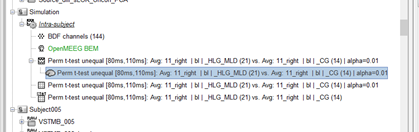

The file highlighted in the database explorer is not a stat result and has no reason to be in t-values. It is indeed supposed to be in physical units (A.m).
There is one confusion in your simulation: you seem to be using t-values (the scouts time series extracted from the stat file) as the time series associated to the scouts. This is not supposed to be used this way. When simulating recordings/sources from scouts, you are supposed to use scouts signals in physical units (A.m).
One more bugfix: Bugfix: Keeping units in scout extraction processes · brainstorm-tools/brainstorm3@070c890 · GitHub
That makes sense thanks. I was following the tutorials Statistics > Example 5 > Convert statistic results to regular files > Convert statistic results to regular files.
Is there a way then to get a source image of the t value results from a perm t test on scouts (where the activity has been averaged within the scout) like under Statistics > Example 4: Parametric test on sources?
This example to simulate MEG is indeed poorly designed, as it explicitly illustrates how to use t-values in input, instead of realistic current density maps...
I added two short paragraphs to clarify that one should rather try to use physical units for simulations:
- Section "Apply statistic threshold": Note that when using this process from the Process1 tab, with one single stat file in input, the values saved in the file are the t-values from the stat file, not the original physical units. In order to obtain real physical units, you need to call the process with two inputs: the stat file on the left, and the file with the values of interest on the right, as in the previous section Directionality: Difference of absolute values.
- Section " Simulate recordings from these scouts": Note that this example is not adapted to simulate realistic MEG values. The source time series used in input for the process "Simulate recordings from scouts" are t-values, and not realistic physical units for a current source density (in pAm). The simulated MEG values localize correctly the simulated scouts, but with meaningless amplitudes. For realistic simulations, you must use input signals with amplitudes that correspond to minimum norm current density maps (in pAm). You can obtain these e.g. by computing them with process "Extract > Scout time series".
Does it make sense?
I'm not clear if these processes will give the image I'm looking for. After I run a Perm t test on source maps (using all vertices. Not scouts) I get the first image below when I click on file. The t values are projected on the cortical map and the color bar is in t values. I'm looking for this for the Perm t test I ran on scouts (with activity averaged within each scout across the time window). The stat file I get from this test is in t-values but it's in a line graph format (second image below). The process below gives me a cortical map view but in p.am units. I'm looking for it in the format of the image below in t-values. Is there a way to do this in Brainstorm?

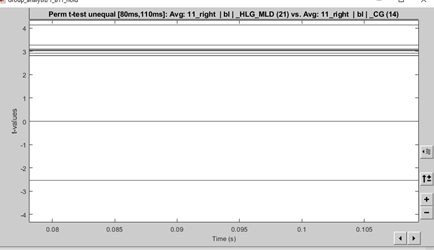
These are signals changing over time. But either you averaged the values over time, or the values don't change between 80ms and 110ms.
The process below gives me a cortical map view but in p.am units.
I'm looking for it in the format of the image below in t-values. Is there a way to do this in Brainstorm?
The process below what?
Please explain thoroughly what you are doing and why this not giving you what you expect.
Sorry I wasn't clear. I'm looking to present the t-values from the Scouts Perm t-test on the cortex.
I followed the process in Tutorials > Statistics > Example 5: Parametric test on scouts. I averaged over the time window. This gave the stat file (line graph with t-values). What I'm looking to do is present these results over the cortex with t-values (same as that in Example 4: Parametric test on sources).
The process > Simulate recordings from these scouts gives a cortex figure but in p.am. I was wondering is there some way to use a process to have the results of the scouts t-test presented on the cortex?
I think I finally got it.
I made a few more modifications: Simulate source maps: option to set the units · brainstorm-tools/brainstorm3@a1d8f3a · GitHub
Please update Brainstorm.
I fixed a few things and added the option to set the units in the process. If you select "pAm", it multiplies the signals by 10^-9 (this was the default before), if you select "Other", it would keep "t".
Use the process "Full source maps from scouts" instead of "Simulate recordings from scouts", as you don't need the recordings.
Does it work?
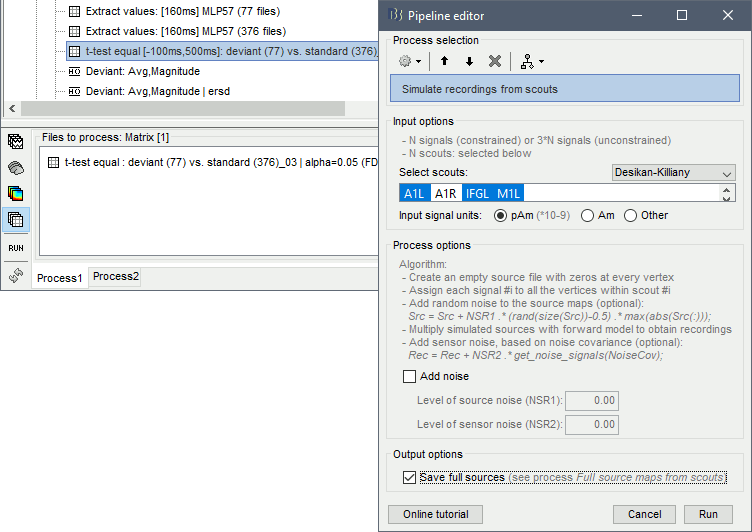
That was what I was looking for. It worked thanks Francois!
Hi Francois,
The images are what I'm looking for but the negative t-values seem to have been removed in cortex map and the color bar at the bottom is 0, rather than a minus number with 0 in the middle.
This is something you can change in the configuration of the colormap.
https://neuroimage.usc.edu/brainstorm/Tutorials/Colormaps#Color_mapping
I did this but I think the issue is that all t values including negative ones are now displayed as positive on the cortex image. If the color bar is set so that blue is positive and green is negative with 0 in middle between 4 and -4 then all activity, (including the negative activity according to stat file (line graph data)) is displayed as blue.

If you are sure that this is not a colormapping issues:
- create a scout with one single source where you expect to observe negative values, and plot the time series for this scouts - this would give you the real values at this location
- post screen captures showing: the configuration of the colormap + the scouts time series figure at the exact same time sample as the image in your previous post
- upload the file you are issues with somewhere, and post the download link here
here's a cortex image and the time series with t values that the cortex was simulated from. From a source analysis on the same data (groups/outcome/time windows) with no scouts, the same data is in green (negative). Where can I upload the file if you need it or I can email it to you?

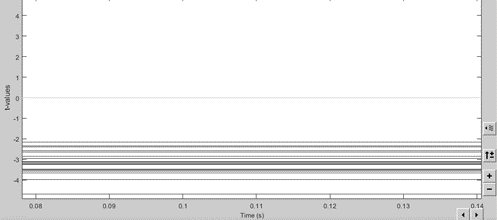
Please do the following:
- create a scout with one single source where you expect to observe negative values, and plot the time series for this scouts - this would give you the real values at this location
- post screen captures showing: the configuration of the colormap + the scouts time series figure at the exact same time sample as the image in your previous post
Where can I upload the file
Google drive? dropbox?
The t value here is positive (from time series of scout). But the same region/t values is negative in the file this cortex map is simulated from.
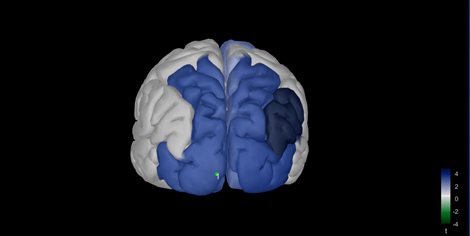

The t value here is positive (from time series of scout).
There is no issue here.
But the same region/t values is negative in the file this cortex map is simulated from.
Then what you need to track is how you managed to obtain these maps that show only positive values.
Note than if you use 3 signals per scout in the simulation, it creates an unconstrained source map.
To check for the individual signals at each location, select the option "Values: relative" in the scout tab, before plotting the scouts time series.
By default, unconstrained source maps show the norm of the three orientations, which leads to strictly positive values.
That makes sense. The time series shows the same scout as a negative t value when set to relative. Is there a way to set the cortex map to do the same? I used the process "Full source maps from scouts"