I’m using the HCP MEG data for a new project. Thank you for the great tutorial!
I’d like to import freesurfer anatomy from the 3T_Structural_preproc_extended datasets. The problem of course, is that the coordinate systems are off between the freesurfer data and the MEG_anatomy data. Does anyone have experience solving this issue?
Transformation data is available from the MEG_anatomy_transform.txt file, but I’m not sure how to apply this to freesurfer files in the brainstorm environment.
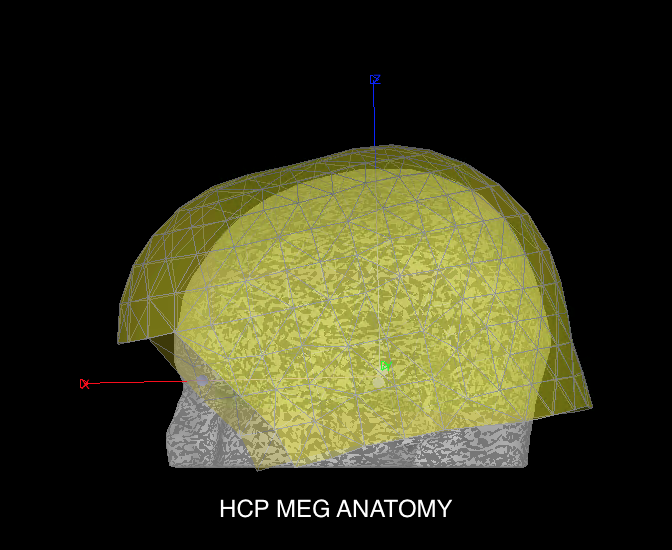
Great! Works well, but the output is different, the brain looks small compared to the MEG sensors i.e. 4D Channel File > MRI Registration > Check. Is there another combination of transforms I should be using for freesurfer data?
For FreeSurfer: did you run FreeSurfer by yourself, or is it something you found in the HCP database?
Is your Brainstorm version up to date? We recently added code to handle correctly FreeSurfer 6 output.
The freesurfer data was downloaded from the HCP website from the 3T_Structural_preproc_extended dataset. I’m using the example subject 175237. My brainstorm software is up to date as of 24-Oct-2017 running R2017a on windows 10.
I never tried to download or import files from the 3T_Structural_preproc_extended packages…
It would be much easier for me to debug if you could package together all the files needed for reproducing this issue (the FreeSurfer folder and one MEG file, I guess). Could you please do this?
Zip all the needed files together (not all the HCP files for this subject, it would too large)
Upload the .zip somewhere (eg. dropbox, google drive, …)
Send me the link in a separate private message (click on my username on this forum)
I don’t think we have any information about the registration FreeSurfer MRI / MEG. The file 175237_MEG_anatomy_transform.txt you tried to use corresponds only to the anatomy in FieldTrip format (what is loaded with the function import_anatomy_hcp_v3.m). The volume T1.mgz in the FreeSurfer folder has a resolution of 1x1x1mm while the one from the imported anaromt (T1w_acpc_dc_restore.nii.gz) has a resolution of 0.7x0.7x0.7mm. I think this explains your scaling issues.
What I suggest you do if you want to import the files from FreeSurfer:
Create a first subject (175237) and import first the anatomy using the function import_anatomy_hcp_v3.m
Create another subject (eg. 175237_fs), right-click on the anatomy > Import anatomy folder, select the FreeSurfer folder, when asked for the position of the fiducials, find the corresponding slices in the other subject (right-click on 175237/MRI>Edit MRI)
You should get coordinates in this range:
NAS = 124 217 75
LPA = 54 126 94
RPA = 202 132 92
If you want solutions for automating this step, please ask the HCP team how to convert coordinates between the two volumes (T1.mgz and T1w_acpc_dc_restore.nii.gz)
Sorry for renew this discussion(which is in year 2017). I have a few questions under this topic.
I am working on HCP MEG data(motor task) by conducting time-frequency analysis and non-parametric permutation test in the source space. Everything goes well with the help of brainstorm(really appreciate that!) except that I would like to extract group statistics.According to the following tutorial#https://neuroimage.usc.edu/brainstorm/Tutorials/CoregisterSubjects#, I have to use Freesurfer or Brainsuite to coregister different subjects' anatomy.
However, as mentioned above, HCP MEG/anatomy(pipelinev3) failed to provide me with Freesurfer anatomy documents, but they are availalbe in 3T_Structural_preproc_extended datasets(according to @magnetom).
With the advice provided by @Francois, I tried to solve the problem by creating a first subject(104012) and another subject(e.g.104012_fs). Here I am get a little bit confused.My understanding is that I have to manually set fiducials(NAS LPA RPA AC PC IH)of freesurfer anatomy in accordance with MEG/anatomy(pipelinev3). In other words, I just view the coordinates on the left viewer, and enter these coordinates on the right viewer(see the picture below).
I am wondering whether I have done everything right, and whether there are any alternatives to load Freesurfer anatomy or extract accurate group statistics.
In other words, I just view the coordinates on the left viewer, and enter these coordinates on the right viewer(see the picture below).
To do for all the fiducials (NAS, LPA, RPA):
On the left figure, you click on NAS:View.
On the right figure, you navigate the volume until you find the same slices in the three axis, and you click on NAS:Set
Repeat for LPA and RPA
Alternatively, it might be possible to do this conversion in a slightly easier way using the "world coordinates".
On the left figure, you click on NAS:View.
On the right figure, click on the button "Set the current coordinates" at the bottom-right of the MRI viewer, then in the text box "World coordinates", copy the "World: x,y,z" values you see in the left figure.
I am wondering whether I have done everything right, and whether there are any alternatives to load Freesurfer anatomy or extract accurate group statistics.
Another solution would be to do your source and statistical analysis using volume source models instead of using the cortical surface. This is based on the MNI registration computed with SPM, it doesn't require to run FreeSurfer. https://neuroimage.usc.edu/brainstorm/Tutorials/TutVolSource