Import and reslice non typical MRI inside Brainstorm

Hello,

This post is the continuation of Aligned MRI outside brainstorm are no longuer aligned after importation

Additionally to the fMRI data, nicely packed in nifty. The group we are working with sent us some additional data as .mat file; that I need to import and visualize on top of the MRI imported in the other topic.

Data:

The data can be downloaded here : https://drive.google.com/file/d/1cIL3gAukUo41JKUTtn_7inw_Pprq3Y6O/view?usp=sharing

sMriRef is from brainstorm and corresponds to the T1 imported after FreeSurfer and correspond to my target MRI.

sMriSrc is the data that I received and that I tried to format as much as possible as Brainstorm.

Here is what I know:

sMriSrc is aligned to the subject MRI ( I don't have access to it) but they computed the transformation to align the subject MRI to the MNI template (sMriRef).
This transformation is stored under: sMriSrc.info.tissue.affine

What I tried:

I tried to copy from mri_resclice code , using
% Transformation subject => MNI
TransfSrc = sMriSrc.info.tissue.affine;

and

TransfRef = [sMriRef.SCS.R, sMriRef.SCS.T; 0 0 0 1];

with the transformation of the grid being:
allGrid = inv(TransfSrc) * TransfRef * allGrid;

function sMriReg = reslice_mri(sMriSrc, sMriRef)
% Reslice the MRI to target MRI. Based on mri_reslice

sMriSrc.Voxsize = [sMriSrc.info.tissue.dim.mmx, sMriSrc.info.tissue.dim.mmy, sMriSrc.info.tissue.dim.mmz];

% Transformation subject => MNI
TransfSrc = sMriSrc.info.tissue.affine;

TransfRef = [sMriRef.SCS.R, sMriRef.SCS.T; 0 0 0 1];


% ===== INTERPOLATE MRI VOLUME =====
% Original position vectors (WATCH OUT FOR THE X/Y PERMUTATION OF MESHGRID!)
X1 = (0:size(sMriSrc.Cube,1)-1) + 0.5;
Y1 = (0:size(sMriSrc.Cube,2)-1) + 0.5;
Z1 = (0:size(sMriSrc.Cube,3)-1) + 0.5;
% Reference position vectors
X2 = (0:size(sMriRef.Cube,1)-1) + 0.5;
Y2 = (0:size(sMriRef.Cube,2)-1) + 0.5;
Z2 = (0:size(sMriRef.Cube,3)-1) + 0.5;
% Mesh grids
[Xgrid2, Ygrid2, Zgrid2] = meshgrid(Y2, X2, Z2);

% Apply final transformation: reference MRI => common space => original MRI
allGrid = [Ygrid2(:)' .* sMriRef.Voxsize(1); ...
           Xgrid2(:)' .* sMriRef.Voxsize(2); ...
           Zgrid2(:)' .* sMriRef.Voxsize(3); ...
           ones(size(Xgrid2(:)))'];

allGrid = inv(TransfSrc) *  TransfRef *  allGrid;

Xgrid2 = reshape(allGrid(2,:), size(Xgrid2));
Ygrid2 = reshape(allGrid(1,:), size(Ygrid2));
Zgrid2 = reshape(allGrid(3,:), size(Zgrid2));

% OPTION #2: Cubic interp, very similar results, much faster
n4 = size(sMriSrc.Cube,4);
newCube = cell(1,n4);
for i4 = 1:n4
    newCube{i4} = single(interp3(...
        Y1 .* sMriSrc.Voxsize(2), ...
        X1 .* sMriSrc.Voxsize(1), ...
        Z1 .* sMriSrc.Voxsize(3), ...
        double(sMriSrc.Cube(:,:,:,i4)), Xgrid2, Ygrid2, Zgrid2, 'cubic', 0));
end
newCube = cat(4, newCube{:});

% Save output
sMriReg         = sMriRef;
sMriReg.Cube    = newCube;
sMriReg.Comment = 'Imported volume';

end

The issue is that it is not aligned :

Would you be able to help me on applying the transformation ? The map is supposed to cover the occipital / temporal lobe of the MRI.

I am wondering if the volume is actually saved as x/y/z or if there is some inversion... but I am not sure on how to check that

Edouard

1 Like

Hi Edouard,

I don't have a full answer, but here are some thoughts.

I'm a bit confused by your description. You call sMriRef a "T1 imported after FreeSurfer", "target MRI", and later "the MNI template". That last one seems contradictory. Do you just mean it was used as the target for alignment, the same way that one might use the MNI template for aligning, but here it's not actually the MNI template? Otherwise I'm not following.

For sMriSrc, it sounds like the nifti of the fmri was aligned to the nifti of the t1, is that right? This would have been saved in the sform of the nifti file for example, and that's what you copied in the .affine field? But I think this transformation would take into account the transformation in the t1 nifti as well, so that it aligns with the "world coordinates" of it, not its raw voxels. But you say you don't have that nifti, only the already imported t1 in Brainstorm. So you'd need to look carefully at the header and history of sMriRef to see if you can figure out how it was imported.

Brainstorm does additional transformations when importing a nifti. In particular, it will reorient the volume if needed to make the voxels oriented as RAS. Whereas the nifti standard only requires the world coordinates after applying the transform to be in RAS orientation - it doesn't specify for the raw volume voxel orientation. So that could be one of the issues; Brainstorm may expect the voxels to be RAS separately from the stored transformations.

I believe there's also a prompt asking whether or not to apply the nifti transformation during import, so you'd have to know or figure out looking at the header and history, if that was done during import of sMriRef.

My main point is that I don't think there's a straightforward way to do this manually without knowing the details. You may have to apply a reorientation to the voxels (and correct the affine transform accordingly), and perhaps apply the inverse ref world transform if it was not applied to ref during its import, after applying the alignment transform. Hope this makes sense.

1 Like

Hello,

Thanks a lot for your reply.

Sorry about the confusion. Our sMRIRef is a version of the MNI template provided by the NeuroDot toolbox (NeuroDOT/Support_Files/Atlases/mni152nl_T1_nifti.nii at main · WUSTL-ORL/NeuroDOT · GitHub). I don't know exactly which version of the MNI template it is. I just know it is not ICBM125 2009c Nonlinear Asymmetric (used by Brainstorm).

What I know is that the volume I want to import was computed using the subject MRI, which I don't have access to. But we have access to the transformation that was computed to align the subject MRI with the MRI mentioned : mni152nl_T1_nifti.nii. I will call this T1 T1ref in the future.

So I think we can say you are right, sMriRef was indeed used as a target for alignment.

The first issue is they didn't provide us with a nifti as for the fMRI I was able to import in the other topic. Here I just have a .mat file, containing the cube and few header information but far from a complete nifti file.

This sMRISrc was aligned to the nifti of the T1ref. and the transformation was saved in the .mat file in sMriSrc.info.tissue.affine. i don't have access to any sFORM or qFORM from that MRI.

The MRI T1ref seems to be ok. and imported well in Brainstorm. This is the history of the file when opened in Brainstorm. I don't get asked any questions about reorientation :

I just found that the toolbox they used is having some function to apply transformation: NeuroDOT/Functions/Spatial_Transforms/affine3d_img.m at main · WUSTL-ORL/NeuroDOT · GitHub

I will try to understand what they are doing. it might help

Edouard :slight_smile:

1 Like

Thanks, that makes sense. So you have fMRI that was aligned (affine) with a template T1.

Regarding reorientation, that's always done when importing, if needed to bring voxels to RAS orientation. And I believe the MRI viewer then assumes the voxels are in RAS and that's how it's displayed, directly from the sMri.Cube without checking any transformation.
What I was saying it prompts you for, is whether to apply the s/qform transformation from the nifti (though it doesn't call it s/qform), but it might only ask under specific conditions. Either way, you can see what was done under sMri.InitTransf. The reorientation would have a label 'reorient', and a "world coordinate" transformation would have the label 'vox2ras'.

Important to note: when the volume gets flipped/permuted to bring voxels to RAS orientation, Brainstorm modifies all sMRI fields accordingly, including under .Header, which may not be obvious at first. So the sMri.Header.nifti transformation info would not match the actual nifti file header in this case.

That's as far as my current knowledge of MRIs in Brainstorm goes. Unfortunately, I'm not familiar with the reslice function, but it makes sense to me that you would need to apply that to do the alignment in Brainstorm. Maybe someone else could give guidance there.

1 Like

Hello,

Good news: we found way to generate a nifti from their mat file :

[header_out, img_out] = nifti_4dfp(sMriSrc.info.tissue.dim, sMriSrc.cube, 'n');

We were then able to save it to brainstorm:

sMri.Cube = img_out;
sMri.Header.nifti = header_out;
sMri.Header.dim.dim = header_out.dim;
sMri.Header.dim.pixdim = [ 1, sData.info.tissue.dim.mmx,  sData.info.tissue.dim.mmy,  sData.info.tissue.dim.mmz, 0,0,0,0 ];
sMri.Voxsize = sMri.Header.dim.pixdim(2:4);

sform = [...
    header_out.srow_x;
    header_out.srow_y;
    header_out.srow_z;
    0 0 0 1];

sMri.InitTransf{2} = sform;

%% Save to brainstorm database

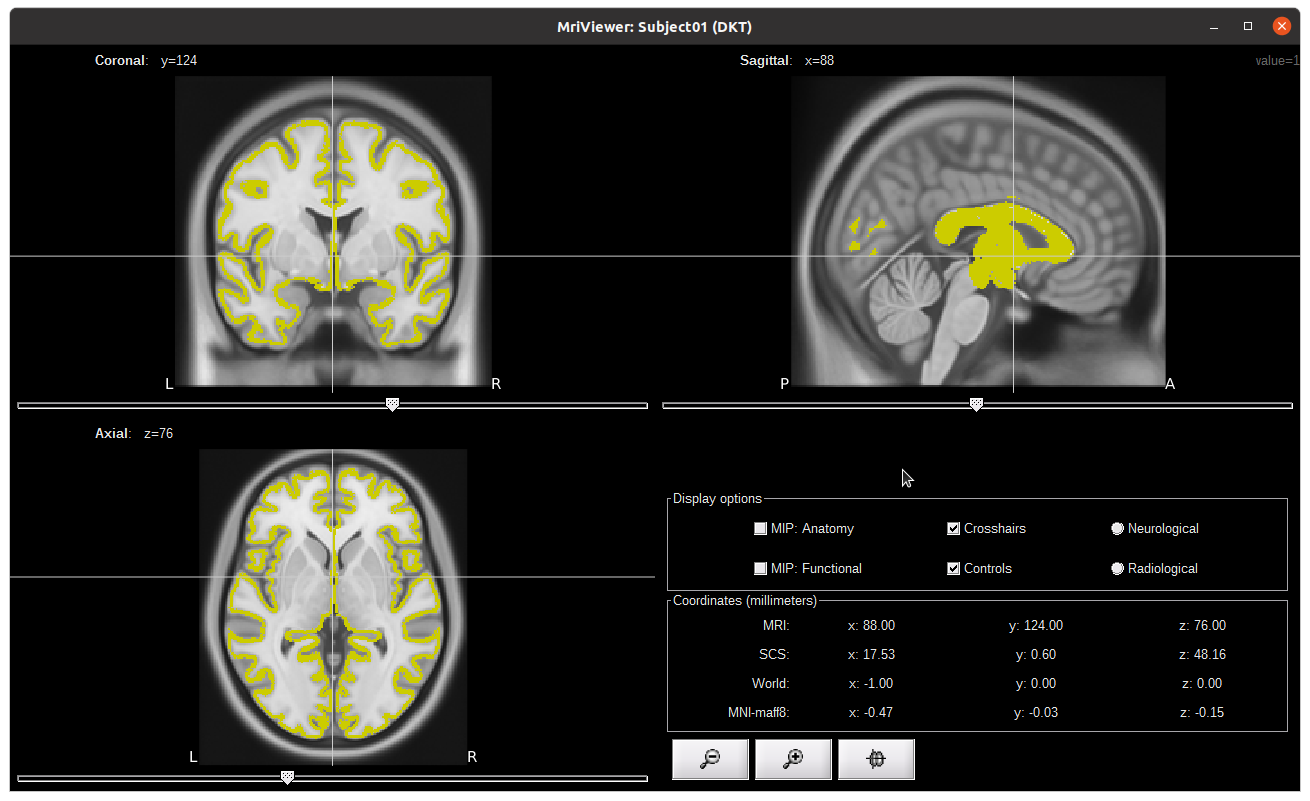
With that we can then call brainstorm reslice function and get the following:

The good thing is that we can see that the orientation is correct. We just need to work on the alignment and this is where the transformation is coming i guess.

So i need to find a way to apply the transformation and rescice.

1 Like

I uploaded the database here: https://drive.google.com/file/d/13YAiQacMR4ILwTMlQFnuoXBksVspQuee/view?usp=sharing

The zip contains the brainstorm database and a transformation.mat file containing
transformation to be applied.

Here is what the database look like:

My goal is to coregister and reslice to the T1 image using the transformation given to us in the transformation.mat:

T = load('transformation.mat')
transformation = T.affine; 

@Raymundo.Cassani Would you have any insight on that ?

Thanks a lot :slight_smile:
Edouard

1 Like

Possibly, but I recommend verifying for potential left-right flip, as well as "one-off" indexing mismatch (0-indexing in nifti, 1-indexing in Matlab generally, likely in Brainstorm's MRI voxels too). These errors are common and would not be immediately apparent. Are you able to import the generated nifti with Brainstorm's usual import function instead of constructing the structure manually? You could then check how the transform fields might be altered vs what you did.

2 Likes

I just found

Time to go home; will explain tomorrow the solution :slight_smile:

2 Likes

@edelaire, what was the solution?