I’m running an experiment to detect cortical+hippocampal activity. I’ve MEG signals with individual MRIs and so on. Thus, I’m following DeepAtlas tutorial (https://neuroimage.usc.edu/brainstorm/Tutorials/DeepAtlas) but using my own data.
Following that tutorial I will be using surface and constrained source space. My question is that I don’t fully understand the “Deep brain” option in the Location constrain. Is it just as saying “use the default option for each structure”? I mean, for my case (cortex+hippocampus) will be the same using the “Deep brain” than the “Surface” option?
Hi Victor, that is a quite interesting question, the short answer is that it will not be the same.
Let me explain:
Computing head model using Cortex surface where the surface to use (in green) is the merge of the cortex+hippocampus, In this case the cortex is comprised of all the vertices in the cortex surface file + hippocampi.
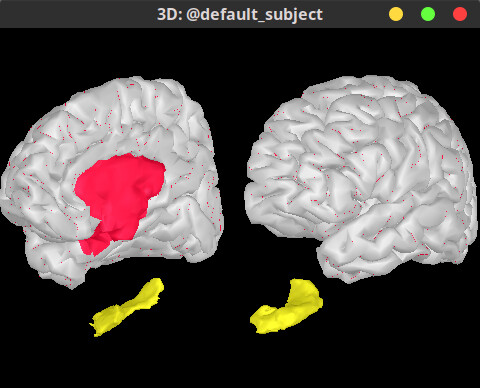
Computing head model using Custom source model where the surface to use (in green) is the merge of the cortex+hippocampus, in this case the only the vertices that are are part of the 4 Scouts (L/R Cortex and L/R Hippocampus) defined in the Source model atlas will be used. The detail is here, the two Scouts L/R Cortex do not contain all the vertices in the cortex surface file, the medial wall is not included, so less vertices are used for the head model for the cortex in this approach.
In Red the entire cortex surface, overlaid in gray is the L/R Cortex Scouts, Yellow is the hippocampus.
Hi thank you for your promp answer. That is a good answer that has actually make me learn a small (but relevant) detail.
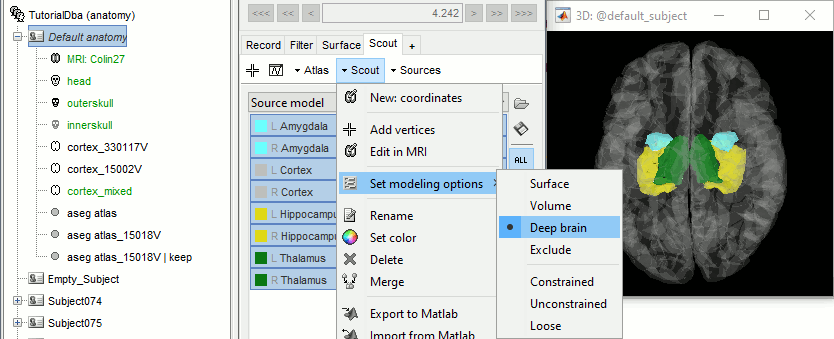
However, I was referring to the source model atlas, when you configure the “Set modeling options” (see image below). What’s the point of “Deep brain” option? Just to select the optimum (Surface or Volume) depending on the specific structure? I mean, for my case (which includes cortex and hippocampus) will be the same as selecting “Surface” for both?
I’ve noticed that the source-level I have are corrupt.
I’m using (as in the tutorial) a mixed BEM head model (from hippocampus + cortex) using the custom source model we created. When I solve the inverse model with LCMV, my imaging kernel has proper dimensions (~15k*306 sensors) but only 574 of them are “good”, the other ones are 0s.
Is there any problem when using LCMV with this source model or something? I’ve noticed that if I left click in my trials and press Compute Sources, LCMV is disabled, but if I use Run>Compute Sources it is enabled.
PS: Other source inversion methods works perfectly
PS2: When computing sources via right click, the sources files contain a “LINK” in its icon, what does this mean? This is not happening when computing sources using the “Run” way.
@John_Mosher, in May 2019 the options LCMV and Dipole modeling were disable for mixed models
Do you happen to know the reason for this change?
The links are not real files on the hard drive, if you select the menu "View file contents" for any of them it would display the structure of the corresponding shared kernel. Thus instead of save the full time series for the sources ([nSources, nTimes)], the inversion kernel is saved [nSources, nSensors] and applied on the sensor data on the fly.
I guess that the limitation in the LCMV with the mixed head model is somehow related with my bug… only detecting around 5% of the sources…
In line with that, I understand volume and surface headmodels, but I don’t understand the mixed one. In my case I’m only using surface sources for my two structures, why a mixed model is created?
It is because it is a model that was created through the special Atlas Source model
(It would be labeled mixed even if only had the cortex as well).
This is a bit related to the point from above. You can compute a surface head model using the surface that is created by merging the cortex and hippocampus.