On an M5 macbook with 24GB RAM. Trying to generate a lead field matrix from surfaces with ~12000 vertices. Ran omassemble for over an hour and got no output, worried it’s stalling.
According to Activity Monitor, omassemble is currently using one whole core (CPU 99%)/9 threads and ~80MB of RAM.
Is omassemble operating properly or is it stalling?
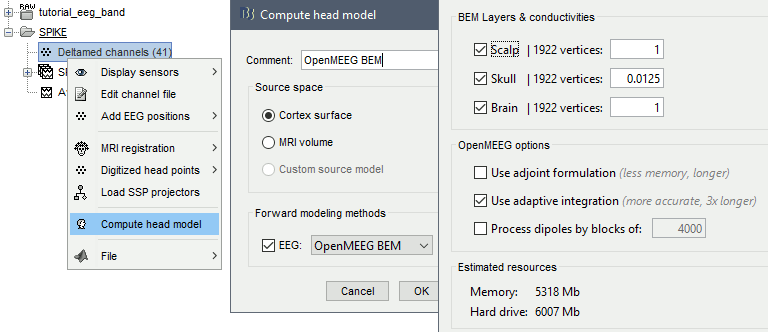
OpenMEEG uses BEM based on non-intersecting 3 surfaces that represent the boundaries between tissues: scalp (head/air interface), outer skull (scalp-skull interface), and inner skull (skull/brain+CSF interface).
That size seems quite high for BEM surfaces. It seems the reason for the long computation. Across the different tutorials and pipelines that we have tested using 1922 vertices per surface leas to good results.
You can check for more information on OpenMEEG in Brainstorm in this tutorial:
My guess is it will take at least a few hours, and it depends on your machine.
Have you tried checking whether it works with the recommended ~1k vertices?
If your surfaces intersect or you have dipoles too close to the interface, the computation will fail. So using 12k vertices directly is not recommended.
Originally for my specific project I thought the higher resolution would have been more interesting, but it’s definitely not necessary. I checked a paper that employed a similar analysis to what I intend and they used 1000 vertices.
I’m not using Brainstorm but instead calling OM command line functions from python. I’m generating the source space surfaces with MNE (mne.setup_source_space()) and made python scripts for generation of the filetypes used by OM (based on this matlab script I found online).
I don’t have a way to set the number of vertices, but increasing the space with mne.setup_source_space() will decrease the #verts. I am currently retrying om_assemble with a source spacing 14mm (1019 verts per hemisphere)
To clarify - is the recommended max of 1922 vertices per hemisphere or across both hemispheres? Thanks for your help, I am new to this area
Hi @ajayp1, it seems there is confusion about the number of vertices.
One thing is the number of vertices that the BEM surfaces have, and another the number of vertices for which the head model will be computed.
BEM surfaces are boundary surfaces that OpenMEEG uses to compute the head model. However, the head model ( a.k.a. forward model, leadfield matrix or gain matrix) is computed for the indicated source space (a.k.a dipoles) in the case that the dipole location is constrained to the cortical surface the number of dipoles corresponds to the number of vertices of the cortical surface.
As you can see, the number of dipoles (vertices in the cortex) is not related with the number of vertices in the BEM surfaces.
For the code in the share link, the source space is defined in: file_source_fif and the 3 BEM surfaces are: surf_outer_skin, surf_outer_skull and surf_inner_skull
BEM surfaces do not have hemispheres, they are closed surfaces. So the number is total.
I see. Thank you for the clear explanation. I was mistaken and all of the vertex numbers I was previously reporting were for the # dipoles/# vertices outputted by mne.setup_source_space(). I am using mne.bem.make_watershed_bem() to generate the BEM surfaces, so I will try to adjust the #verts in this step. It appears that the BEM surfaces (generated from MNE src object w 1019 verts) is still 10,242.