
|
Size: 4736
Comment:
|
← Revision 8 as of 2026-04-29 20:57:37 ⇥
Size: 2605
Comment:
|
| Deletions are marked like this. | Additions are marked like this. |
| Line 1: | Line 1: |
| = Using Containers with Brainstorm = Authors: Takfarinas Medani & Malte Höltershinken |
= Containers with Brainstorm = ''Authors: Takfarinas Medani, Malte Höltershinken, and Raymundo Cassani'' |
| Line 4: | Line 4: |
| Some Brainstorm processes rely on external software distributed using '''containers''' (for example: ''duneuro''). Containers allow Brainstorm to run complex tools without requiring manual installation of dependencies. | Some Brainstorm functions and plugins rely on external software that is distributed as containers (for example: ''duneuro 2026''). These containers are managed in Brainstorm as '''container''' plugins. |
| Line 6: | Line 6: |
| This page explains how to install a supported container runtime on your system. | {{{#!wiki note Container plugins are not usually installed alone, their installation is commonly as a dependency for a code plugin. }}} |
| Line 8: | Line 10: |
| <<TableOfContents(3)>> | This page explains how containers are used by Brainstorm, and how set up your system to use them. |
| Line 10: | Line 12: |
| <<TableOfContents(2,2)>> | |
| Line 11: | Line 14: |
== Containers for beginners == '''What is a container?''' |
== Introduction == |
| Line 23: | Line 24: |
| You do ''not'' need prior knowledge of containers to use Brainstorm. | You do ''not'' need prior knowledge of containers to use Brainstorm. {{attachment:bstContainer.jpg}} |
| Line 25: | Line 26: |
| ---- | To be able to use containers with Brainstorm it is necessary to have a supported container engine. |
| Line 27: | Line 28: |
| == Supported container runtimes == Brainstorm supports the following container runtimes: |
== Container engines == Brainstorm supports the following container engines: |
| Line 30: | Line 31: |
| * '''Docker''' (recommended for most users) * '''Podman''' (Linux alternative to Docker) * '''Apptainer / Singularity''' (recommended on HPC clusters) |
* '''Docker Desktop''' (recommended for most users) * TODO '''Podman''' (Linux alternative to Docker) * TODO '''Apptainer / Singularity''' (recommended on HPC clusters) |
| Line 36: | Line 37: |
| You only need to install '''one''' of them. | You need to install at least '''one''' of them. |
| Line 38: | Line 39: |
| ---- | === Docker Desktop (recommended) === |
| Line 40: | Line 41: |
| == Which runtime should I install? == ||'''Operating system''' ||'''Recommended runtime''' || ||Windows ||Docker Desktop || ||macOS ||Docker Desktop || ||Linux (desktop) ||Docker or Podman || ||Linux (HPC) ||Apptainer / Singularity || |
To install, be sure of follow the instructions for your OS: <<BR>> https://docs.docker.com/desktop/ |
| Line 48: | Line 45: |
| ---- | == Interactive management == SHOW THE GUI FOR CONTAINER PLUGINS |
| Line 50: | Line 48: |
| == Windows == === Docker Desktop (recommended) === 1. Download Docker Desktop: . [[https://docs.docker.com/desktop/|Docker Desktop documentation]] |
== Command-line management == The calls to install or manage containers plugins are the same than for (code) plugins, see the [[https://neuroimage.usc.edu/brainstorm/Tutorials/Plugins#Command-line_management|plugin tutorial]]. |
| Line 55: | Line 51: |
| 1. During installation: * Enable '''WSL 2''' if prompted * Restart your computer if required |
An API for low-level interaction between Brainstorm and the container engine has been implemented in `bst_containers.m` |
| Line 59: | Line 53: |
| 1. Start '''Docker Desktop''' and wait until it reports that Docker is running | <<HTML(<div style="border:1px solid black; background-color:#EEEEFF; width:720px; height:400px; overflow:scroll; padding:10px; font-family: Consolas,Menlo,Monaco,Lucida Console,Liberation Mono,DejaVu Sans Mono,Bitstream Vera Sans Mono,Courier New,monospace,sans-serif; font-size: 13px; white-space: pre;">)>><<EmbedContent("https://neuroimage.usc.edu/bst/viewcode.php?core=bst_containers.m")>><<HTML(</div >)>> |
| Line 61: | Line 55: |
| No additional configuration is required for Brainstorm. ---- == macOS == === Docker Desktop (recommended) === 1. Download Docker Desktop: . [[https://docs.docker.com/desktop/|Docker Desktop documentation]] 1. Install and launch Docker Desktop 1. Wait until Docker reports that it is running ''On macOS, Docker runs inside a virtual machine. This is normal and fully supported by Brainstorm.'' ---- == Linux (desktop or workstation) == === Option 1: Docker === Install Docker following the official instructions: [[https://docs.docker.com/get-docker/|Docker installation guide]] After installation, verify that Docker is running: {{{ docker info }}} === Option 2: Podman === Podman is a Docker-compatible alternative available on many Linux systems: [[https://podman.io/get-started|Podman getting started]] Podman does not require a background service. ---- == Linux (HPC clusters) == === Apptainer / Singularity (recommended) === Most HPC systems provide '''Apptainer''' (formerly Singularity) by default. Check availability: {{{ apptainer version }}} or {{{ singularity version }}} If Apptainer is not available, please contact your system administrator or consult: [[https://apptainer.org/|Appt contandoer documentation]] ---- == Container images in Brainstorm == You do ''not'' need to download container images manually. When a Brainstorm process requires a container: * Brainstorm checks whether the image is already available * If not, you will be asked for confirmation * The image is downloaded automatically No additional commands are required. ---- == Frequently Asked Questions == === Do I need to learn Docker or containers to use Brainstorm? === No. Brainstorm manages containers automatically. You only need to install a supported runtime. ---- === Docker is installed but Brainstorm says it is not running === Make sure '''Docker Desktop is started''' and fully initialized, then retry the Brainstorm process. ---- === I don’t have administrator rights on my computer === If you are working on a shared system or cluster: * Apptainer / Singularity is usually available * If not, contact your system administrator ---- === Are containers slower than native installations? === On Linux systems, performance is usually identical. On Windows and macOS, containers run inside a virtual machine, which may be slightly slower but is generally negligible for most workflows. ---- == Summary == * Brainstorm supports Docker, Podman, and Apptainer / Singularity * Install '''one''' runtime appropriate for your system * Brainstorm downloads required container images automatically * No container expertise is required For additional help, please consult the Brainstorm forum: [[https://neuroimage.usc.edu/forums/|Brainstorm Forum]] |
For additional help, please consult the [[https://neuroimage.usc.edu/forums/|Brainstorm Forum]] |
Containers with Brainstorm
Authors: Takfarinas Medani, Malte Höltershinken, and Raymundo Cassani
Some Brainstorm functions and plugins rely on external software that is distributed as containers (for example: duneuro 2026). These containers are managed in Brainstorm as container plugins.
Container plugins are not usually installed alone, their installation is commonly as a dependency for a code plugin.
This page explains how containers are used by Brainstorm, and how set up your system to use them.
Introduction
A container is a packaged version of a software tool that includes everything it needs to run.
With containers:
You do not need to install additional libraries
- The software runs the same way on different computers
- Brainstorm can automatically download and use the required tools
You do not need prior knowledge of containers to use Brainstorm. 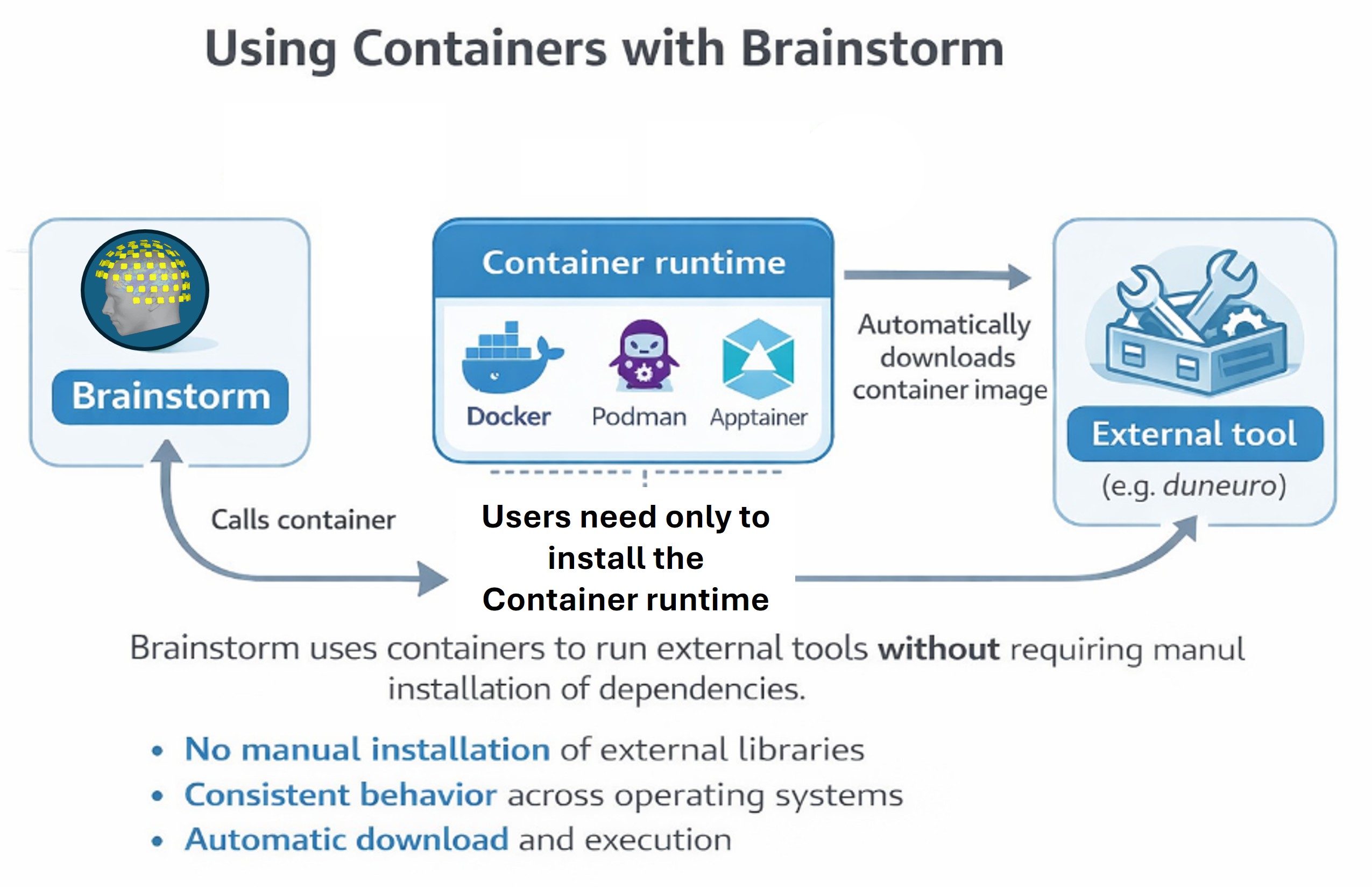
To be able to use containers with Brainstorm it is necessary to have a supported container engine.
Container engines
Brainstorm supports the following container engines:
Docker Desktop (recommended for most users)
TODO Podman (Linux alternative to Docker)
TODO Apptainer / Singularity (recommended on HPC clusters)
Brainstorm automatically detects which runtime is available on your system.
You need to install at least one of them.
Docker Desktop (recommended)
To install, be sure of follow the instructions for your OS:
Interactive management
SHOW THE GUI FOR CONTAINER PLUGINS
Command-line management
The calls to install or manage containers plugins are the same than for (code) plugins, see the plugin tutorial.
An API for low-level interaction between Brainstorm and the container engine has been implemented in bst_containers.m
For additional help, please consult the Brainstorm Forum