
|
Size: 3905
Comment:
|
Size: 3902
Comment:
|
| Deletions are marked like this. | Additions are marked like this. |
| Line 16: | Line 16: |
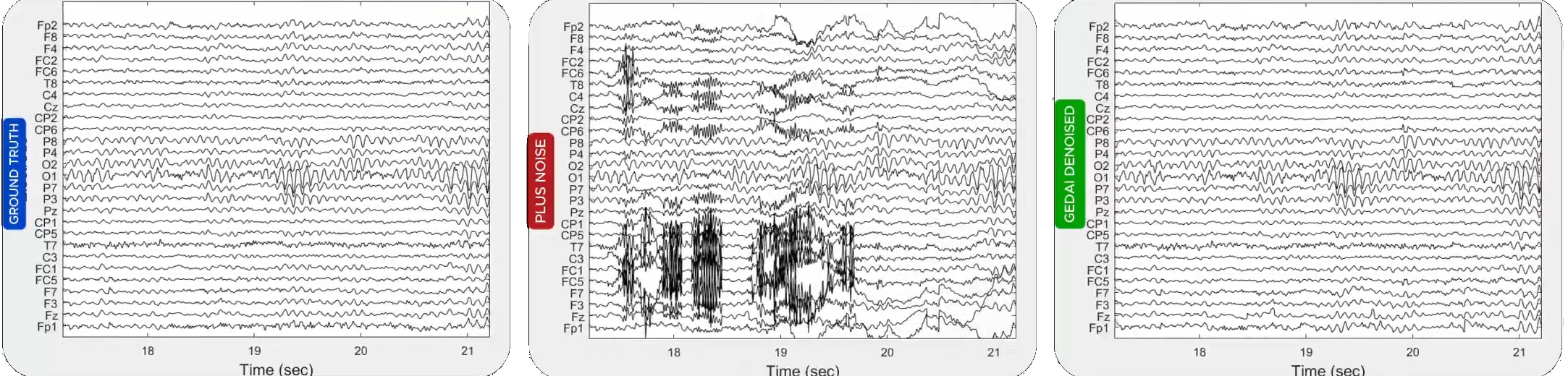
{{attachment:gedai_result.jpg||width="100%"}} |
{{attachment:gedai_result.jpg||width="100%"}} |
Generalized Eigenvalue De-Artifacting Instrument (GEDAI)
Authors: Tomas Ros, Yingqi Huang, Takfarinas Medani, Raymundo Cassani
This tutorial introduces the generalized eigenvalue de-artifacting instrument (GEDAI) algorithm which is an unsupervised EEG denoising method based on the leadfield filtering.
Introduction
EEG signals may be considered to be a mixture of electrical activities from a brain “signal” (sub)space, and one containing different types of non-cerebral noise or “artifacts”. This mixture may be “unmixed” by linear decomposition techniques (e.g. PCA or ICA) into separate "components" with individual source locations and respective time-courses. However, although PCA and ICA leverage statistical properties within mixed data to recover underlying sources, they are "blind" source separation methods, functioning without a priori knowledge of the original signals or their mixing process. GEDAI combines theoretical knowledge of the brain’s “signal” subspace with generalized eigenvalue decomposition (GEVD) to automatically separate brain and artifact components. Here, a theoretical model of EEG generation is used as an estimate of the brain’s “noise-free” subspace. An overview of This is shown in the Panel A of the figure below.

Panels B, C and D show these steps at more detail. Panel B: each data covariance matrix (dataCOV) is decomposed into source components with GEVD. Panel C: The GEVD uses a fixed theoretical reference matrix (refCOV) across all epochs, based on the leadfield matrix of an EEG forward model. Panel D: To determine the optimal threshold separating brain and artifactual subspaces, output EEG data is evaluated using the Signal & Noise Subspace Alignment Index (SENSAI). This is done by respectively maximizing and minimizing the subspace similarities of the retained "signal" and removed "noise" with the refCOV.
Install
Being a Brainstorm plugin, GEDAI plugin can be installed, updated and removed directly from the Brainstorm GUI. For further information, see the plugins tutorial.
From the main window go to Plugins > Artifacts > gedai > Install.
![[ATTACH]](/moin_static1911/brainstorm1/img/attach.png "[ATTACH]")
A message will appear saying, "Plugin gedai is not installed on your computer. Download the latest version of GEDAI now?" click 'Yes'.
- The plugin will be downloaded and installed automatically. Once installed, you will see a confirmation message.
![[ATTACH]](/brainstorm/Tutorials/Gedai?action=AttachFile&do=upload_form&ticket=00697fbb5c.8c74cae0fb506acfd0974ffcb2e95b81451c8876&target=install_plugin.png "[ATTACH]")
![[ATTACH]](/brainstorm/Tutorials/Gedai?action=AttachFile&do=upload_form&ticket=00697fbb5c.8c74cae0fb506acfd0974ffcb2e95b81451c8876&target=plugin_manager.png "[ATTACH]")
![[ATTACH]](/brainstorm/Tutorials/Gedai?action=AttachFile&do=upload_form&ticket=00697fbb5c.8c74cae0fb506acfd0974ffcb2e95b81451c8876&target=successfully_installed.png "[ATTACH]")
By following these steps, you will successfully install the bst-neuromaps plugin.
Using GEDAI
[TODO] Expanding these points
On GEDAI provided data
- Create a new protocol
- Importing data
- Install GEDAI plugin
- Running GEDAI process Description of the process GUI and each of their elements
- Results
On epilepsy EEG
- We can use GEDAI on the raw EEG data in the Epilepsy tutorial
Additional documentation
Related tutorials
Articles
* Ros, T., Férat, V., Huang, Y., Colangelo, C., Kia, S. M., Wolfers, T., Vulliemoz, S., & Michela, A. (2025).
Return of the GEDAI: Unsupervised EEG denoising based on leadfield filtering.
bioRxiv : The Preprint Server for Biology.