
BEst - wavelet-based source localization
This toolbox implements the "maximum-entropy on the mean" (MEM) technique for solving MEG, EEG and fused MEEG inverse problems. Along with the classical MEM, we exploit wavelet decompositions of the data in order to target specifically oscillatory (wMEM) and synchronous cortical sources (rMEM). BEst, for "Brain Entropy in space and time", is the result of a collaborative work between École de Technologie Supérieure and the department of biomedical enginnering at McGill university (Montreal, Canada). The present tutorial shows how to use MEM on averaged MEG Tutorial UQAMwork data that can be downloaded here.


See below for more info on the BEst license and the associated publications.
MEM: quick steps
We need one gain matrix for each recording modality considered for source localization. These matrices can be computed within Brainstorm using either, sperical or realistic (recommended) head models. See the tutorial on Head models for details. Note that unlike the other methods proposed in Brainstorm, the MEM does not require prior calculation of a noise covariance matrix. In fact, this matrix is estimated using a baseline signal that can either be part of the data to localize or come from a different data.
- Select the TutorialCTF protocol
- Go to the data view mode (second button on top of the database explorer)
Right-click on the data average > Compute sources > BrainEntropy MEM.. Hit 'Ok' Note: The MEM option only appears in expert mode. Make sure it is toggled from the buttom at the bottom left. It is recommended that you personnalize the comment field so as to avoid confusion when performing multiple localizations for a given dataset
- Select the MEM pipeline (MEM, wMEM or rMEM). For now, we leave the 'Clustering' options to default values, these are described here.
You can select a specific time window for source localization. This option can be necessary for long data epochs, as MEM is a slow iterative process (default: localize all data). Note: this option is not considered for the wMEM (localize whole data)
- By default, the panel looks for a data called 'baseline' within the same study as the data to be localized. When not found, the baseline is the data segment specified in the field 'Window'. You can select an external baseline by hitting 'import'.
- Hitting 'Ok' will launch the MEM pipeline. At the end, a new results file appears in the database under the appropriate dataset. Simply double-click it to visualize.
Forward model
- Switch to the view "Functional data (sorted by subjects)"
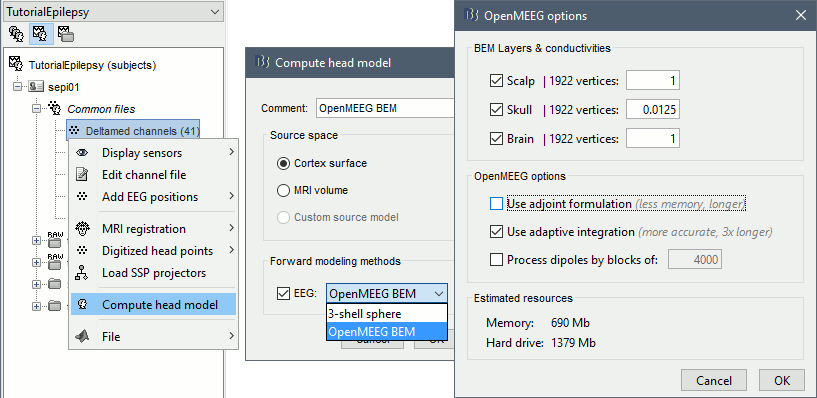
Right-click on Subject01 / Right > Compute head model. Select OpenMEEG BEM in the list. Click on Run.
- Explanations of the options:
BEM Layers & conductivities: In this panel you can select how many layers you want to use for the BEM model. The possible options in our case are Scalp (=head), Skull (=outer skull), and Brain (=inner skull). The values on the right are the relative conductivities of each layer.
- For EEG: Use all the layers
- For MEG: Use only the inner skull layer
Use adjoint formulation: Decrease significantly the amount of memory that is necessary in memory and on the hard drive, but much longer.
Use adaptive integration: This produces a much more accurate solution, mostly in the cases of dipoles (vertices of the cortex surface) that are very close to the inner skull layer. You should keep this option selected.
Process dipoles by blocks: If you consistently run into crashes, it's probably because you don't have enough memory available. You can try to process the dipoles by smaller blocks. It would be longer but would probably work. Do not select unless you cannot compute the solution with having memory errors.
- Download OpenMEEG software? Yes.
- This will download the latest version of OpenMEEG binaries for your operating system from INRIA website, and install it in Brainstorm user folder (~username/.brainstorm/openmeeg/)
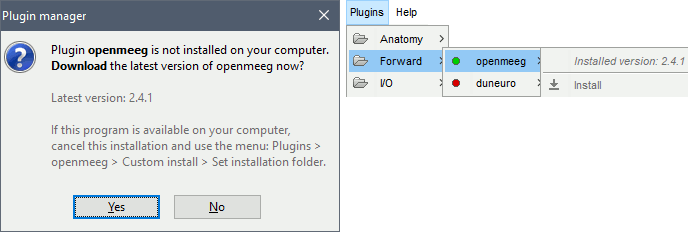
- This will download the latest version of OpenMEEG binaries for your operating system from INRIA website, and install it in Brainstorm user folder (~username/.brainstorm/openmeeg/)
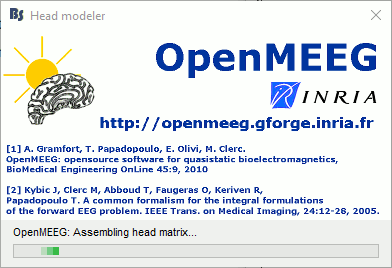
- Once downloaded, the calculation of the head model will start automatically. You may wait for a very long time. Be patient, it's worth it...
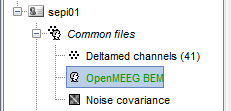
- You have now a new head model in your condition, that you can use exactly the same way you would use your previous "Overlapping sphere" model.

License
OpenMEEG is distributed under the French opensource license CeCILL-B. It is intended to give users the freedom to modify and redistribute the software. It is therefore compatible with popular opensource licenses such as the GPL and BSD licenses. The CeCILL-B license imposes to anybody distributing a software incorporating OpenMEEG the obligation to give credits (by citing the appropriate publications), in order for all contributions to be properly identified and acknowledged.
The references to be acknowledged are:
Gramfort, T. Papadopoulo, E. Olivi, M. Clerc. OpenMEEG: opensource software for quasistatic bioelectromagnetics, BioMedical Engineering OnLine 45:9, 2010
Kybic J, Clerc M, Abboud T, Faugeras O, Keriven R, Papadopoulo T. A common formalism for the integral formulations of the forward EEG problem. IEEE Transactions on Medical Imaging, 24:12-28, 2005. [pdf]