Brainstorm
  • Comments
  • Menu
    • Attachments
    • Versions
    • Raw Text
    • Print View
  • Login

Software

  • Introduction

  • Gallery

  • Download

  • Installation

Users

  • Tutorials

  • Forum

  • Courses

  • Community

  • Publications

Development

  • What's new

  • What's next

  • About us

  • Contact us

  • Contribute

Revision 88 as of 2021-03-31 08:59:04
1 2 3 4 5 6 7 8 9 10 11 12 13 14 15 16 17 18 19 20 21 22 23 24 25 26 27 28

MEG current phantom (CTF)

Authors: Francois Tadel, Elizabeth Bock

This tutorial explains how to import and process CTF current phantom recordings. We decided to release this example for testing and cross-validation purposes. With these datasets, we can evaluate the equivalence of various forward models and dipole fitting methods in the case of simple recordings with single dipoles. The recordings are available in two file formats (native and FIF) to cross-validate the file readers available in Brainstorm and MNE. A similar page exists for the Elekta-Neuromag phantom.

Contents

  1. License
  2. CTF current phantom
  3. Description of the experiment
  4. Download and installation
  5. Generate anatomy
  6. Access the recordings
  7. Import recordings
  8. Noise covariance
  9. Source estimation
  10. Dipole scanning
  11. Dipole fitting with FieldTrip
  12. Results comparison
  13. Digitized head points
  14. Scripting

License

This tutorial dataset remains a property of its authors: Elizabeth Bock, Francois Tadel and Sylvain Baillet (MEG Lab, McConnell Brain Imaging Center, Montreal Neurological Institute, McGill University, Canada).

If you reference this dataset in your publications, please aknowledge them and cite Brainstorm as indicated on the website. For questions, please contact us through the forum.

CTF current phantom

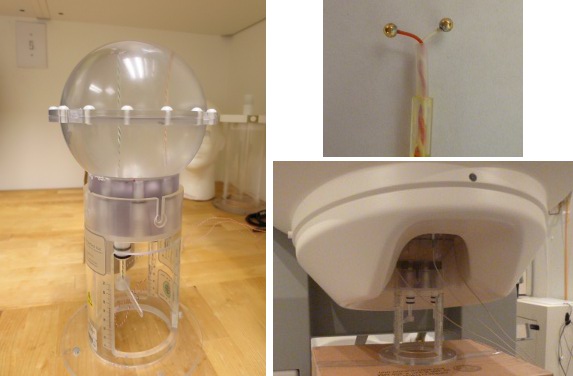
The CTF current dipole phantom is a spherical container filled with a conducting saline solution which contains a current source and sink. This electric dipole is used to simulate brain sources in a conductive medium. The globe has a 130mm inner diameter and small attachment posts to attach the three CTF head localization coils. The position of this dipole can be adjusted within this globe.

The dipole itself is constructed of two gold spheres about 2 mm in diameter, separated by 9.0 mm center to center. The dipole moment can be calculated by the equation m=I.L, where I is the current flow (in Amperes) and L is the length of the dipole (0.009 meters).

The location of the dipole is recorded relative to the center of the sphere (0,0,0)m, where X is positive toward the nasion, Y is positive toward the left ear and Z is positive toward the top of the head (see the CoordinateSystems tutorial for more details).
  • phantom_ctf.jpg

Reference

VSM/CTF documentation: PN900-0018, Revision 3.2, 23 November 2006. This document can be found with your full CTF installation at /opt/ctf/docs/Phantom.pdf.

Description of the experiment

Files distributed as part of the CTF phantom tutorial:

  • phantom_ctf/ds/phantom_200uA_20150709_01.ds
    Current=200uA, Moment=1800nAm, Frequency=7Hz, Location=(0, -18, 49)mm - 03-Jul-2015
    This corresponds to a very strong dipole, that could be studied without any averaging.

  • phantom_ctf/ds/phantom_20uA_20150603_03.ds
    Current=20uA, Moment=180nAm, Frequency=23Hz, Location=(0, -18, 49)mm - 03-Jun-2015
    This is a weaker dipole, closer to the range of amplitudes we can expect from the brain. You will not see the dipole activity emerging from the noise without averaging a few cycles together.

  • phantom_ctf/ds/emptyroom_20150709_01.ds
    MEG empty room measurements: the phantom is in the MEG helmet but not connected - 09-Jul-2015

  • phantom_ctf/ds/phantom_20160222_01.pos
    "Head shape" of the phantom digitized with a Polhemus device using the Brainstorm digitizer.

  • phantom_ctf/fif/phantom_20uA_20150603_03.fif
    Dataset 20uA converted to FIF format using MNE utility mne_ctf2fiff

  • phantom_ctf/fif/phantom_200uA_20150709_01.fif
    Dataset 200uA converted to FIF format using MNE utility mne_ctf2fiff

  • All recordings were performed by Elizabeth Bock at the MEG lab at McGill with a CTF MEG system with 275 axial gradiometers.

Download and installation

  • Requirements: You have followed the introduction tutorials and Brainstorm is installed.

  • Go to the Download page of this website, and download the file: sample_phantom_ctf.zip

  • Unzip it in a folder that is not in any of the Brainstorm folders (program folder or database folder)
  • Start Brainstorm (Matlab scripts or stand-alone version)
  • Select the menu File > Create new protocol. Name it "TutorialPhantom" and select the options:

    • "No, use individual anatomy",

    • "No, use one channel file per acquisition run (MEG)".

Generate anatomy

  • In the Matlab command window: type "generate_phantom_ctf".

  • This creates a new subject PhantomCTF and generates the "anatomy" for this device: one volume and a few surfaces representing the geometry of the phantom.
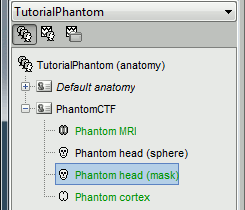
    phantom_anat.gif

  • You can display the MRI and surfaces as presented in the introduction tutorials.
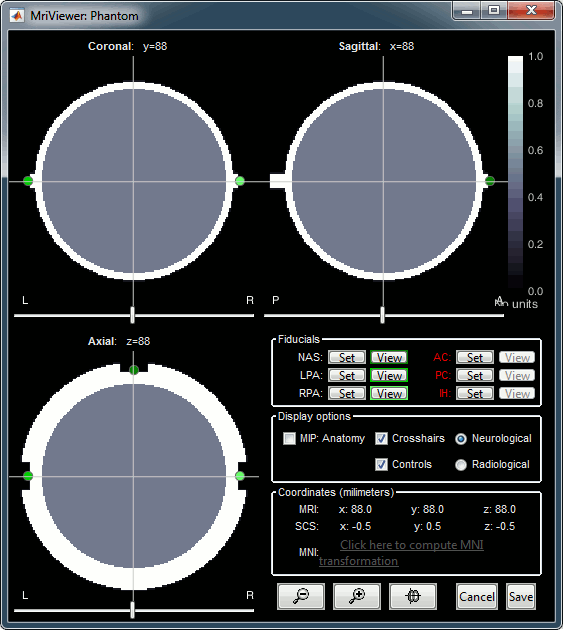
    phantom_mri.gif phantom_surfaces.gif

Access the recordings

  • Switch to the "functional data" view.
  • Right-click on the subject folder > Review raw file.
    Select the file format: "MEG/EEG: CTF (*.ds)"
    Select all the folders in: sample_phantom_ctf/ds.
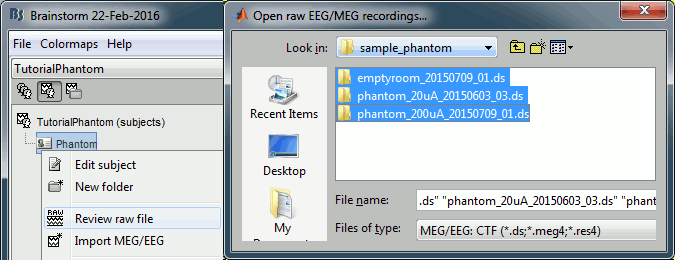
    phantom_review.gif

  • Each folder corresponds to one dataset:
    • emptyroom_20150709_01.ds: Phantom inside the MEG helmet, but not plugged in

    • phantom_20uA_20150603_03.ds: Phantom active, 23Hz, 20uA, [0,-1.8,4.9]cm

    • phantom_200uA_20150709_01.ds: Phantom active, 7Hz, 200uA, [0,-1.8,4.9]cm

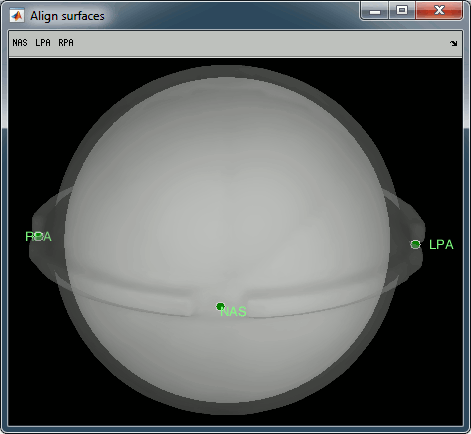
  • The recordings were acquired on different days, the position of the phantom in the MEG helmet is not the same for the two runs. Left = 20uA, Right = 200uA
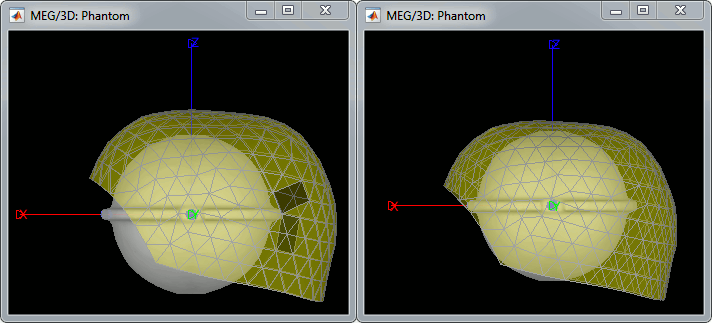
    phantom_registration.gif

  • For each of the three runs: right-click on "Link to raw file" > Switch epoched/continuous
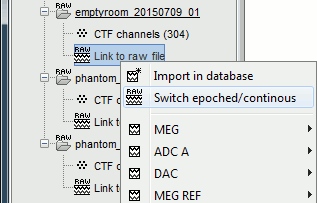
    phantom_continuous.gif

Import recordings

Event detection

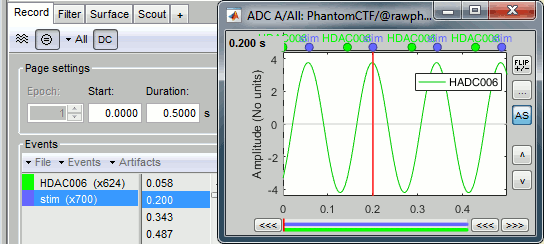
The sinusoidal signal is generated by the CTF hardware on channel HDAC006. While there are some automatic trigger events generated by the system that can be used for importing, we will have a more precise event average if the events are detected again offline.

  • In Process1: Select the 20uA and 200uA links, then click on [Run].
  • Select process: Events > Detect events above threshold
    Event name=stim, Channel name=HDAC006, Time window=[0,10]s, Max thresh=0.5, Units=None, No filter, Uncheck absolute value, Check remove DC.
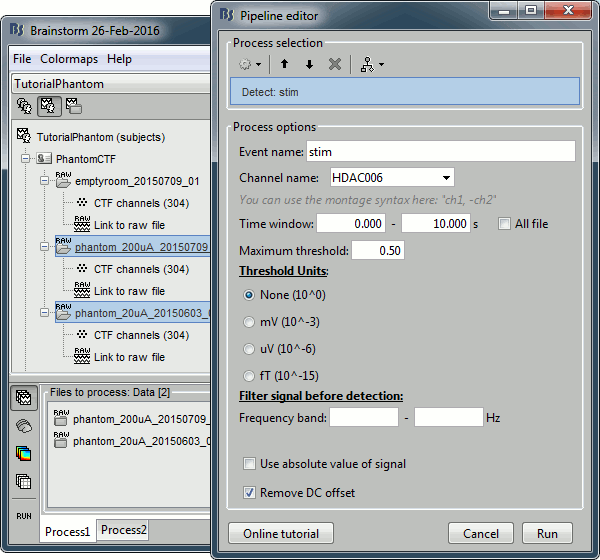
    phantom_detect.gif

  • Add the process Events > Convert to simple event:
    Event names=stim, Keep the middle of the events.
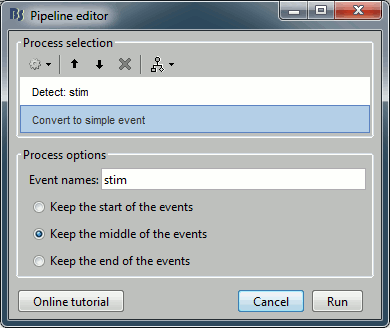
    phantom_detect2.gif phantom_detect3.gif

Import and average

  • In Process1: Keep the same files selected (20uA and 200uA links), then click on [Run].
  • Select process: Import > Import recordings > Import MEG/EEG: Events:
    Subject name=PhantomCtf, Event names=stim, Time window=[0,10]s, Epoch time=[-70,70]ms,
    Uncheck Create one condition, Check the last three boxes.

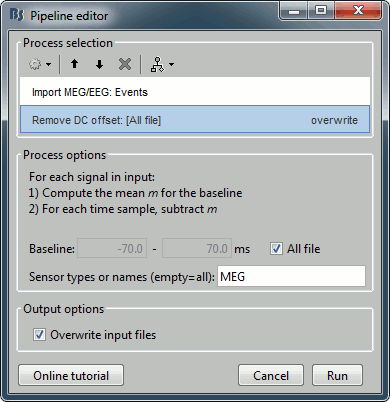
  • Add process Pre-process > Remove DC offset: All file, Sensor types=MEG, check Overwrite.

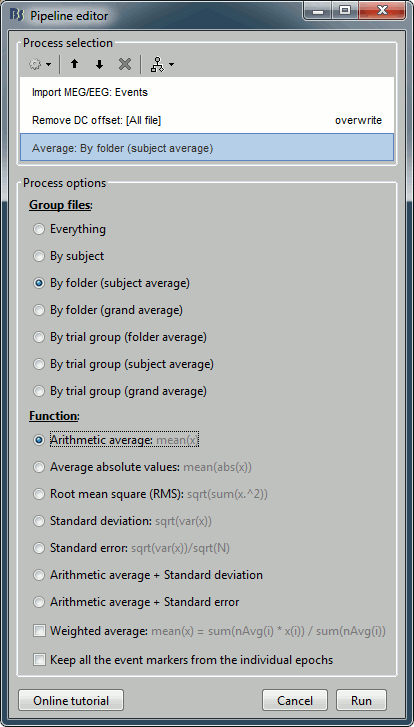
  • Add process Average > Average files: By folder (subject average). Run the pipeline.
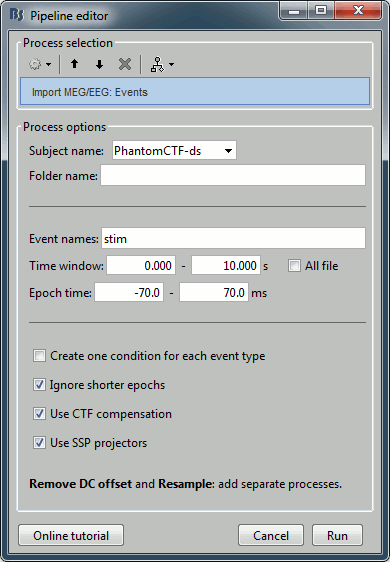
    phantom_import.gif phantom_import2.gif phantom_average.gif

Noise covariance

Use the empty room recordings.

  • Right-click on the empty room Link to raw file > Noise covariance > Compute from recordings: Baseline=[0,998.3]ms, select Block by block, Full matrix.
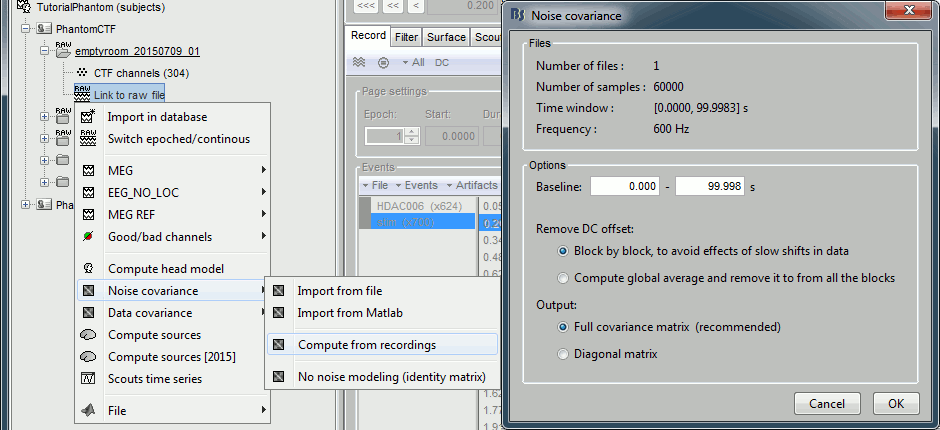
    phantom_noisecov.gif

  • Right-click on the Noise covariance: MEG > Copy to other folders.
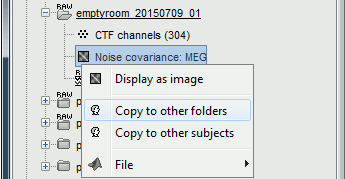
    phantom_noisecov2.gif

Source estimation

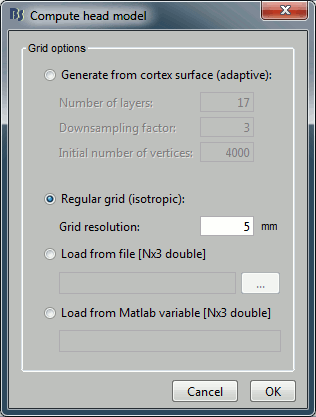
Compute a forward model and inverse model for a regular grid inside the phantom volume.

  • In Process1, select the two averages (20uA and 200uA).
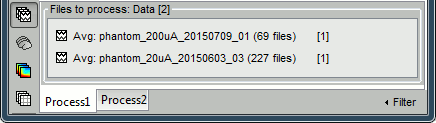
    phantom_inverse3.gif

  • Select process Sources > Compute head model: MRI Volume, Regular grid (5mm), Single sphere.
    Increase the density of the grid for higher spatial accuracy.
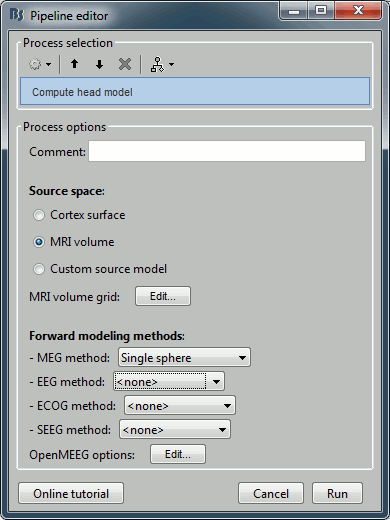
    phantom_headmodel1.gif phantom_headmodel2.gif

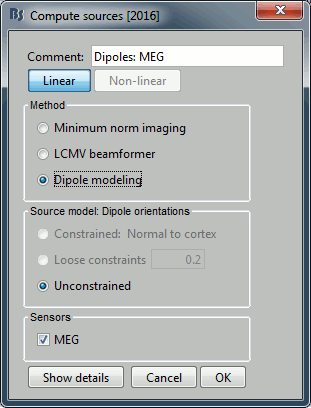
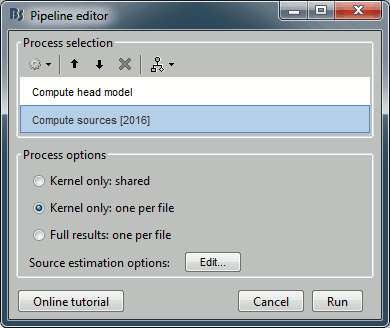
  • Add process Sources > Compute sources [2016]: Kernel only (one per file), Dipole modeling.
    phantom_inverse1.gif phantom_inverse2.gif

Dipole scanning

Scan the for the most significant dipole in the grid of computed dipoles estimate previously.

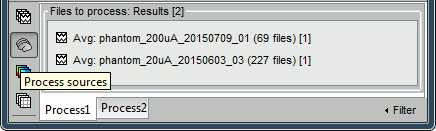
  • In Process1, select the source maps for the two conditions (20uA and 200uA)
    or leave the averaged recordings selected and click on [Process sources].
    phantom_dipscan.gif

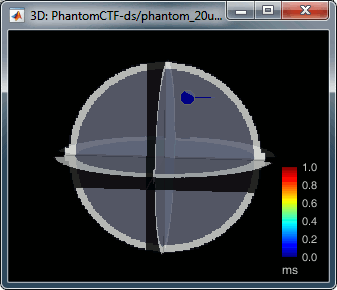
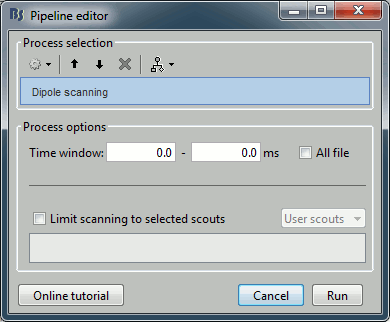
  • Run process Sources > Dipole scanning: Time window=[0,0]ms
    phantom_dipscan2.gif phantom_dipscan3.gif

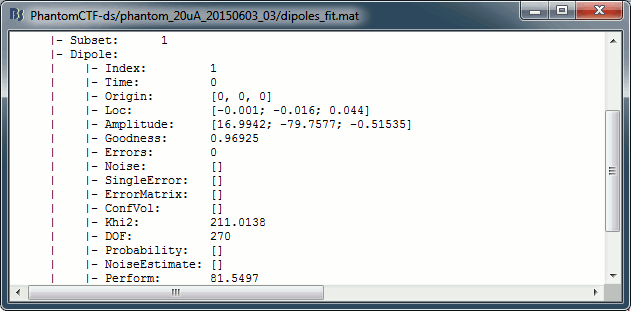
  • Right-click on the dipole file > File > View file contents:
    phantom_dipscan4.gif

  • Note that there is no non-linear fitting in this process. This operation selects a dipole in the grid of points available in the grid with a 5mm spacing we used during the computation of the forward model. Therefore the localisation cannot be more precise than the resolution of the grid, all the results have to interpreted with an uncertainty of +/-2.5mm.

  • For a higher spatial resolution, you just need to recompute another forward model with a denser grid (2mm spacing for a 1mm precision).

Dipole fitting with FieldTrip

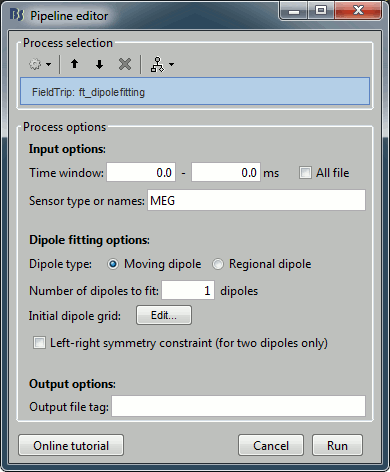
Perform a non-linear dipole fit with the function ft_dipolefitting from the FieldTrip toolbox.

  • In Process1, select the average recordings for the two conditions (20uA and 200uA).
  • Run process Sources > FieldTrip: ft_dipolefitting: Time window=[0,0], Sensor type=MEG
    phantom_dipfit.gif

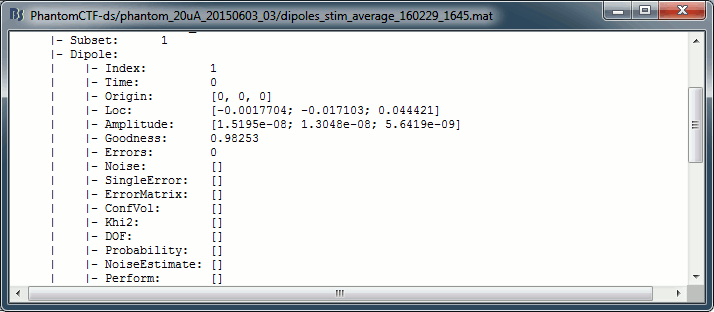
  • Right-click on the dipole file > File > View file contents:
    phantom_dipfit2.gif

  • The dipoles obtained with this non-linear dipole fitting method generally have a higher goodness of fit and a more accurate location than the dipole scanning previously illustrated. But this precision comes with computation costs that can be significantly higher in the case of more realistic head models.

Results comparison

Condition

Method

Forward model

X

Y

Z

GOF

Nominal location

0

-18

49

mm

200uA

Scanning (5mm)

Single sphere

-1.00

-16.00

44.00

99.80%

Scanning (5mm)

Overlapping spheres

-1.00

-16.00

44.00

99.81%

Scanning (5mm)

OpenMEEG BEM

-1.00

-16.00

44.00

99.76%

Fitting

Single sphere

-1.04

-17.00

43.98

99.95%

Fitting

Overlapping spheres

-1.05

-16.98

44.00

99.95%

CTF software

-1

-17

44

99.95%

MNE software

-0.79

-17.00

43.98

99.9%

20uA

Scanning (5mm)

Single sphere

-1.00

-16.00

44.00

96.94%

Scanning (5mm)

Overlapping spheres

-1.00

-16.00

44.00

96.96%

Scanning (5mm)

OpenMEEG BEM

-1.00

-16.00

44.00

96.90%

Fitting

Single sphere

-1.75

-17.13

44.39

98.25%

Fitting

Overlapping spheres

-1.78

-17.14

44.45

98.25%

CTF software

-1

-17

44

98.38%

MNE software

-1.38

-16.31

44.01

99.1%

The nominal location indicates where the dipole is supposed to be, relative to the center of the sphere. It is measured with rulers with an overall precision of about 5mm. The range of discrepancy we observe between this nominal location and the position of the dipole estimated from the recordings is acceptable.

Advanced

Digitized head points

The head points collected with the Brainstorm digitizer are usually copied to the .ds folders and imported automatically when loading the recordings. We decided not to include them in this example because in the case of this current phantom, there is no ambiguity in the definition of the anatomical fiducials. As this refined registration with the .pos files is not part of the standard CTF workflow, not including it will make it easier to compare the workflow and results with other programs.

For additional testing purposes, the .pos file for the phantom is included in the sample_phantom_ctf.zip package, but you have to add it manually to the recordings. Do not use these points to refine automatically the registration: the fitting algorithm may fail finding the best rotation around the Z axis because the phantom is completely spherical, and the registration is already close to perfection.

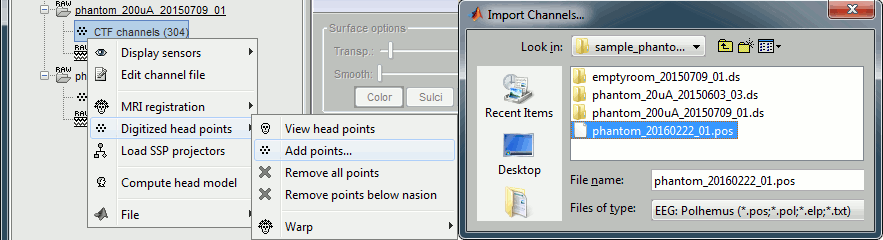
  • Right-click on one of the channel files (20uA or 200uA) > Digitized head points > Add points.
    Select the file format: "EEG: Polhemus"
    Select file: sample_phantom_ctf/ds/phantom_20160222_01.pos

    phantom_pos.gif

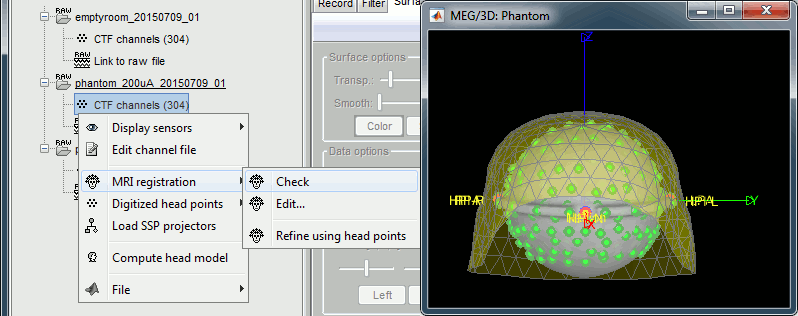
  • Right-click on the channel file > MRI registration > Check.
    phantom_check.gif

Scripting

A script available in the Brainstorm distribution reproduces the different steps of this tutorial:

brainstorm3/toolbox/script/tutorial_phantom_ctf.m

1 function tutorial_phantom_ctf(tutorial_dir) 2 % TUTORIAL_PHANTOM_CTF: Script that runs the tests for the CTF current phantom. 3 % 4 % CORRESPONDING ONLINE TUTORIAL: 5 % https://neuroimage.usc.edu/brainstorm/Tutorials/PhantomCtf 6 % 7 % INPUTS: 8 % tutorial_dir: Directory where the sample_phantom.zip file has been unzipped 9 10 % @============================================================================= 11 % This function is part of the Brainstorm software: 12 % https://neuroimage.usc.edu/brainstorm 13 % 14 % Copyright (c) University of Southern California & McGill University 15 % This software is distributed under the terms of the GNU General Public License 16 % as published by the Free Software Foundation. Further details on the GPLv3 17 % license can be found at http://www.gnu.org/copyleft/gpl.html. 18 % 19 % FOR RESEARCH PURPOSES ONLY. THE SOFTWARE IS PROVIDED "AS IS," AND THE 20 % UNIVERSITY OF SOUTHERN CALIFORNIA AND ITS COLLABORATORS DO NOT MAKE ANY 21 % WARRANTY, EXPRESS OR IMPLIED, INCLUDING BUT NOT LIMITED TO WARRANTIES OF 22 % MERCHANTABILITY AND FITNESS FOR A PARTICULAR PURPOSE, NOR DO THEY ASSUME ANY 23 % LIABILITY OR RESPONSIBILITY FOR THE USE OF THIS SOFTWARE. 24 % 25 % For more information type "brainstorm license" at command prompt. 26 % =============================================================================@ 27 % 28 % Author: Francois Tadel, 2016 29 30 31 % ===== FILES TO IMPORT ===== 32 % You have to specify the folder in which the tutorial dataset is unzipped 33 if (nargin == 0) || isempty(tutorial_dir) || ~file_exist(tutorial_dir) 34 error('The first argument must be the full path to the dataset folder.'); 35 end 36 % Build the path of the files to import 37 Run200FileDs = fullfile(tutorial_dir, 'sample_phantom_ctf', 'ds', 'phantom_200uA_20150709_01.ds'); 38 Run20FileDs = fullfile(tutorial_dir, 'sample_phantom_ctf', 'ds', 'phantom_20uA_20150603_03.ds'); 39 NoiseFileDs = fullfile(tutorial_dir, 'sample_phantom_ctf', 'ds', 'emptyroom_20150709_01.ds'); 40 Run200FileFif = fullfile(tutorial_dir, 'sample_phantom_ctf', 'fif', 'phantom_200uA_20150709_01.fif'); 41 Run20FileFif = fullfile(tutorial_dir, 'sample_phantom_ctf', 'fif', 'phantom_20uA_20150603_03.fif'); 42 PosFile = fullfile(tutorial_dir, 'sample_phantom_ctf', 'ds', 'phantom_20160222_01.pos'); 43 % Check if the folder contains the required files 44 if ~file_exist(Run200FileDs) 45 error(['The folder ' tutorial_dir ' does not contain the folder from the file sample_phantom_ctf.zip.']); 46 end 47 48 % ===== CREATE PROTOCOL ===== 49 % The protocol name has to be a valid folder name (no spaces, no weird characters...) 50 ProtocolName = 'TutorialPhantom'; 51 % Start brainstorm without the GUI 52 if ~brainstorm('status') 53 brainstorm nogui 54 end 55 % Delete existing protocol 56 gui_brainstorm('DeleteProtocol', ProtocolName); 57 % Create new protocol 58 gui_brainstorm('CreateProtocol', ProtocolName, 0, 0); 59 % Start a new report 60 bst_report('Start'); 61 62 63 % ===== ANATOMY ===== 64 % Subject name 65 SubjectNameDs = 'PhantomCTF-ds'; 66 SubjectNameFif = 'PhantomCTF-fif'; 67 % Generate the phantom anatomy 68 generate_phantom_ctf(SubjectNameDs); 69 generate_phantom_ctf(SubjectNameFif); 70 71 % ===== LINK CONTINUOUS FILES ===== 72 % Process: Create link to raw files 73 sFilesRun200Ds = bst_process('CallProcess', 'process_import_data_raw', [], [], ... 74 'subjectname', SubjectNameDs, ... 75 'datafile', {Run200FileDs, 'CTF'}, ... 76 'channelalign', 0); 77 sFilesRun20Ds = bst_process('CallProcess', 'process_import_data_raw', [], [], ... 78 'subjectname', SubjectNameDs, ... 79 'datafile', {Run20FileDs, 'CTF'}, ... 80 'channelalign', 0); 81 sFilesNoiseDs = bst_process('CallProcess', 'process_import_data_raw', [], [], ... 82 'subjectname', SubjectNameDs, ... 83 'datafile', {NoiseFileDs, 'CTF'}, ... 84 'channelalign', 0); 85 sFilesRun200Fif = bst_process('CallProcess', 'process_import_data_raw', [], [], ... 86 'subjectname', SubjectNameFif, ... 87 'datafile', {Run200FileFif, 'FIF'}, ... 88 'channelalign', 0); 89 sFilesRun20Fif = bst_process('CallProcess', 'process_import_data_raw', [], [], ... 90 'subjectname', SubjectNameFif, ... 91 'datafile', {Run20FileFif, 'FIF'}, ... 92 'channelalign', 0); 93 sFilesRawDs = [sFilesRun200Ds, sFilesRun20Ds]; 94 sFilesRawFif = [sFilesRun200Fif, sFilesRun20Fif]; 95 sFilesRawAll = [sFilesRawDs, sFilesRawFif]; 96 97 % Process: Convert to continuous (CTF): Continuous 98 bst_process('CallProcess', 'process_ctf_convert', [sFilesRawDs, sFilesNoiseDs], [], ... 99 'rectype', 2); % Continuous 100 101 102 % ===== ADD HEAD POINTS ===== 103 % Process: Add head points 104 bst_process('CallProcess', 'process_headpoints_add', sFilesRawAll, [], ... 105 'channelfile', {PosFile, 'ASCII_NXYZ'}); 106 107 % Process: Snapshot: Sensors/MRI registration 108 bst_process('CallProcess', 'process_snapshot', [sFilesRun200Ds, sFilesRun20Ds], [], ... 109 'target', 1, ... % Sensors/MRI registration 110 'modality', 1, ... % MEG (All) 111 'orient', 1, ... % left 112 'Comment', 'MEG/MRI Registration'); 113 114 115 % ===== DETECT EVENTS ===== 116 % Process: Detect: stim 117 bst_process('CallProcess', 'process_evt_detect_threshold', sFilesRawAll, [], ... 118 'eventname', 'stim', ... 119 'channelname', 'HDAC006', ... 120 'timewindow', [0, 99.99833333], ... 121 'thresholdMAX', 0.5, ... 122 'units', 1, ... % None (10^0) 123 'bandpass', [], ... 124 'isAbsolute', 0, ... 125 'isDCremove', 1); 126 % Process: Convert to simple event 127 bst_process('CallProcess', 'process_evt_simple', sFilesRawAll, [], ... 128 'eventname', 'stim', ... 129 'method', 2); % Keep the middle of the events 130 131 132 % ===== IMPORT EVENTS ===== 133 % Process: Import MEG/EEG: Events 134 sFilesEpochsAll = bst_process('CallProcess', 'process_import_data_event', sFilesRawAll, [], ... 135 'subjectname', [], ... 136 'condition', [], ... 137 'eventname', 'stim', ... 138 'timewindow', [0, 10], ... 139 'epochtime', [-0.07, 0.07], ... 140 'createcond', 0, ... 141 'ignoreshort', 1, ... 142 'usectfcomp', 1, ... 143 'usessp', 1, ... 144 'freq', [], ... 145 'baseline', [-0.07, 0.07]); % Remove DC: Entire file 146 % Process: Average: By folder (subject average) 147 sAvgAll = bst_process('CallProcess', 'process_average', sFilesEpochsAll, [], ... 148 'avgtype', 3, ... % By folder (subject average) 149 'avg_func', 1, ... % Arithmetic average: mean(x) 150 'weighted', 0, ... 151 'keepevents', 0); 152 153 % Process: Snapshot: Recordings time series 154 bst_process('CallProcess', 'process_snapshot', sAvgAll, [], ... 155 'target', 5, ... % Recordings time series 156 'modality', 1); % MEG (All) 157 % Process: Snapshot: Recordings topography (one time) 158 bst_process('CallProcess', 'process_snapshot', sAvgAll, [], ... 159 'target', 6, ... % Recordings topography (one time) 160 'modality', 1, ... % MEG (All) 161 'time', 0); 162 163 164 % ===== NOISE COVARIANCE ===== 165 % Process: Compute noise covariance 166 bst_process('CallProcess', 'process_noisecov', sFilesNoiseDs, [], ... 167 'baseline', [], ... 168 'sensortypes', 'MEG, EEG, SEEG, ECOG', ... 169 'target', 1, ... % Noise covariance 170 'dcoffset', 1, ... % Block by block, to avoid effects of slow shifts in data 171 'identity', 0, ... 172 'copycond', 1, ... 173 'copysubj', 1, ... 174 'replacefile', 1); % Replace 175 % Process: Snapshot: Noise covariance 176 bst_process('CallProcess', 'process_snapshot', sFilesNoiseDs, [], ... 177 'target', 3, ... % Noise covariance 178 'Comment', 'Noise covariance'); 179 180 181 % ===== SOURCE ESTIMATION ===== 182 % Define source grid options 183 VolumeGrid = struct(... 184 'Method', 'isotropic', ... 185 'nLayers', 17, ... 186 'Reduction', 3, ... 187 'nVerticesInit', 4000, ... 188 'Resolution', 0.005); 189 % Process: Compute head model 190 bst_process('CallProcess', 'process_headmodel', sAvgAll, [], ... 191 'Comment', '', ... 192 'sourcespace', 2, ... % MRI volume 193 'volumegrid', VolumeGrid, ... 194 'meg', 2); % Single sphere 195 % Define inverse options 196 InverseOptions = struct(... 197 'Comment', 'Dipoles: Single sphere', ... 198 'InverseMethod', 'gls', ... 199 'InverseMeasure', 'performance', ... 200 'SourceOrient', {{'free'}}, ... 201 'Loose', 0.2, ... 202 'UseDepth', 1, ... 203 'WeightExp', 0.5, ... 204 'WeightLimit', 10, ... 205 'NoiseMethod', 'reg', ... 206 'NoiseReg', 0.1, ... 207 'SnrMethod', 'fixed', ... 208 'SnrRms', 0.001, ... 209 'SnrFixed', 3, ... 210 'ComputeKernel', 1, ... 211 'DataTypes', {{'MEG'}}); 212 % Process: Compute sources [2018] 213 sAvgSrcAll = bst_process('CallProcess', 'process_inverse_2018', sAvgAll, [], ... 214 'output', 2, ... % Kernel only: one per file 215 'inverse', InverseOptions); 216 % Process: Snapshot: Sources (one time) 217 bst_process('CallProcess', 'process_snapshot', sAvgSrcAll, [], ... 218 'target', 8, ... % Sources (one time) 219 'orient', 6, ... % back 220 'time', 0, ... 221 'threshold', 40); 222 223 224 % ===== DIPOLE SCANNING ===== 225 % Process: Dipole scanning 226 sDipScan = bst_process('CallProcess', 'process_dipole_scanning', sAvgSrcAll, [], ... 227 'timewindow', [0, 0], ... 228 'scouts', {}); 229 % Process: Snapshot: Dipoles 230 bst_process('CallProcess', 'process_snapshot', sDipScan, [], ... 231 'target', 13, ... % Dipoles 232 'orient', 3); % top 233 234 235 % ===== FIELDTRIP DIPOLE FITTING ===== 236 % Process: FieldTrip: ft_dipolefitting 237 sDipFit = bst_process('CallProcess', 'process_ft_dipolefitting', sAvgAll, [], ... 238 'filetag', 'Single sphere', ... 239 'timewindow', [0, 0], ... 240 'sensortypes', 'MEG', ... 241 'dipolemodel', 1, ... % Moving dipole 242 'numdipoles', 1, ... 243 'symmetry', 0); 244 % Process: Snapshot: Dipoles 245 bst_process('CallProcess', 'process_snapshot', sDipFit, [], ... 246 'target', 13, ... % Dipoles 247 'orient', 3); % top 248 249 250 % ===== REPORT RESULTS: SINGLE SPHERE ===== 251 strResults = ['CTF current phantom' 10 '==============================================' 10]; 252 % Dipole scanning 253 strResults = [strResults, 'Single sphere / Scanning:' 10]; 254 for i = 1:length(sDipScan) 255 dipMat = load(file_fullpath(sDipScan(i).FileName)); 256 strResults = [strResults, sprintf(' - %s: [%1.2f, %1.2f, %1.2f]mm %1.2f%% gof\n', bst_fileparts(sDipScan(i).FileName), dipMat.Dipole(1).Loc.*1000, dipMat.Dipole(1).Goodness.*100)]; 257 end 258 % Dipole fitting 259 strResults = [strResults, 'Single sphere / Fitting:' 10]; 260 for i = 1:length(sDipFit) 261 dipMat = load(file_fullpath(sDipFit(i).FileName)); 262 strResults = [strResults, sprintf(' - %s: [%1.2f, %1.2f, %1.2f]mm %1.2f%% gof\n', bst_fileparts(sDipFit(i).FileName), dipMat.Dipole(1).Loc.*1000, dipMat.Dipole(1).Goodness.*100)]; 263 end 264 % Report results 265 bst_report('Info', 'process_dipole_scanning', [], strResults); 266 disp([10 '==============================================' 10 strResults]); 267 268 269 % ===== OVERLAPPING SPHERES ===== 270 % Process: Compute head model 271 bst_process('CallProcess', 'process_headmodel', sAvgAll, [], ... 272 'Comment', '', ... 273 'sourcespace', 2, ... % MRI volume 274 'volumegrid', VolumeGrid, ... 275 'meg', 3); % Overlapping spheres 276 % Process: Compute sources [2018] 277 InverseOptions.Comment = 'Dipoles: Overlapping spheres'; 278 sSrcOs = bst_process('CallProcess', 'process_inverse_2018', sAvgAll, [], ... 279 'output', 2, ... % Kernel only: one per file 280 'inverse', InverseOptions); 281 % Process: Snapshot: Sources (one time) 282 bst_process('CallProcess', 'process_snapshot', sSrcOs, [], ... 283 'target', 8, ... % Sources (one time) 284 'orient', 6, ... % back 285 'time', 0, ... 286 'threshold', 40); 287 288 % Process: Dipole scanning 289 sDipScanOs = bst_process('CallProcess', 'process_dipole_scanning', sSrcOs, [], ... 290 'timewindow', [0, 0], ... 291 'scouts', {}); 292 % Process: FieldTrip: ft_dipolefitting 293 sDipFitOs = bst_process('CallProcess', 'process_ft_dipolefitting', sAvgAll, [], ... 294 'filetag', 'Overlapping spheres', ... 295 'timewindow', [0, 0], ... 296 'sensortypes', 'MEG', ... 297 'dipolemodel', 1, ... % Moving dipole 298 'numdipoles', 1, ... 299 'symmetry', 0); 300 301 302 % ===== OVERLAPPING SPHERES: REPORT RESULTS ===== 303 strResults = ''; 304 % Dipole scanning 305 strResults = [strResults, 'Overlapping spheres / Scanning:' 10]; 306 for i = 1:length(sDipScanOs) 307 dipMat = load(file_fullpath(sDipScanOs(i).FileName)); 308 strResults = [strResults, sprintf(' - %s: [%1.2f, %1.2f, %1.2f]mm %1.2f%% gof\n', bst_fileparts(sDipScanOs(i).FileName), dipMat.Dipole(1).Loc.*1000, dipMat.Dipole(1).Goodness.*100)]; 309 end 310 % Dipole fitting 311 strResults = [strResults, 'Overlapping spheres / Fitting:' 10]; 312 for i = 1:length(sDipFitOs) 313 dipMat = load(file_fullpath(sDipFitOs(i).FileName)); 314 strResults = [strResults, sprintf(' - %s: [%1.2f, %1.2f, %1.2f]mm %1.2f%% gof\n', bst_fileparts(sDipFitOs(i).FileName), dipMat.Dipole(1).Loc.*1000, dipMat.Dipole(1).Goodness.*100)]; 315 end 316 % Report results 317 bst_report('Info', 'process_dipole_scanning', [], strResults); 318 disp(strResults); 319 320 321 % ===== OPENMEEG BEM ===== 322 % Process: Generate BEM surfaces (DS) 323 bst_process('CallProcess', 'process_generate_bem', [], [], ... 324 'subjectname', SubjectNameDs, ... 325 'nscalp', 362, ... 326 'nouter', 162, ... 327 'ninner', 162, ... 328 'thickness', 4, ... 329 'method', 'brainstorm'); 330 % Process: Generate BEM surfaces (FIF) 331 bst_process('CallProcess', 'process_generate_bem', [], [], ... 332 'subjectname', SubjectNameFif, ... 333 'nscalp', 362, ... 334 'nouter', 162, ... 335 'ninner', 162, ... 336 'thickness', 4, ... 337 'method', 'brainstorm'); 338 339 % Process: Compute head model 340 bst_process('CallProcess', 'process_headmodel', sAvgAll, [], ... 341 'Comment', '', ... 342 'sourcespace', 2, ... % MRI volume 343 'volumegrid', VolumeGrid, ... 344 'meg', 4); % OpenMEEG BEM 345 % Process: Compute sources [2018] 346 InverseOptions.Comment = 'Dipoles: OpenMEEG BEM'; 347 sSrcBem = bst_process('CallProcess', 'process_inverse_2018', sAvgAll, [], ... 348 'output', 2, ... % Kernel only: one per file 349 'inverse', InverseOptions); 350 % Process: Snapshot: Sources (one time) 351 bst_process('CallProcess', 'process_snapshot', sSrcBem, [], ... 352 'target', 8, ... % Sources (one time) 353 'orient', 6, ... % back 354 'time', 0, ... 355 'threshold', 40); 356 % Process: Dipole scanning 357 sDipScanBem = bst_process('CallProcess', 'process_dipole_scanning', sSrcBem, [], ... 358 'timewindow', [0, 0], ... 359 'scouts', {}); 360 361 362 % ===== OPENMEEG BEM: REPORT RESULTS ===== 363 strResults = ''; 364 % Dipole scanning 365 strResults = [strResults, 'OpenMEEG BEM / Scanning:' 10]; 366 for i = 1:length(sDipScanBem) 367 dipMat = load(file_fullpath(sDipScanBem(i).FileName)); 368 strResults = [strResults, sprintf(' - %s: [%1.2f, %1.2f, %1.2f]mm %1.2f%% gof\n', bst_fileparts(sDipScanBem(i).FileName), dipMat.Dipole(1).Loc.*1000, dipMat.Dipole(1).Goodness.*100)]; 369 end 370 % Report results 371 bst_report('Info', 'process_dipole_scanning', [], strResults); 372 disp(strResults); 373 374 375 376 % Save and display report 377 ReportFile = bst_report('Save', []); 378 bst_report('Open', ReportFile); 379 380


Feedback: Comments, bug reports, suggestions, questions
Email address (if you expect an answer):


  • MoinMoin Powered
  • Python Powered
  • GPL licensed
  • Valid HTML 4.01